

Keys
Updated 6 October 2026 · applies to 1.0.1 · Commercial
Keys, under Memcached in the sidebar, reads, writes and deletes one key at a time on a node you choose. Three properties of Memcached decide the shape of this screen, and each is stated on the screen — behind the ? beside its title, or beside the field it concerns — rather than left in documentation nobody opens mid-incident.
The console cannot know which node holds a key
A client picks a node by hashing the key, with an algorithm that differs between libraries and is configured per application. BROKA cannot reproduce that without guessing, and a guess would send you looking for a key on a node that never held it.
So every action here is against a node you choose. If a key is not where you looked, it may still be on one of the others.
Reading a value, and what it changes
A plain get moves the item to the top of the LRU, marks it as fetched and resets its last-access
time — perturbing the very figures the Overview and Memory screens report.
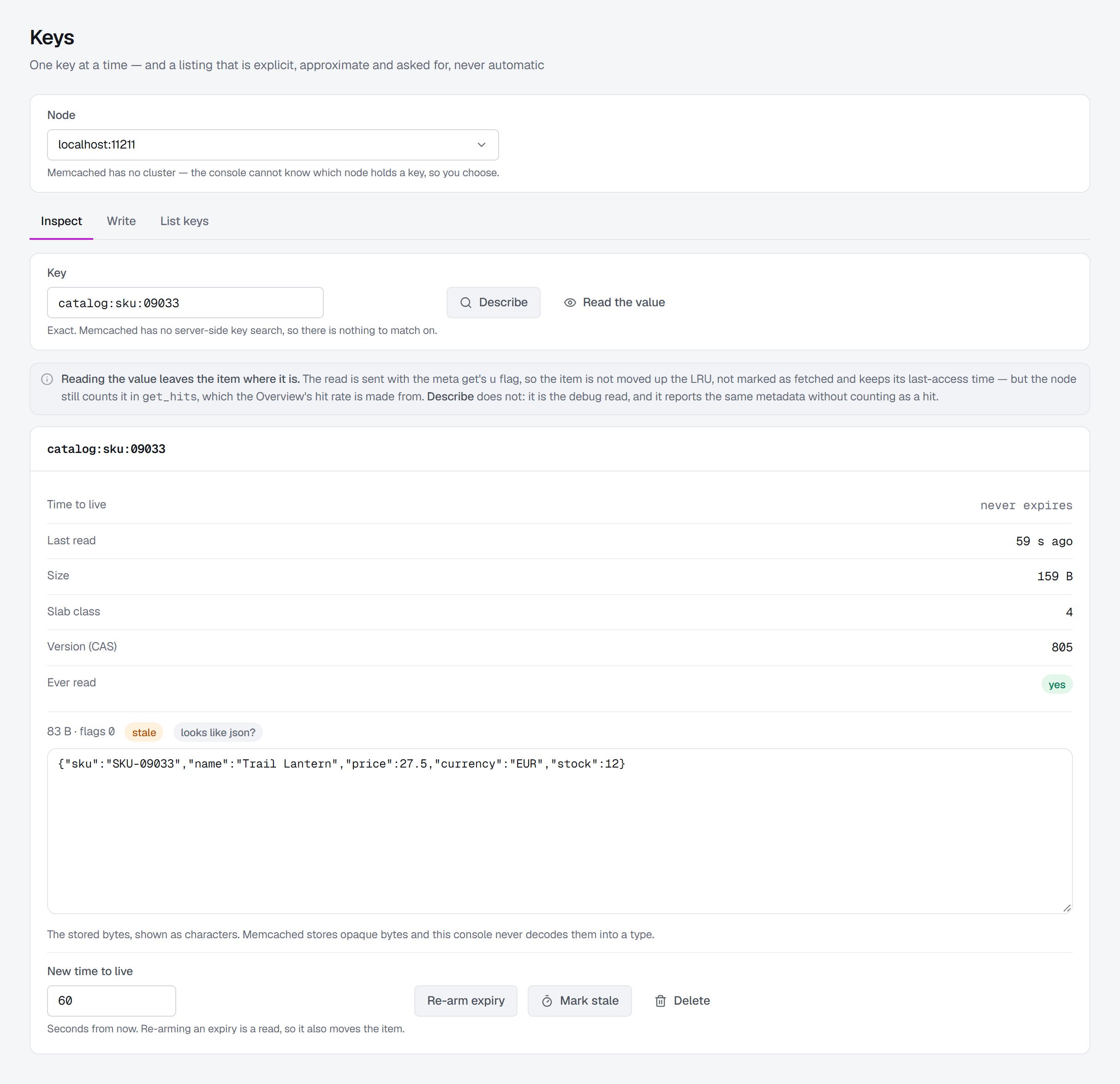
So where the node allows it, BROKA reads with the meta get's no-bump flag: the item stays where it is in the LRU, is not marked fetched and keeps its last-access time. The node still counts the read as a hit, so it does move the Overview's hit rate. Whether a node accepts the flag is asked of each node separately. Where it does, the ? beside the screen's title says so — reading the value leaves the item where it is; on a node that refuses the flag, a warning above the result says that reading an item changes it on this node, because there the read is a plain get.
Look up changes nothing and counts nothing. It is the debug read: the item's metadata, without counting as a hit — which is why the value is read only when you ask for it, with Show value in the key's card.
Values are never decoded
The flags integer stored beside a value is the client library's private serializer tag. Every library numbers it differently, so it says nothing portable about what the bytes are.
The bytes are shown as bytes. Where a value turns out to be readable text, the console offers a preview and labels it a guess made from the bytes themselves — never as a decoding, and never derived from the flags. Text you store is written as UTF-8, so any language's characters go in and come back as typed; bytes that are not UTF-8 are shown as base64 and said not to be text.
Inspect
Exact keys only. Memcached has no server-side key search, so there is nothing to match a pattern against — the field takes the key you already know.
Look up opens the key's card: the time to live, when it was last read, the item size — the whole item as the node holds it — the slab class, the CAS value and whether it has ever been fetched. An item that is not on the chosen node says Not on this node rather than reporting an absence as an emptiness. Show value in the card then reads the value, with its own size — Value 83 B — and the client flags; the box it is shown in is as tall as what it holds.
From here you can re-arm the expiry — which is itself a read, so it also moves the item, as the ? beside New time to live says — or mark the item stale; Delete sits apart, in the card's header. The three controls appear only where you may change the connection.
Marking an item stale
Mark stale is the alternative to deleting. The value stays; the item is marked stale and given a new
version. The next application that reads it with a meta get is told to refresh it — the first to ask is
handed the right to do so, while the others keep being served the old value — and a classic get still
serves it unchanged. A delete cannot do that: after a delete, every application misses at once.
It confirms first, and it is sent at the version the card shows, as a delete is, so an item that changed
in between is refused rather than marked. Reading a stale item shows a Stale badge; its hover says
whether this read took the right to refresh it — in which case the next application to ask is told
another client is refreshing it — and the audit entry of that read says so too. A node that does not
accept the meta protocol's I flag shows the button greyed out, with that reason.

Write
Five store modes, and the difference between them is what happens when the key already exists:
| Mode | Behaviour |
|---|---|
| Set | Stores it, whether or not the key exists. |
| Add | Stores it only if the key does not exist. An existing key is left alone and the node says so. |
| Replace | Stores it only if the key already exists. |
| Append / Prepend | Adds bytes to the end or the front of an existing value, leaving its flags and expiry as they were. |
Flags are yours to set. Whatever reads this key expects its own value there, and the console never invents one — the ? beside the field says so.
A save made from what you inspected cannot overwrite somebody else's change. When you store a value for the item you have open, the write carries the item's CAS value from your read: if the item changed in between, the node refuses the write and the console says this item changed since you opened it — reload it and apply your change again — rather than overwriting the other change. Delete does the same with the CAS value Look up read. And a save that finds the item gone says it was removed since you read it. A node started with CAS disabled has no CAS values to compare, so there the write is sent without one.
The 30-day cliff
Memcached reads one number for two different things: a TTL above 2 592 000 seconds is an absolute Unix date rather than a duration. An operator typing "31 days" in seconds is one keystroke away from an item that expired in February 1970 — and the store succeeds, so nothing tells them.
Every control here takes a relative duration, in seconds, and the hint under it says what you typed amounts to — = 2 hours — until you cross the line, when it changes to say which of the two things is about to happen. The conversion is done once, in the broker service, so an absolute expiry cannot be expressed by accident. Zero means no expiry.
Counters
Memcached counters are decimal strings stored as ordinary values, with two behaviours worth knowing before pressing the button — the ? beside Adjust a counter says both: a decrement never goes below zero — it clamps — and an increment past the 64-bit ceiling wraps around. Neither is configurable. What comes back is the node's own new value rather than one computed here.
The amount is always positive; the direction is the button, not the sign. A missing counter fails unless you give it a create-at value.
List keys
The screen's third tab, List keys, asks a node for the keys it holds, and lets you re-arm or delete the ones you select; it has its own page, Listing keys.
Masked fields
A data masking rule can hide an item's value from people who may read values but
not that one. Show value then returns it masked by the broker service: a value that is JSON keeps its shape,
each masked field reading ••••, 0 or false by its type; a rule on the whole value makes it read ••••; a value
that is not UTF-8 text, under a rule that looks inside it, is masked whole. A masked badge beside the value
names on hover each masked field, its method and the rule — or, for a value masked whole, the reason. The key is
never masked.
For someone who may not read the item unmasked, storing over a key a rule covers — Set, Replace, Append or Prepend — and adjusting it as a counter are refused, because they would change what is masked; for the item you have just read, the console disables Store, Increment and Decrement, with the reason. Add, which stores only where nothing is, re-arming the expiry, marking the item stale and deleting it are not affected.
Someone allowed to read the item unmasked sees it as it is, with a shown unmasked badge, and the read is recorded in the audit trail.
What is recorded
Writes are audited: store, touch, delete, mark stale and counter adjustment, each naming the node and the key. What a listing and the bulk actions on it record is on Listing keys.
Reading an item's value is audited too, and gated on write permission rather than read, and on
Read message contents (messages.read) as well — without it, Show value is shown disabled
with the reason. It returns a cached payload, which is data disclosure in the same sense a message browser is. The key is recorded;
the value never is. Seeing a value a data masking rule covers as it is, and storing over or adjusting such a key,
takes Read masked contents unmasked (messages.read.unmasked) too — on the connection's environment or the
connection, or by a key grant whose pattern matches the key.
Deleting says the part that is easy to miss: a cache keeps no history, so once the item is gone the audit entry is the only surviving record that it existed — and only on that node.
Every write is refused in a read-only environment or on a read-only connection.
Deleting an item and re-arming its expiry ask for a reason in every environment — the delete in its confirmation, the re-arm in a reason window before it is sent. Storing, marking stale and adjusting a counter ask for one only in a guarded environment, where every write does.