

Connect your first broker
Updated 3 October 2026 · applies to 1.0.0 · Community and Commercial
A connection is one broker, registered in one environment. Everything else in the console hangs off it: the screens for that platform read the live broker through it, and the audit trail records writes against it.
It is created in the environment you are in
There is no environment field on the form. The connection is created in the environment currently selected in the top bar, so the thing that decides which policy applies is the thing you can see rather than a dropdown you might miss.
Switch environment first, then create. Moving a connection afterwards is not the same act as creating it in the right place.
Test before you save
Test connection validates the form and opens a real connection to the broker without saving anything. It returns what the broker said and how long it took.
Use it. A saved connection that has never been tested sits in the list as unknown until something reaches the broker through it, so a typo saved untested surfaces only on the screen where somebody needed it.
The test reports failures as reasons rather than as a status: a refused TCP connection, a rejected credential and an unreachable host produce different messages, because they need different fixes.
What it asks for depends on the platform
Every connection has a name and a read-only switch. Beyond that the form is shaped by the platform:
- Kafka — bootstrap servers, an optional JMX port (with a user and password, if the JMX agent asks for them) for live broker metrics, and an authentication method: none, SASL (PLAIN, SCRAM-SHA-256, SCRAM-SHA-512, or OAUTHBEARER against your own OAuth client-credentials endpoint) or SSL, with a client certificate when the broker requires mutual TLS. Kerberos and cloud-provider IAM signing are not offered. For OAUTHBEARER, BROKA asks your token endpoint for the token itself, for that connection only; the endpoint is an http or https address that is never a link-local or cloud-metadata one, redirects are not followed, and a failed sign-in says what failed — the client credentials refused, with the endpoint's error code, or the endpoint unreachable.
- Redis — a topology (standalone, cluster, Sentinel, Redis Enterprise or a managed cloud endpoint), its nodes, an optional ACL user and password, and a transport security card for TLS, certificate verification, a CA and a client certificate.
- RabbitMQ — the management API endpoint, optionally the AMQP host, port and virtual host, and an authentication method: a password, or OAuth 2.0 client credentials against your own identity provider. A transport security card covers TLS, verifying the server's certificate against your own CA, and a client certificate — which can also be AMQP's identity, through SASL EXTERNAL. Every field is described on Connecting and authentication.
- Apache Artemis (formerly ActiveMQ Artemis) — the Jolokia endpoint its own web console serves, and a broker user with a role granted management access. BROKA reads Artemis over JMX-on-HTTP and never over a messaging protocol, so that is the only endpoint it needs.
- Memcached — a list of nodes rather than a cluster, because Memcached servers share no state.
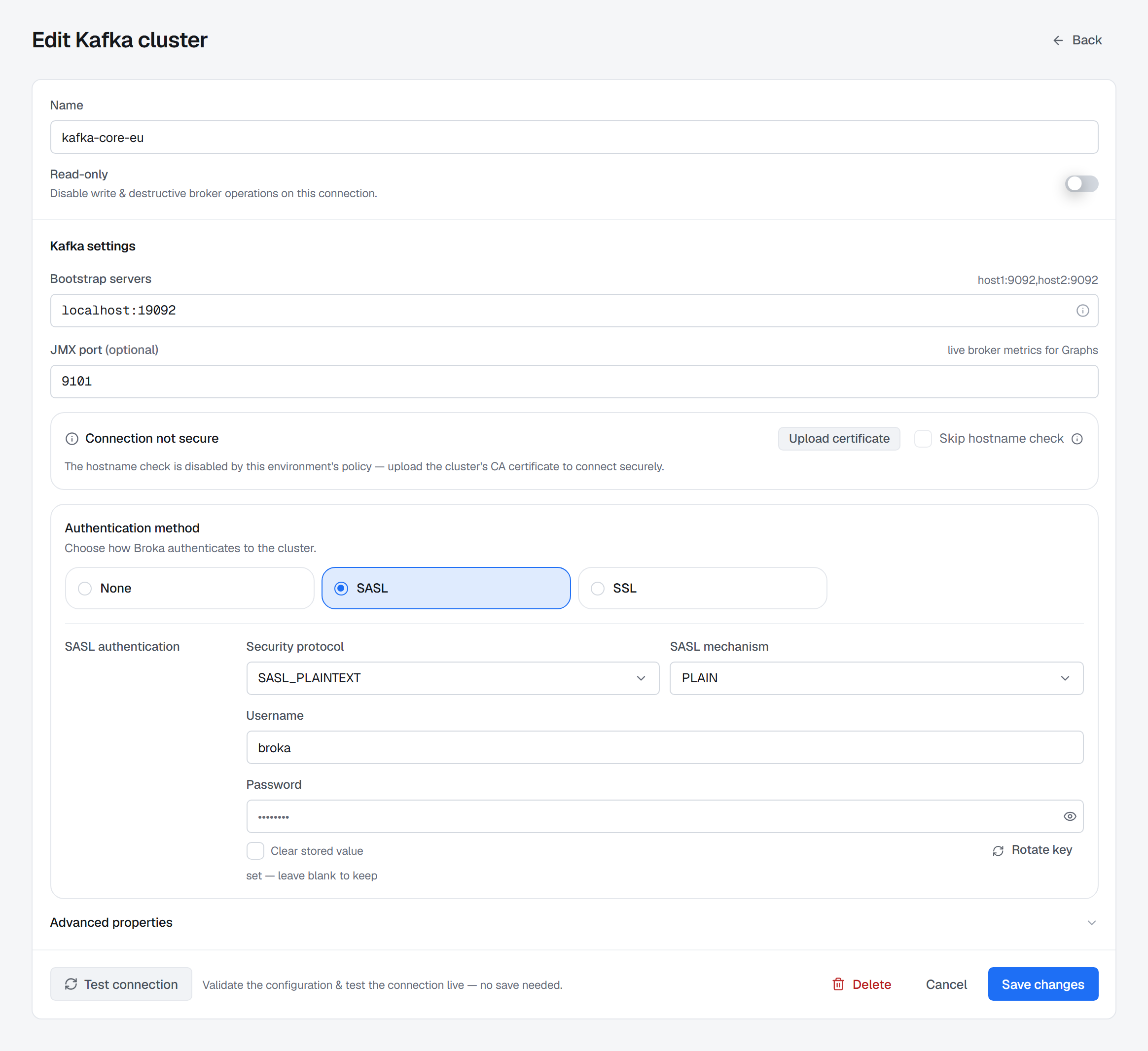
Read-only is a property of the connection
The switch disables writes and destructive operations on that connection, whatever the person using it is allowed to do elsewhere.
It is not the same control as an environment's protection, and the two stack: a read-only connection in a protected environment is read-only for both reasons, and removing one does not remove the other.
Secrets go in and do not come back
Credentials are encrypted before storage and are never returned to the browser. Editing a connection shows the field as already set rather than as a value you can read, and leaving it untouched keeps what is stored.
That is why a password cannot be recovered from BROKA. Rotating one means entering the new value, not retrieving the old.
After it saves
The platform's screens light up against the live broker. Detail screens are read the moment you open them; the two largest Kafka lists — topics and consumer groups — come from a short-lived index the service keeps per cluster, and each says when it was last refreshed with a Refresh beside it. If the broker is unreachable the screen says so and names the connection, rather than rendering an empty list that reads like an empty broker.
The connection's page then shows what its server supports: the product and version BROKA detected, and every feature it can or cannot offer there, with the reason. Anything the server cannot do is greyed out across the console with that same reason, rather than missing — see Connections.
Next: User and team setup.