

Alerts
Updated 17 October 2026 · applies to 1.3.1 · Community and Commercial
A rule watches one part of your estate through one to four conditions and opens an incident when all of them hold. BROKA evaluates those rules on a schedule, across every platform it serves, keeps what it measured as the metric history, and tells whoever you have told it to tell.
Alerting is in both editions, with no quota. Two parts of it are Commercial: rules scoped to an application, and the Slack, Microsoft Teams and webhook channels. E-mail and the console are in both.
The four tabs
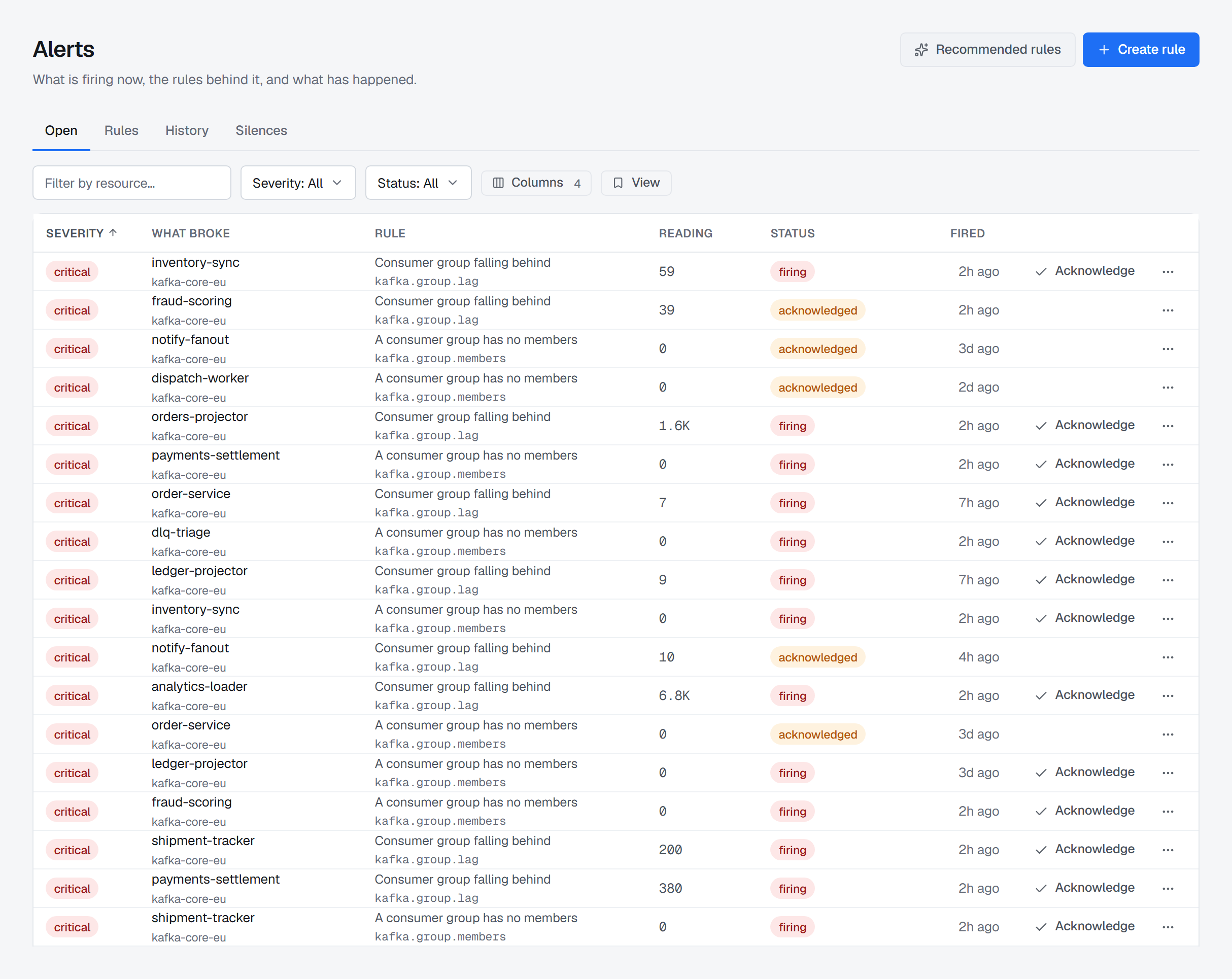
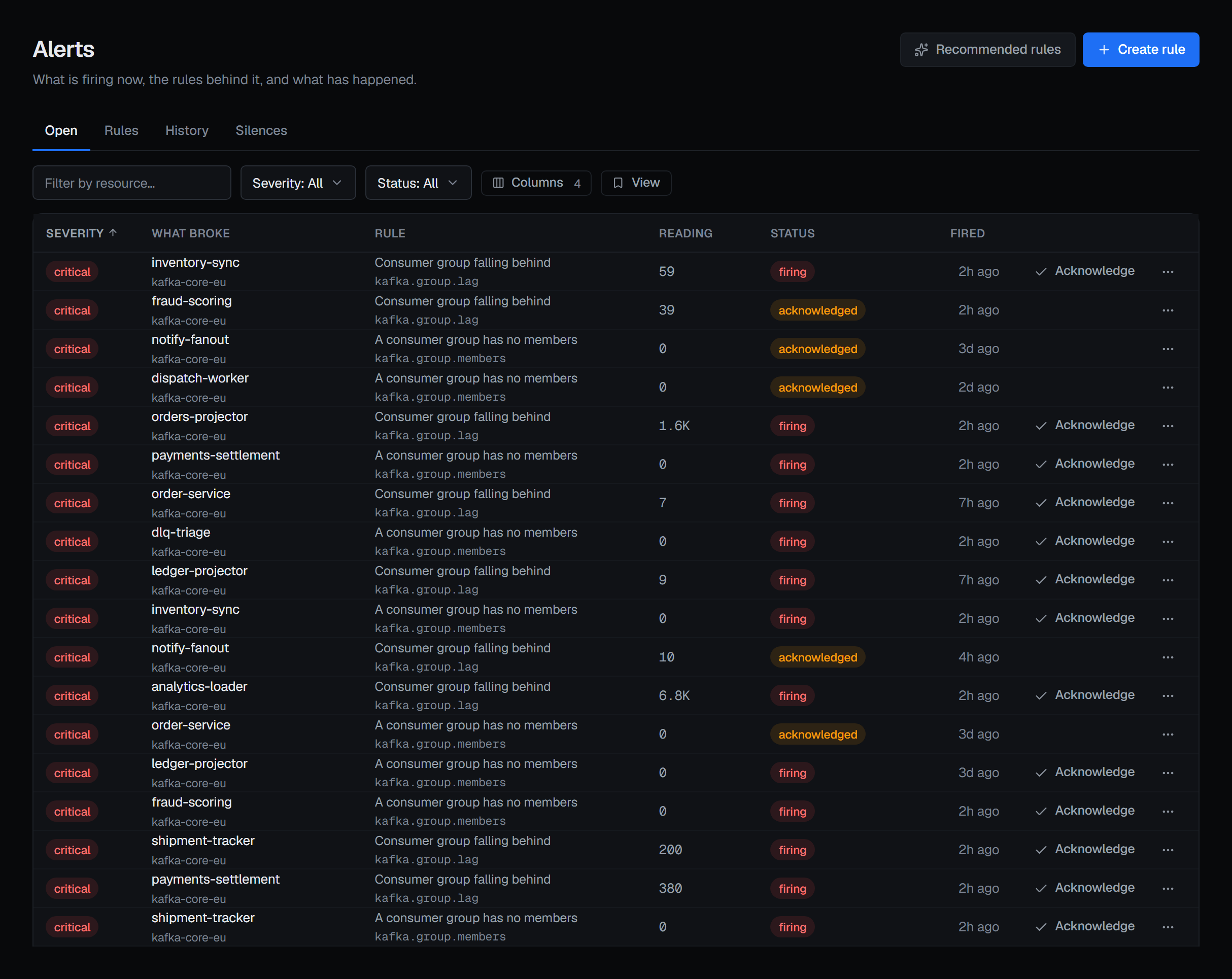
Open comes first, and that is the whole argument for the screen's shape: the rules are what you came here to change, the incidents are what you came here to see. A monitoring screen that opens on configuration makes you click to find out whether anything is broken.
A rule with several incidents open is one row — its severity, how many alerts and on which clusters, the rule, and when the newest fired — and the arrow beside it opens the row to its incidents. An incident shows its status only when it is not simply firing: Acknowledged, with who took it, or Suppressed. Tick incidents, or a rule's row for all of them, and Actions acknowledges the selection, after one confirmation, or silences it: one window on their rule when they share one, or on their cluster when they share that. A selection across several rules and clusters has no one window to name, and the menu says so.
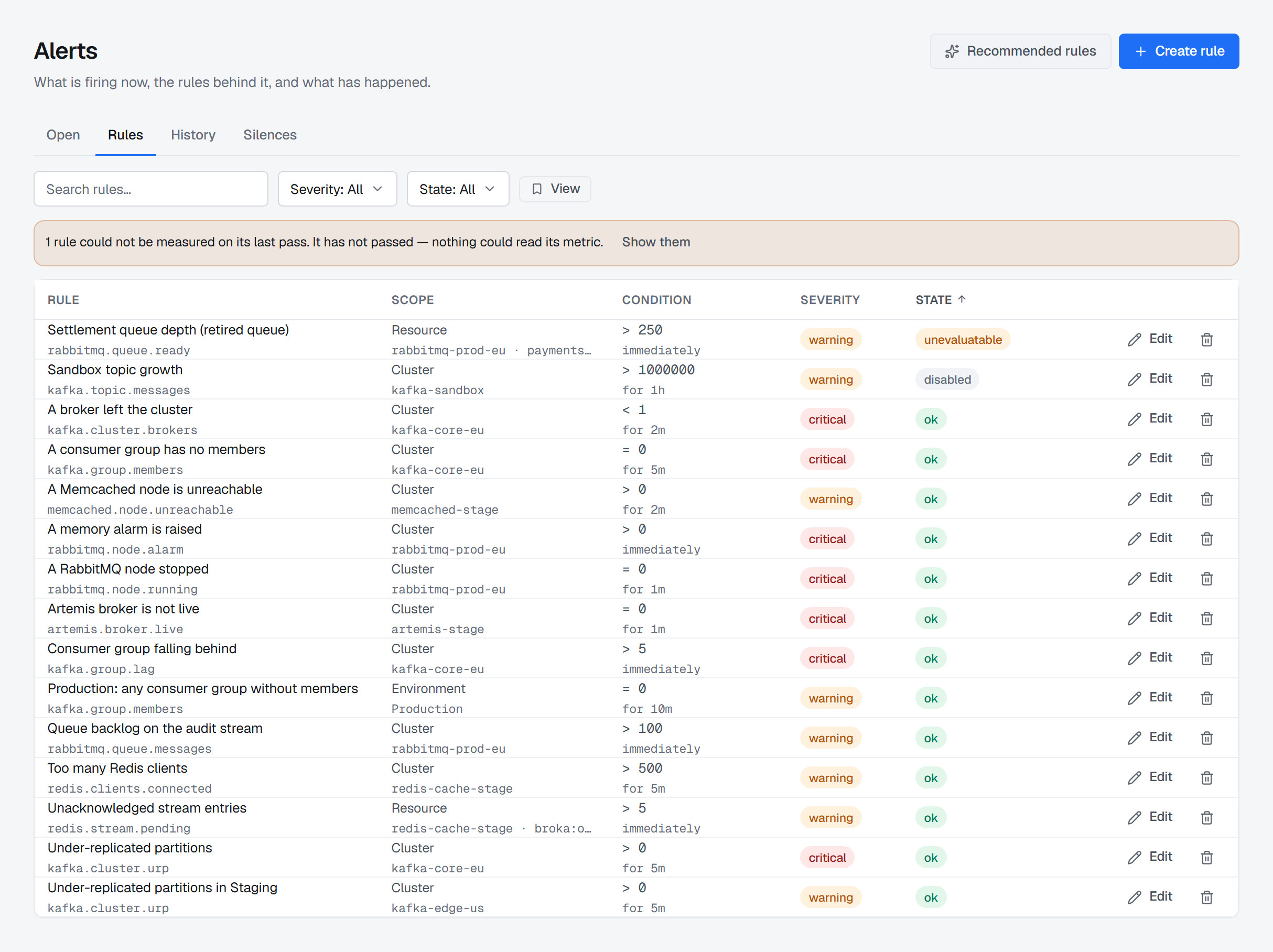
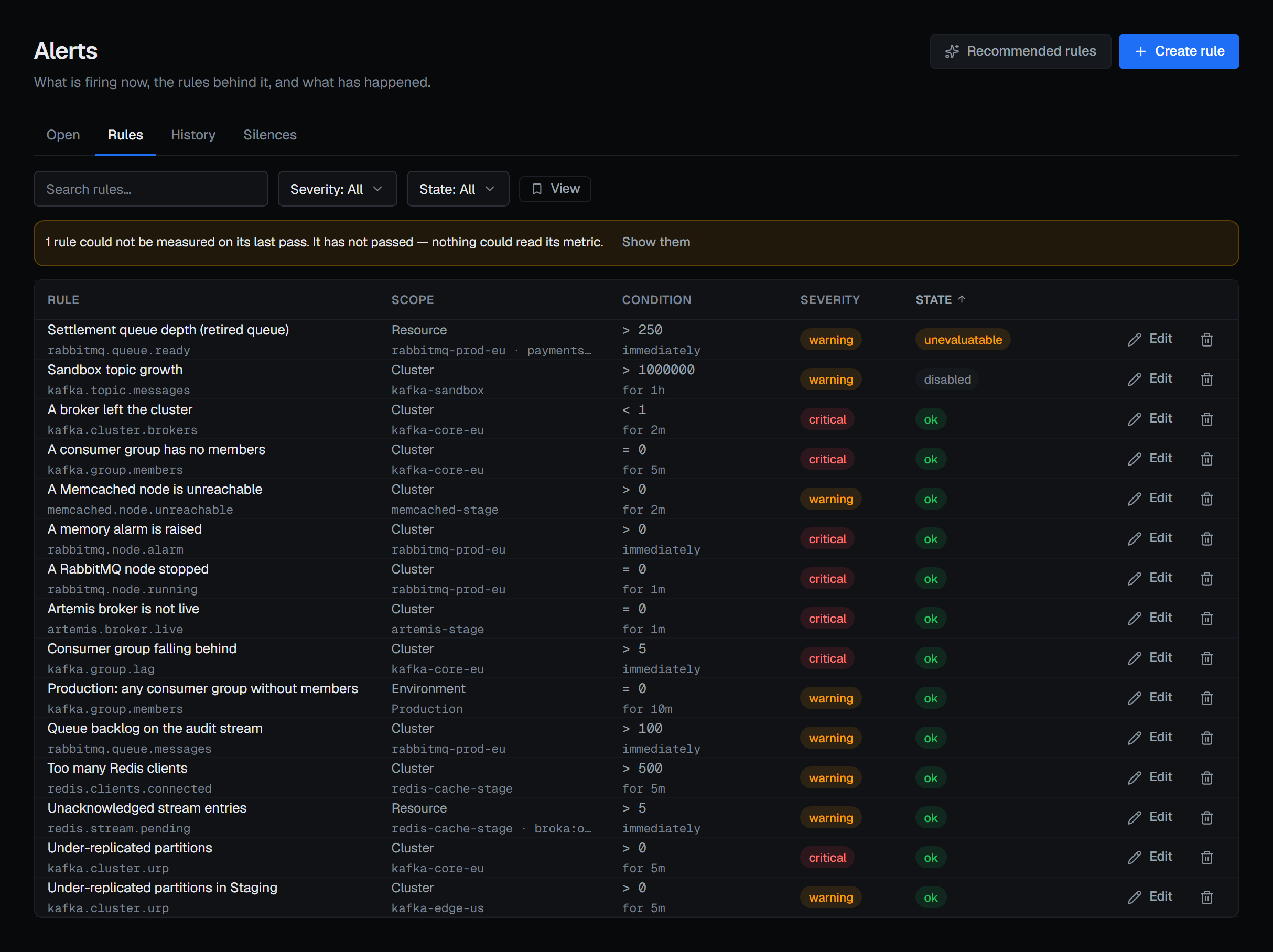
Rules is where a rule is written, edited, enabled, disabled or removed — Enabled is the switch in the rule dialog's header. Disabling or removing a rule closes its open incidents, marked as closed by you and why, since nothing is watching them any more. So does moving a rule to watch something else — another cluster, environment, application or resource, or another metric — for the incidents it leaves behind. Removing a rule also withdraws the silences that cover only that rule and have not ended.
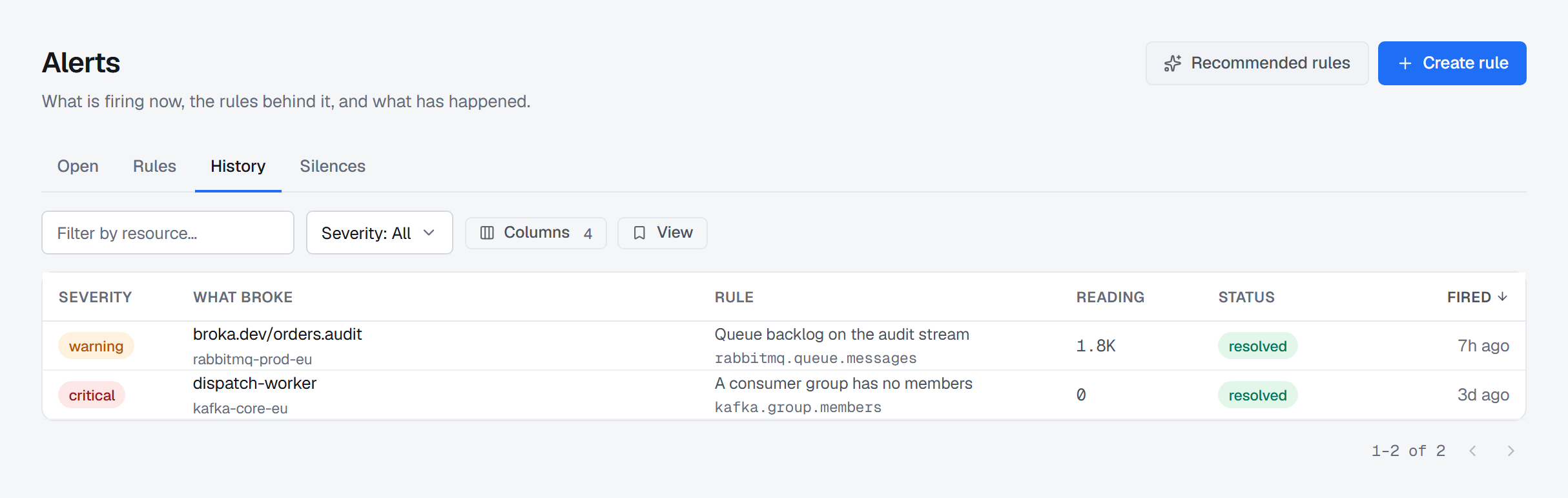
History is every event the evaluator has opened and closed, so "did this happen before, and how often" has an answer. Each row says when it was resolved and how long it lasted.
Silences are maintenance windows: a planned upgrade should not page anybody, and suppressing the noise should not mean turning the rule off and forgetting to turn it back on. A silence covers everything, an environment, a connection, an application (Commercial), a resource or one rule, for a window with an end. A breach inside it is still recorded — as suppressed — and notifies nobody, not even with a reminder. If it is still breaching when the window ends, it is notified then. While the Silences tab is open, the page header's button is Silence alerts, where the other tabs have Create rule.
One incident
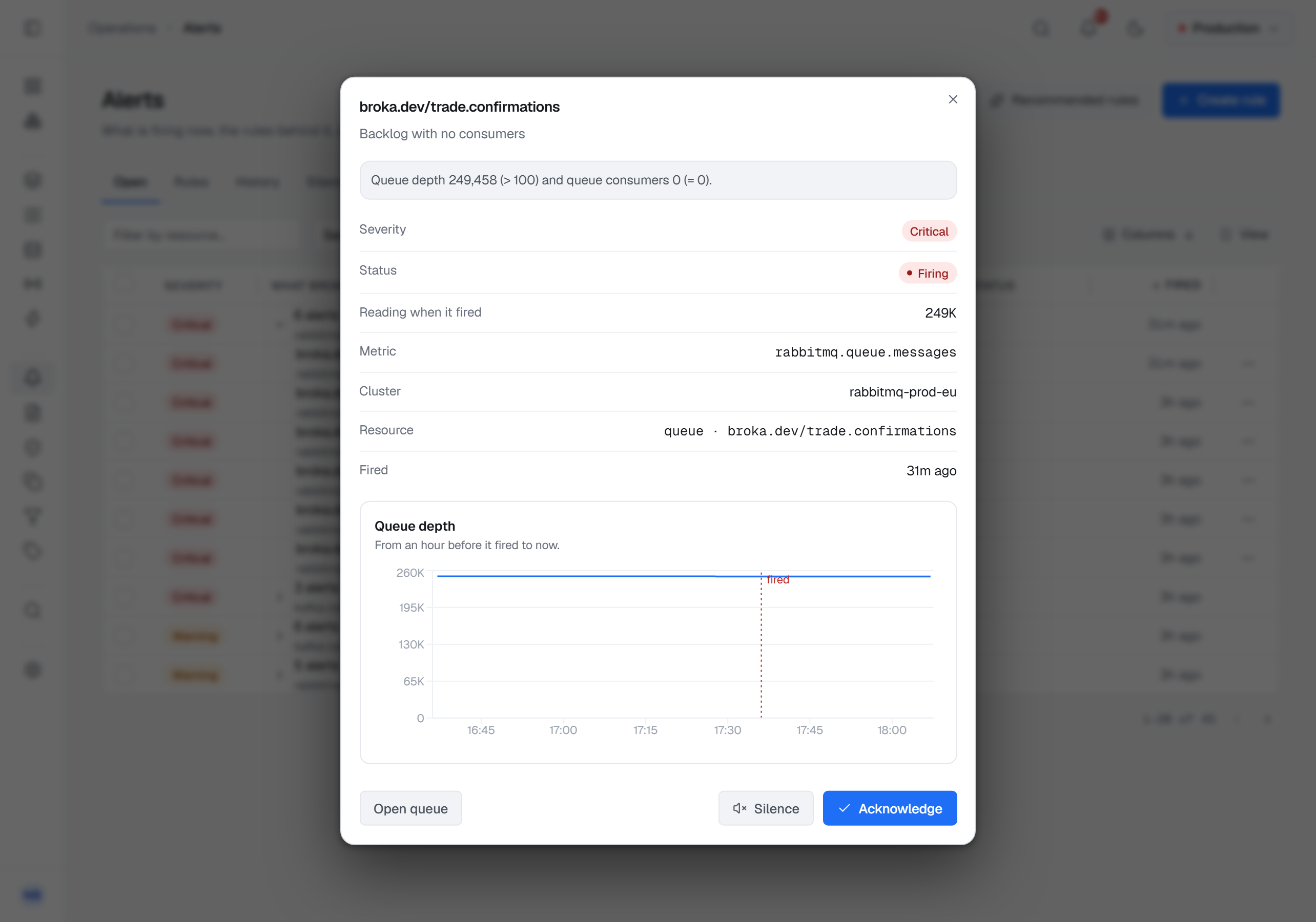
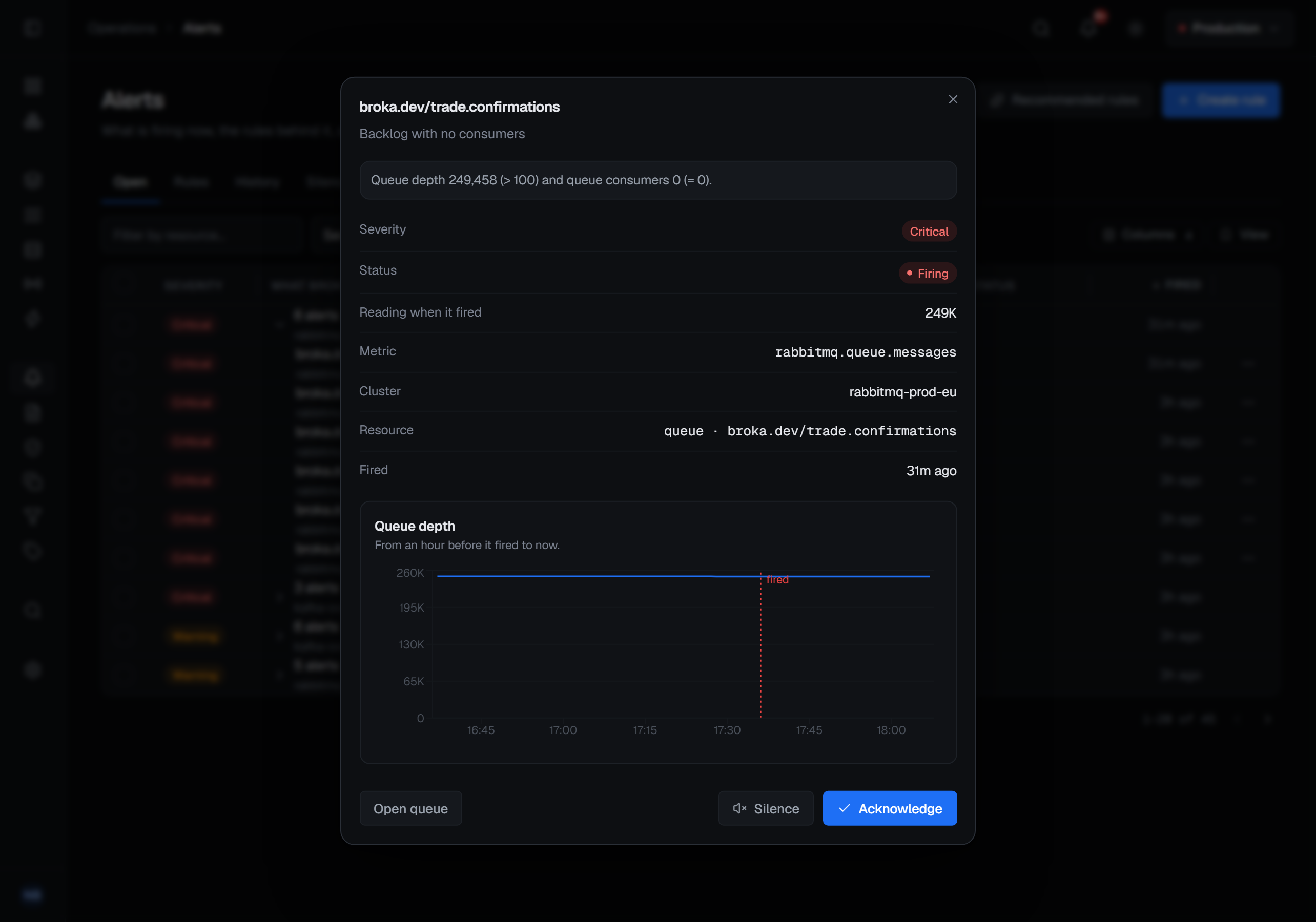
Opening an incident shows the rule that raised it, the target, the reading that fired it, who took it and when it closed — only the facts it has. Below them is a chart of the figure from an hour before the incident fired to when it closed — or to now while it is open — with the moment it fired marked down it, and the rule's threshold across it when the rule is one plain threshold.
While it is open, its foot has Acknowledge and Silence, the same as the row's menu, for whoever may take them, and a link to what broke — Open queue, Open topic, Open cluster for a cluster-wide incident — the screen Search opens for the same thing, for whoever may open it.
An incident of a rule with several conditions, or with a change, a comparison or a band, says what each condition read when it fired, each metric by its name — Consumer group lag 12,480 (> 1,000) and consumer group members 0 (= 0). When it closes, the reason it closed follows that sentence.
What a rule says
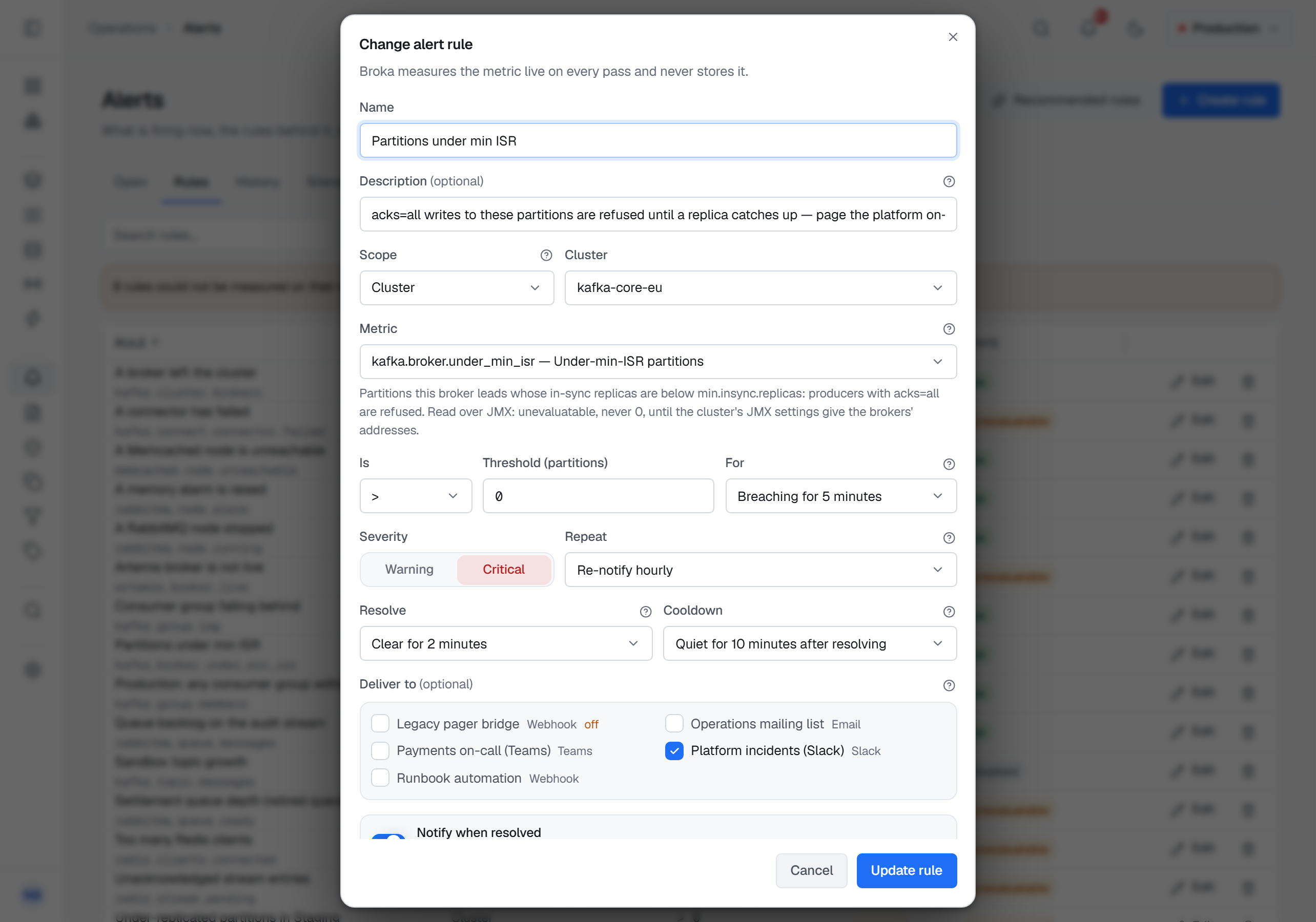
A rule is a handful of decisions, and the dialog asks them in the order they matter.
The metric, chosen from a catalogue rather than typed, with its kind beside it (below). Consumer lag, under-replicated partitions, queue depth, a queue with no consumer, the age of a queue's oldest message (Artemis), memory, connection health — each platform contributes the figures it actually has, so the list you see depends on what your installation serves. Beside each platform's own figures are the components around it, described below; every metric, with its unit and what it lands on, is listed in Alert metrics.
The scope: an environment, a connection, an application (Commercial), or a named resource. A rule that names nothing watches everything the scope covers, and the number of targets that produces is a number worth knowing before you save — which is what the dry run below is for. A named RabbitMQ queue is looked up by its name however many queues the broker holds, and each evaluation reads a cluster's figures once for all of its rules.
Besides topics, groups, queues and the rest, a named resource can be a Connect cluster, a connector — shown as its Connect cluster's name and its own, and stored as the two together — a shovel, a federation link, a bridge or a broker connection, each picked from a list of what the connection has rather than typed. Schema Registry figures belong to the connection, since a connection has at most one registry. A JMX figure at connection scope is measured on every node — every broker, or every broker and controller — and an incident names the node it fired on, broker 2 or controller 3001.
A rule over an environment or an application measures each cluster on its own. One cluster's incident never resolves another's, and a hold window on one cluster is not reset by a sibling that is healthy — the same resource name on two clusters is two targets, not one. A cluster that cannot be read is named in the rule's state ("1 of 2 clusters could not be evaluated. orders-eu: …"), and the rule reads healthy only when every cluster is.
The comparison and the threshold — above, at or above, below, at or below, equal to, not equal to. Not equal to is for a figure with one right value: a cluster's active controllers, which should be exactly one.
The kind — what is compared with the threshold:
- Value — the reading itself, as every rule was before 1.2.0.
- Change — how far the reading moved over the last 5 minutes to 24 hours, in percent or in the metric's own unit. The dialog writes it in words, Risen by more than or Fallen by more than, with the size in the field.
- Compared with the past — how far the reading is from this time yesterday or from the same hour last week, in percent: Above by more than or Below by more than.
- Usual band — whether the reading is above, below or outside the band of the same hour of the day over the last seven days: its mean plus or minus a width you give in standard deviations, from 1 to 10. A figure that barely moves still gets a band at least 1% of its mean wide, so it does not fire on its first wobble.
The last three compare with the metric history, and until the history holds what they compare with — a reading from the start of the window, from yesterday or last week, or three days of the hour — they read not enough history yet. Such a condition neither fires nor clears: the rule says why, and an open incident stays open.
More conditions. Add a condition adds up to three more, each with its own metric, kind, comparison and threshold, and all of them must hold on the same resource at the same time: queue depth above 1,000 and no consumers is one rule on one queue. A further condition offers only the metrics that describe the same kind of resource as the first, so every condition lands on the same targets. A condition that plainly does not hold clears the target, whatever the others could not decide, and the rule list's Condition column reads every condition.
How long it must hold. A figure that crosses a line for one tick and comes back is not an incident. Leave it at zero to fire on the first breach. With several conditions, the wait counts the whole rule: every condition held, continuously. A reading that cannot be taken — a JMX agent that missed one reading, say — does not restart the wait once or twice in a row; a third time, the target reads unevaluatable.
The severity — critical or warning.
Whether to repeat. An incident that stays open can page again after an interval, or stay quiet until it resolves.
How it settles. Resolve after keeps an incident open until the figure has been clear for a while — two minutes unless you choose otherwise — so a figure hovering at the line is one incident, not ten. Cooldown keeps an incident that reopens on the same target soon after resolving on the console without notifying anybody again — ten minutes unless you choose otherwise. Notify when resolved — the box under Deliver to, ticked unless you untick it — tells the channels the incident reached that it is over. Rules written before these settings existed took the same defaults. Resolve on the first clear reading and No cooldown turn the two windows off.
What can be alerted on
The catalogue grows with what BROKA reads, and Alert metrics lists every metric. Besides each platform's own figures:
- Kafka over JMX, where JMX is set up — per node: cluster health (active controllers, offline partitions, leader and unclean elections), broker health (partitions under and at their minimum in-sync replicas, ISR shrinks, offline log directories, a broker not running, metadata lag), requests (p99 and mean time by type, failed requests, rejected bytes), saturation (idle request handlers and network threads, queues, purgatories), disk (log flush p99), the JVM and system (heap, garbage-collection time, CPU, file descriptors, threads) and each broker's own throughput. A topic's own rates are shown on its page but are not alertable.
- Kafka Connect — a Connect cluster that does not answer, its failed connectors and tasks; a connector that has failed, is paused or stopped, is unassigned, has failed tasks or a share of tasks running.
- Schema Registry — whether it answers, how long it takes, whether it has gone read-only, how many subjects it holds.
- RabbitMQ shovels and federation links (Commercial, with RabbitMQ) — whether each runs, whether a shovel is blocked and what it has pending, and how many of either are not running.
- Apache Artemis bridges, broker connections and cluster connections (Commercial, with Artemis) — whether a bridge or broker connection is connected, what a bridge has pending, and how many members a cluster connection sees.
Not answering is a value. A Connect worker or a registry that does not answer reads reachable = 0, which a rule can fire on; the figures that need its answer are then unevaluatable rather than read as zero. A connection with no registry registered, or no JMX set up, is a reason the rule states — never a 0. An incident on a component names its kind in words and links to its page.
The dry run
Before a rule is saved, Check measures the draft against your live estate: which targets it matches, what each one reads right now, and how many of them would fire. It writes nothing and creates no rule. It decides the draft's conditions as the evaluator will, the past included, so a trend with no history yet says so here, on the row, rather than on the first evaluation.
Below the rows, a chart draws the last six hours of the targets that would fire — or, when none would, of those nearest the threshold — up to five, each read on its own cluster. The threshold is drawn across it when the rule is one plain threshold; a change, a band or a second metric is not a level on this figure's axis, so none is drawn.
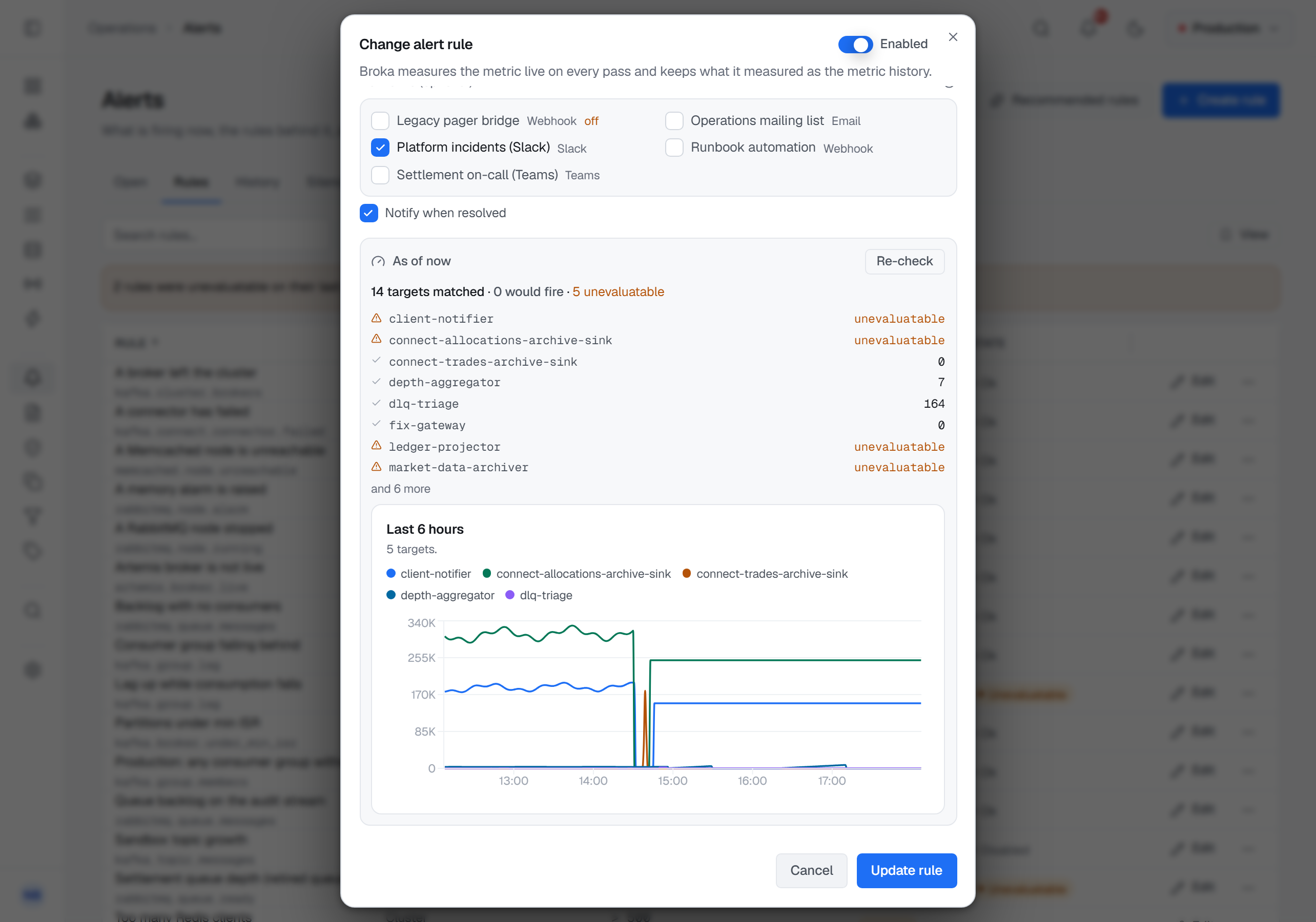
Two things about it are deliberate. The counts describe every target even though the list of rows is capped — a truncated list whose total matched its own length would understate the blast radius of the rule being written, which is the one number the author is there to learn. And a target whose figure cannot be read is reported as unevaluatable, by name, rather than quietly left out.
A rule nobody has evaluated yet says so
A saved rule that has not been evaluated reads not evaluated yet — not ok. An unknown state that defaults to green is how a screen ends up reporting a quiet, healthy estate on a product that has measured nothing.
The same rule applies once the evaluator is running. A rule whose targets cannot be measured says how many — "3 of 47 targets could not be measured" — rather than reporting on the forty-four it could reach and calling that the answer.
A rule scoped to an application, kept from a Commercial installation that was moved back to Community, reads not evaluated: Community does not evaluate it, and its hover names the edition that does.
A rule the evaluator has stopped reaching reads stale once its last evaluation is three periods old, rather than keeping the last ok it was given. A rule whose scope covers no cluster at all says why. A Kafka rule on topics or groups whose snapshot is older than three refreshes reads unevaluatable with the snapshot's age, rather than judging the present by an old reading. A rule that names nothing and would watch more than 500 targets on one cluster watches the first 500 and says so — "500 of 1,450 targets evaluated" — whatever the targets are.
What the evaluator does, and what it keeps
It runs on a schedule, reads each rule's metric live on its targets, and opens or resolves events accordingly. Each connection is evaluated on its own schedule: a cluster that is down or slow delays only its own rules, never another cluster's, and within a Kafka connection a Connect cluster, the registry or JMX that does not answer fails alone, without making the cluster's other rules unevaluatable. An incident whose target has gone — a deleted topic, a removed shovel — is resolved and says why; one whose target merely could not be read stays open.
It keeps what it measures, as the metric history below. About an alert it stores the event: when it opened, on what, against which rule, what each condition read, and when it closed and why. The hold window for a rule that must breach for a while before it fires is held in memory, so a restart of the broker service resets it; that is stated here rather than discovered. A resolved event, and the record of the notifications it sent, is kept for the audit retention window and then removed; an open one is kept for as long as it is open.
The metric history
Once a minute the evaluator keeps what it read, in the installation's own database:
- every figure an enabled rule watches, on every target the rule evaluates;
- then a default set for each connection — on Kafka the cluster's throughput, under-replicated partitions and size, each topic's produce rate, messages and size, and each consumer group's lag and consume rate; on Redis memory, operations a second, connected clients, hit rate and keys; on RabbitMQ the publish and deliver rates and messages, and each queue's messages, unacknowledged messages and consumers; on Apache Artemis each queue's messages, consumers and messages in delivery, and each address's size; on Memcached each node's memory, hit rate, items and connections.
A connection keeps at most 1,000 series, a rule's series first; a resource beyond them has its live figures and no history. A reading that could not be taken is a gap in the history, never a zero. A Redis stream is kept only when a rule watches it: the evaluator does not walk a keyspace once a minute to find streams. A JMX figure is kept only when a rule watches it; the Brokers ▸ Graphs tab stays live.
The minute readings are kept for 48 hours; after that, each hour's mean, minimum and maximum, for the retention set in Settings ▸ System — 7, 30, 45 or 90 days, 7 unless you change it. A connection at its 1,000 series takes about 180 MB with seven days and 300 MB with ninety; the minute readings are most of it.
Where it is drawn: in the rule dialog after Check; in an incident's detail; and in the Metrics tab of a Kafka topic and consumer group, a RabbitMQ queue, an Apache Artemis queue, a Redis stream and Memcached's nodes, and the Metrics section of an Artemis address and of the Kafka, Redis and RabbitMQ overviews — over 1 hour, 6 hours, 24 hours, 7 days, or the retention when it is longer. Up to two days a chart draws each minute; beyond that each hour's mean, with its range as a band. A gap is where nothing was read.
A chart follows the page's permissions. The history of a topic, a consumer group or a connector you may not view is not shown to you — by name or in a list — and a platform you may not view has no charts for you.
Where an alert goes
Slack, Microsoft Teams and webhook channels — Commercial only. E-mail and the console are in both editions.
Notification channels are configured in Settings ▸ Integrations, and there are four kinds: Slack, Microsoft Teams, e-mail through the installation's own SMTP relay, and a generic webhook, which posts BROKA's own document to any endpoint you name. A delivery that fails is tried again a few minutes later, up to five times, and a channel that stops answering does not hold back anybody else's alerts.
Everything that starts breaching on one connection in one evaluation goes to a channel as one message, listing
every rule and target, so a bad minute is one notification rather than a flood. Each channel has a lane of its own:
it is sent one message at a time at a bounded pace, a channel that answers too many requests is waited for as long
as it asks (Retry-After), and a slow channel holds back no other. A failure that certainly delivered nothing — a
refused connection, a server error — is retried at once; a timeout is not, because the message may have arrived.
The console is always a destination and needs no channel: an open incident reaches the bell in the top bar and the dashboard's alert card whether or not anything is configured.
What leaves your network when a channel fires. A webhook carries whether the message is about incidents firing or resolving, the connection's name and, for each rule in it, the severity, the rule, the metric, the comparison and threshold and the names of the targets that breached, plus a link back to your own console. For a rule with conditions, the message also names each condition and what each target read. That is the minimum a receiver can route on — and it is worth knowing that resource names travel, because on some estates a topic name is itself information.
Starting from something
A fresh installation is offered recommended starter rules for each platform it serves, enabled in one click. A product whose alerting starts as an empty list is a product whose alerting stays an empty list.
A starter rule about a component is offered only where the connection has it: connector failed, failed tasks and Connect cluster unreachable with a Connect cluster; registry unreachable and registry read-only with a registry; shovel not running and federation link not running where RabbitMQ has them; bridge disconnected and broker connection disconnected where Artemis has them. With JMX set up: active controllers ≠ 1, offline partitions, partitions under their minimum in-sync replicas, offline log directories, a broker not running, request handlers less than 20% idle for five minutes, produce p99 over a second for five minutes, failed produce requests for five minutes, heap above 85% for ten minutes, and open file descriptors above 80% of the limit.
The permission
Reading this screen needs alerts.view, which is in the standard bundle. Incidents, and a rule's
preview, show only the clusters your role lets you see. The rules you see follow what each one watches:
a rule on a cluster or a resource, when you may see that cluster; a rule on an environment, when you
hold a role in that environment or a global one; a rule on an application, when you may see the
applications. The same decides what you may change: a rule you cannot see cannot be edited or
deleted by you, and a rule cannot be created or moved to watch something you cannot see. Acknowledge and Resolve
on an incident need alerts.respond — the permission for an on-call rota that should handle incidents
without being able to change the rules. Writing rules and silences needs alerts.manage. Configuring the channels they dispatch to is a different right again — it lives with
settings, because a channel holds a credential.