

Audit review
Updated 6 October 2026 · applies to 1.0.1 · Community and Commercial
An access review asks two questions: who can do what, and what did they actually do. BROKA answers them from two different places, and the difference matters — one is the current state, the other is the record. The first is Commercial; the record is in both editions.
Who can do what, right now
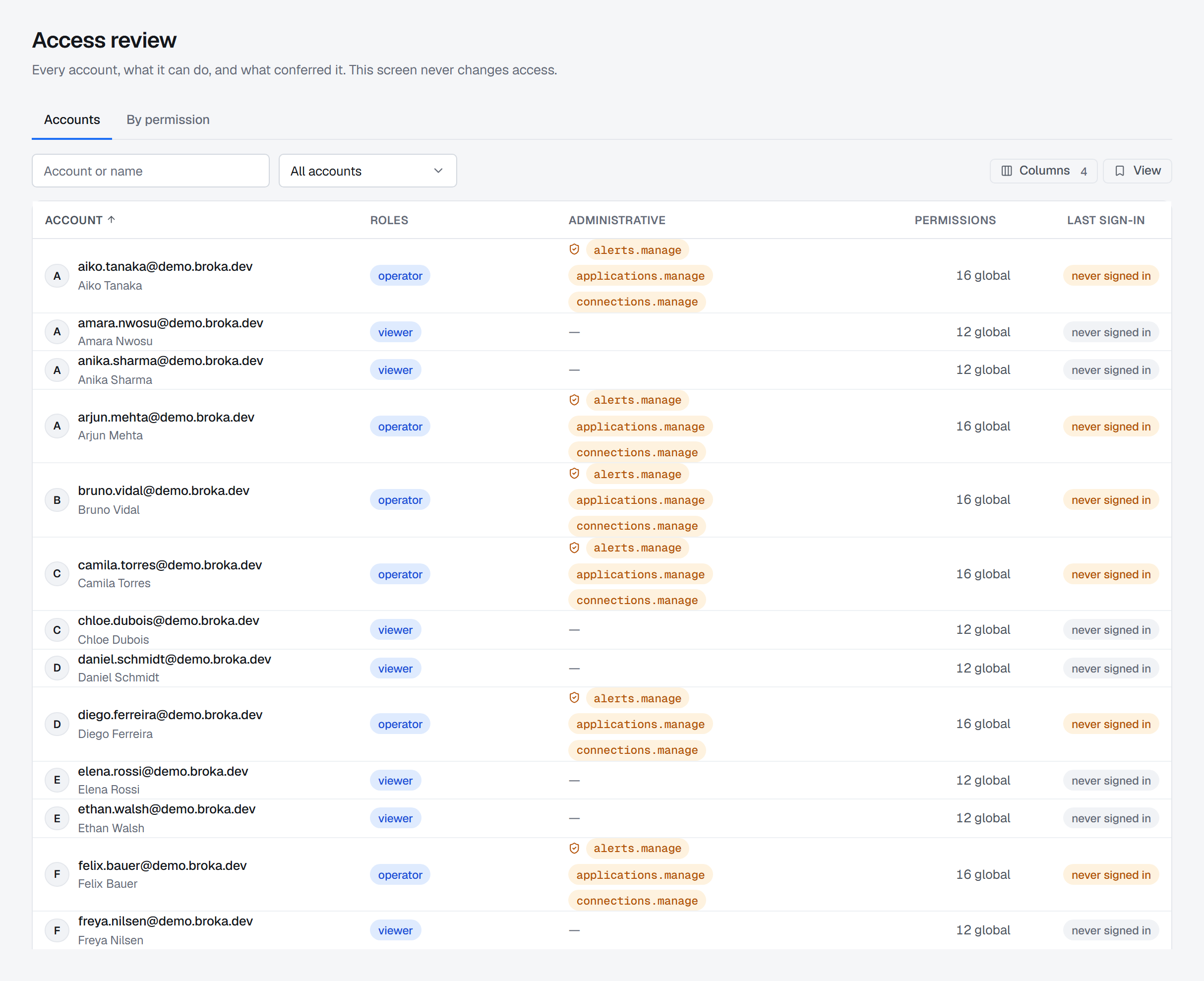
Commercial only. The report is Operations ▸ Access Review.
The effective-access report answers it three ways: the whole roster, one person's access at each scope, or everyone who holds a given permission.
That last view is the one reviews are usually built around, because the question in a review is rarely "what can Alice do" and usually "who can delete a topic in production".
The report covers roles and Service access. Grants on resource patterns, set under Resource access, are not part of it — a pattern grant can let someone delete the topics it matches without any role that does — so a review reads those on each account's and each team's own access panel.
Each account's report also says how many API tokens it holds that still work, and the roster can show the same count as a column. A token acts with the account's whole access and outlives its sessions, so an account that never signs in can still be in use.
The report is deliberately gated on the audit permission rather than the user-management one. A reviewer who is not allowed to change access must still be able to see it — and separating the two is what makes the review independent of the people it reviews.
Reading the report is itself recorded, unless read recording is switched off in Settings ▸ Security.
What actually happened
The trail holds every change BROKA makes and every request it refuses, and each entry carries when, who, where, why when a reason was needed, and how it ended — Success, Denied, Blocked or Failed.
Two properties are worth building a review around:
A refusal is recorded exactly like a success. A write blocked by an environment policy, a permission denied, a failed sign-in — each is an entry. A trail that held only successes could not answer the question a review is actually asking, which is usually about attempts rather than outcomes. A refusal says what was attempted — the principal a denied grant was for, the role a refused assignment named — so a run of them can be read without guessing; what it cannot know, it says it does not know.
The actor is recorded by id, and the name beside it is looked up when you read the trail, so you see the name as it is now. An entry from months ago still names who performed it after that account has been deleted. The one exception is deliberate: a person's name can be erased from the trail on request, and their entries then name the account by id alone — the entries themselves, and the chain, are untouched.
What an AI assistant did is marked as such (Commercial). An action taken through the MCP server carries the channel MCP, with the tool, the client's name and version and the API token's prefix, and the trail's channel filter shows those alone or the console's alone. Its reads follow the read setting exactly as the console's do.
Changes and reads are different questions
Commercial only. A Community installation records every change and every refusal, and no reads.
Most reads are not recorded — recording them all produces a trail nobody reads. By default a small number are, because they are events: anything that returns message or key contents, returns or decrypts a secret, shows who may do what — users, permissions, a cluster's ACLs — or produces an export. Reading the trail is one of them: each page of it read on the audit screen is recorded, with the filters that narrowed it but not what they were set to, so a review can see who has been looking. Settings ▸ Security can switch read recording off or extend it to every read; know which it is set to before you read absence as innocence.
One kind of read ignores that setting. Contents a data masking rule covers, shown
unmasked to someone allowed to see them, are recorded every time, and each entry names the rules that were skipped
and their tags. Typing read-unmasked in the Action filter lists them — which is how who read data tagged for a
regime unmasked, and when is answered.
Those entries are badged read, and the screen's activity filter shows you one kind or the other.
Proving the trail has not been altered
Records are chained, and Verify integrity walks the chain over the dates chosen and reports the first break it finds, saying which kind it is: a link that no longer follows its neighbour, a record that has gone missing without a retention record to account for it, content that no longer hashes to what was recorded, or a link sealed under an algorithm it cannot recompute.
What verification proves: within the range it walked, no covered record was altered, removed or reordered by anyone who cannot write the database.
What it cannot prove, and states rather than glossing:
- That nothing was removed from the newest end. A truncated chain is internally consistent — nothing inside it records how long it should be. This is the limit that matters most, and it is why the custody of the database holding the trail is part of the control rather than incidental to it.
- A count of tampering. Past a break every later link mismatches by construction, so a total would measure chain length rather than interference.
- Anything against someone who can write the database. The chain is unkeyed and lives in that same
database, so they can change records and reseal every link after them. A copy they cannot reach is
what holds: the evidence pack's
checkpoint.jsonkept outside the installation, or a forwarded copy of the trail — to a file or an HTTP endpoint in either edition, or to Kafka or RabbitMQ in Commercial.
Alongside the verdict it reports how many links it checked, how many records are not yet chained (the newest ones always are — chaining runs behind live traffic, and the console says so rather than implying coverage it does not have), how many links retention has pruned, and how many timestamps run backwards. That last one is reported apart from the verdict, because the usual cause is a clock correction rather than tampering.
The evidence pack
An evidence pack is a single archive for a reviewer or an auditor: the entries for the period as CSV views — the whole trail, sign-ins, privileged actions, changes and, in Commercial, reads — the sealed events themselves with a checkpoint of the chain's head, the access report, the integrity verdict, the retention state, and a manifest describing what is inside — including the limits of what it can claim.
That last part is deliberate. Handing over an artefact that overstates itself is worse than handing over nothing, because the overstatement is the thing that gets relied on.
Retention is part of the control
The trail is kept for at most six months — 180 days, which is also the default — and retention cannot be switched off. Shortening it requires the security permission and a reason, because it deletes records sooner. The change is itself recorded.
Set it against your review cycle, not against your disk. A trail that expires between reviews cannot answer the question the review exists to ask — so if a review looks further back than six months, forward the trail. Anything older exists only in the forwarded copy: a file or an HTTP endpoint in either edition, or Kafka or RabbitMQ in Commercial. A record that was never forwarded is still deleted at 180 days, and BROKA warns seven days before that happens.
A review that fits in an afternoon
- Pull the effective-access report (Commercial) and read the per-permission view for the permissions that matter to you — the ones that delete, publish, or change access.
- Reconcile it against who should hold them. Departures, role changes and one-off grants given during an incident are what this step is for.
- Verify the trail's integrity for the period, and note the unchained tail rather than treating it as a gap.
- Read the refusals. They are in the same trail as the successes, and a cluster of denials against one person or one resource is usually the most interesting thing in the period.
- Export what you filtered, or produce an evidence pack for the period and keep it with the review. The CSV export carries down every filter that is on screen, and its own audit record names which ones narrowed it; the NDJSON export takes the dates alone, because it is the sealed chain an auditor's verifier checks, and a chain with entries left out reads as one that was tampered with. The evidence pack is deliberately the other thing — the whole range, unnarrowed — so the next review starts from a fixed point rather than from a live query.