

Users
Updated 6 October 2026 · applies to 1.0.0 · Community and Commercial
Accounts are local to your installation — an email address and a password, held in your own database next to everything else BROKA keeps. Nothing about an account leaves your network.
The first account
The first time BROKA starts it has no users, and the console opens on a setup screen instead of a sign-in form. You give it an email address, a password and optionally a display name — plus the installation's default time zone and its own environment, described in Initial setup — and it creates the first administrator.
That screen closes itself. Once any account holds the Admin role the setup endpoint refuses every further call, so there is no window left open behind you and nothing to remember to turn off. It is also rate-limited, and it is safe to reach twice at once: two simultaneous attempts cannot produce two first administrators — one wins and the other is sent to the sign-in page.
Creating the first administrator is also when BROKA seeds its four built-in roles — Admin, Operator, Viewer and Auditor — and the catalogue of permissions they are built from.
Setup does not sign you in. It tells you the account was created and sends you to the sign-in page.
Adding everyone else
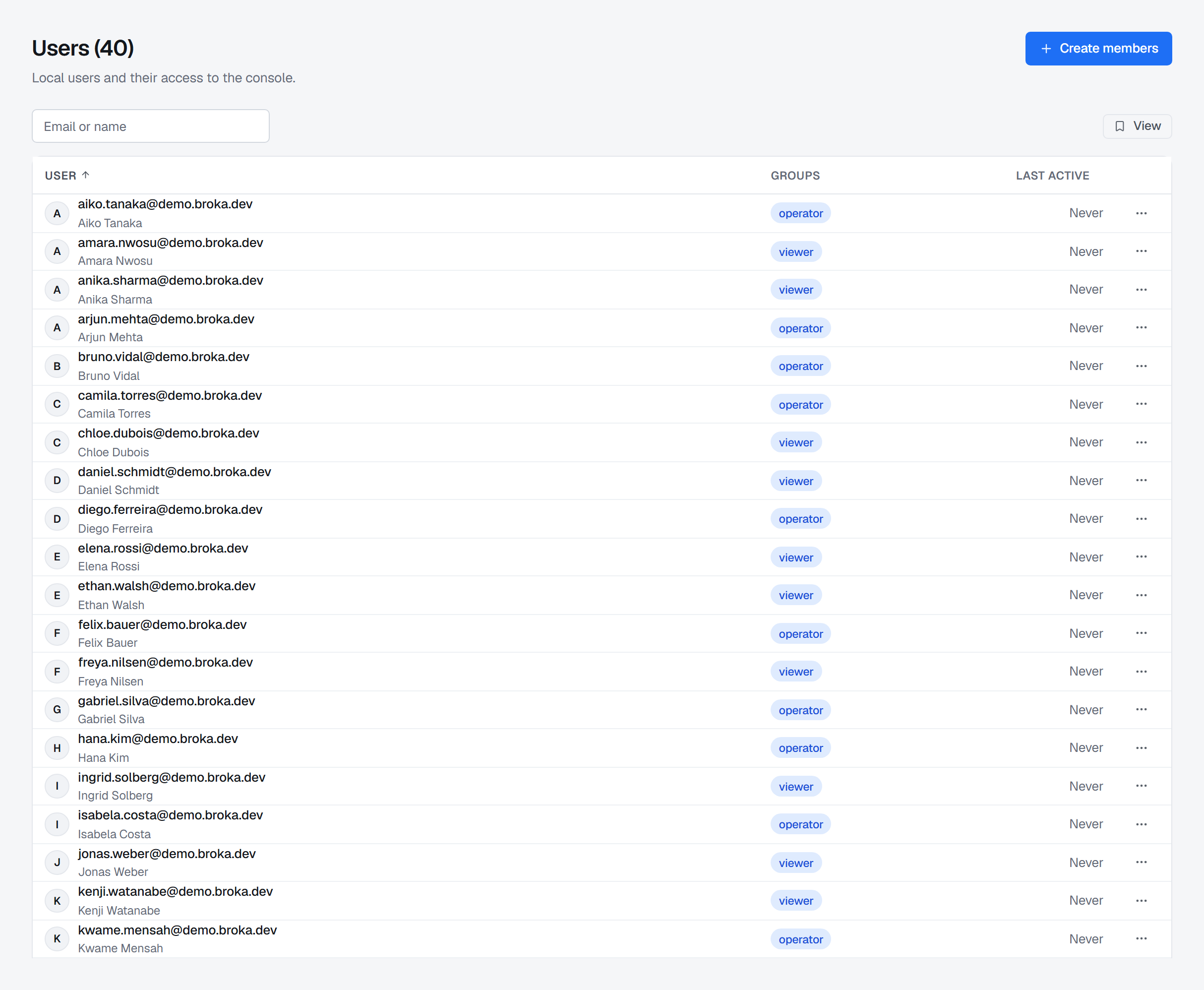
Every later account is created by an administrator, from Settings ▸ Users ▸ Create members: an email address and an initial password. You pass the password to the person yourself — BROKA sends no mail and exposes no self-registration, which is what lets it run in a network with no outbound path at all.
A new account starts with no access. Creating someone is deliberately separate from deciding what they may do, so an account never arrives carrying rights nobody chose for it.
What a password must be is the installation's password policy, set in Settings ▸ Security: by default at least 12 characters, with an upper-case letter, a lower-case letter, a digit and a symbol, and always at least four distinct characters. It is checked wherever a password is set — at first-run setup, when you create an account or reset a password, and when someone changes their own — and every field that sets one states the policy in force. A stricter policy applies to the next password, not to the ones in use: each keeps working until it is next changed. If the policy gives passwords an expiry, a password past it still signs its holder in, but only to a screen that asks for a new one. After five failed sign-ins an account locks for fifteen minutes, and the lockout is recorded in the audit trail as its own event.
Sign-in itself is written not to answer questions it was not asked: an account that is disabled is only told so after its password has verified. A wrong password gets the same generic answer whatever the state of the account, so the form cannot be used to find out which addresses exist.
Deciding what someone may do
Access is granted after the account exists, from the panel that opens beside a user in the list — click the address, or choose Manage roles, Service access, Resource access, Sessions or API tokens from the row's menu. It has five tabs. Three of them are what this account may do; the last two are what it is doing — the sign-ins it has open and the API tokens it has made, each of which you can end from there.
Roles — what kind of work this person does here. This is also the only place a scope is chosen: a role can be held across the whole installation, in one environment, or on a single connection. "Operator in staging, Viewer in production" is one person with two assignments.
Service access — individual permissions turned on or off for this person on top of their roles, each one inherited, allowed or denied. A denial wins over everything, including a role that would otherwise grant it.
Resource access — what they may do to resources whose names match a pattern, on one cluster or on all of them. These are BROKA's own rules about who may press which button; they are never written to your brokers as ACLs, and your broker's own authorisation keeps applying underneath.
Two rules guard the panel itself. You cannot change your own access — the person who grants and the person who receives are never the same — and you cannot give away a permission you do not hold yourself, so administration cannot be used to climb. Removing a deny counts as giving: it hands back what the person's roles confer, so you can lift a deny only on permissions you hold yourself. A full administrator is exempt from the first rule, for the obvious reason that otherwise the only administrator could not open their own access page; that exemption is covered instead by a detector that raises a critical signal whenever an actor changes their own access.
A third rule protects administrators. Nobody but an administrator can take access away from an administrator: adding a deny that reaches one, revoking one of their roles, putting them in a team that carries a deny or taking them out of a team, disabling or deleting them, and ending their sessions or revoking one of their API tokens are all refused to anyone who is not one, with the sentence Only an administrator can take access away from an administrator. The person who installed BROKA holds every permission, and someone they have delegated user management to cannot lower them. Administrators may restrict each other, and themselves.
Sessions, and how quickly a change takes effect
A signed-in session is a short-lived token — fifteen minutes — refreshed in the background by a long-lived one that the browser holds in a cookie it cannot read, restricted to the refresh endpoint alone. Each refresh replaces the previous token rather than reusing it, and a token that is presented again once it has been replaced is treated as stolen: the whole chain descending from it is revoked at once, which turns a copied cookie into a session that ends rather than a session that is shared. The few seconds after a replacement are the exception — two tabs of one browser refreshing together present the same token, and the second is simply told to try again.
Access changes do not wait for a token to expire. Changing someone's roles, permissions or team membership, or disabling them, invalidates every token they currently hold — the next request they make, in any tab, is refused. Signing out revokes the current token immediately and ends that person's other sessions with it.
A session nobody uses is signed out. Sign out after inactivity, in Settings ▸ Security — Off, 15 minutes, 30 minutes, 1 hour, 4 hours or 8 hours; 1 hour by default — is enforced by the server, which refuses to renew a session once that long has passed since its person last did anything. Only real use counts: a screen left open that refreshes itself, or a live view that stays connected, does not keep a session alive. The console signs itself out at the same moment, counting input in any of the browser's tabs, and the sign-in page says why. API tokens are not sessions and are not affected.
Resetting somebody's password
Passwords are not recoverable — they are stored as hashes, so nobody, including you, can read one back. What an administrator can do is replace one. Settings ▸ Users, the row's menu, Reset password, and the console generates a one-time password of twenty characters — or of the password policy's minimum length, if that is longer — and shows it once. You can reset only an account no more privileged than your own: a reset hands the new password to whoever asked for it, so it would otherwise be a way to take over an administrator.
It is shown rather than sent because BROKA sends no mail: you are the delivery channel, the same way
you are for the initial password. The generated value avoids the characters that get misheard when
one is read aloud — no I, O, l, 0 or 1 — and it is stored nowhere, so a lost one is
replaced by resetting again rather than looked up.
A reset does four things beyond changing the password:
- Every session that account has open ends — the access tokens through the security stamp, and the refresh tokens that would have minted new ones. A reset that left the old sessions running would be a second way in rather than a way back in, which is the wrong shape when the reset is answering a suspected compromise.
- The account's API tokens are revoked, for the same reason: a token is not tied to the password, so one minted by whoever held the account would otherwise keep working. Signing an account out everywhere revokes them too.
- The account must choose its own password. Signing in with the one you handed over opens the password change and nothing else, until the person has chosen theirs.
- The reset is audited, and the password is not. The entry records that it happened, to whom, by whom, how many sessions it ended and how many tokens it revoked. The temporary value is deliberately left out: the trail is readable by more people than the reset is, and a recorded password is a standing key.
There is no self-service route — no Forgot password link, and no email-based reset. Recovery is an administrator's act, which is worth planning for while there is still more than one of them.
Renaming, disabling and removing someone
Rename member changes the display name shown beside the address in lists, audit records and access reviews; the address itself cannot be changed. Clearing the name falls back to the address.
Disable member is the reversible answer to "this person has left" or "this account may be compromised": it stops them signing in and ends the sessions they have open, and keeps every role and grant, so Re-enable member gives back exactly the access they had. Disabling asks for a reason. Re-enabling hands every one of those accesses back at once, so it follows the reset rule: only someone at least as privileged as the account may do it.
Delete member stops them signing in and cuts their current sessions immediately, and asks for a reason. The record itself is retained rather than erased, which is what keeps the audit trail readable after the account is gone: an entry from months ago still names who performed it. For the same reason the address stays claimed, so a deleted account is not silently replaced by a new one wearing the same name.
Removing an account does not remove what was granted to it. Team memberships, role assignments and grants stay where they are — which matters if you ever restore the person, and matters more if you are reviewing who has access to what.
Erase name from audit trail is for a person who asks to be forgotten. It removes the name shown beside that account's entries and keeps every entry, still attributed to the account's id, so the trail and its tamper-evidence stay intact. It cannot be undone, a later sign-in does not bring the name back, and the erasure is itself recorded.
The console cannot be locked out
Two rules exist so that an ordinary administrative afternoon cannot end with nobody able to administer anything. You cannot deactivate your own account, and the last administrator cannot be removed, stripped of the role, or denied the permission that makes them one — the refusal comes from the same guard whichever of the three routes you take.
Everything here is recorded
Creating an account, changing it, deleting it, assigning or revoking a role, editing either kind of grant, creating or changing a team — each is an audit entry, with the actor, the target and the outcome. So are sign-ins, failed sign-ins with their reason, lockouts, sign-outs and refresh-token reuse. The very first administrator's creation is recorded too, attributed to the system, because at that moment there is no user to attribute it to.
Reviewing access without holding it
Commercial only. The report is Operations ▸ Access Review.
There is a read-only effective-access report — the full roster, one person's access at each scope, or everyone who holds a given permission — and it is deliberately gated on the audit permission rather than the user-management one. A reviewer who is not allowed to change access must still be able to see it. It covers roles and service access; Resource access grants are read on the account's own panel. Reading the report is itself audited, unless read recording is switched off.