

Hot keys
Updated 29 September 2026 · applies to 1.0.0 · Commercial
The Hot keys tab of the Keys screen, under Redis in the sidebar, asks a Redis 8.6 server which keys cost it the most CPU time and network bytes. Redis measures this itself, in a timed session: for every command, the CPU time and the network bytes it spent, per key.
The tab sits beside Browse and Analysis, but unlike them it does not follow the top bar's database switcher. A session is the server's, so keys from every database are ranked together, whichever database the switcher shows.
Where it is available
Hot keys arrived with Redis 8.6. On an older server the tab stays and says Hot keys are not available on this connection, with the server's reason, in place of the controls. The same notice appears on a Redis Cluster, where each node keeps a session of its own and BROKA does not start one on every node, and where the connection's identity may not use the server's administrative commands, which the hot-key commands are.
Starting and stopping a session
Track for (seconds) sets how long a session measures: 60 unless you change it, and a whole number from 1 to 3,600. Outside that range the field says so and Start tracking is not available. A session that never ends is not offered.
Start tracking asks first, saying what it costs: until the session ends, the server measures every command's CPU time and network bytes per key, which every command pays a little for. When the time is up the session stops on its own. Stop ends it early, and asks first as well; what was measured stays readable until the next session starts. Stopping when no session runs changes nothing, and is recorded all the same.
Starting and stopping a session need write permission on the connection. Where the environment is read-only, the connection is marked read-only, or your role may not write to it, Start tracking and Stop are not shown, and a line above the tabs says which of the three it is. Each start and each stop is recorded in the audit trail. Neither is treated as destructive, so neither asks for a reason — except in a guarded environment, where every write does.
One session per server
The server keeps one session, whoever started it. The ranking you read may come from a session another console or
a redis-cli started, and starting one while another is running is refused with the server's reason, which says it
may be another client's.
Reading the ranking
The ranking names keys, so it is read only when you ask. Until then the tab says No ranking read yet. Read the ranking confirms first, saying that the ranking names the keys the server measured across every database — a disclosure of what your applications keep there — and that the read is recorded in the audit trail. It is recorded as a key listing that counts the distinct keys named and names none of them.
Reading takes the same access as listing keys: write permission on the connection. A user who may only view the connection is refused.
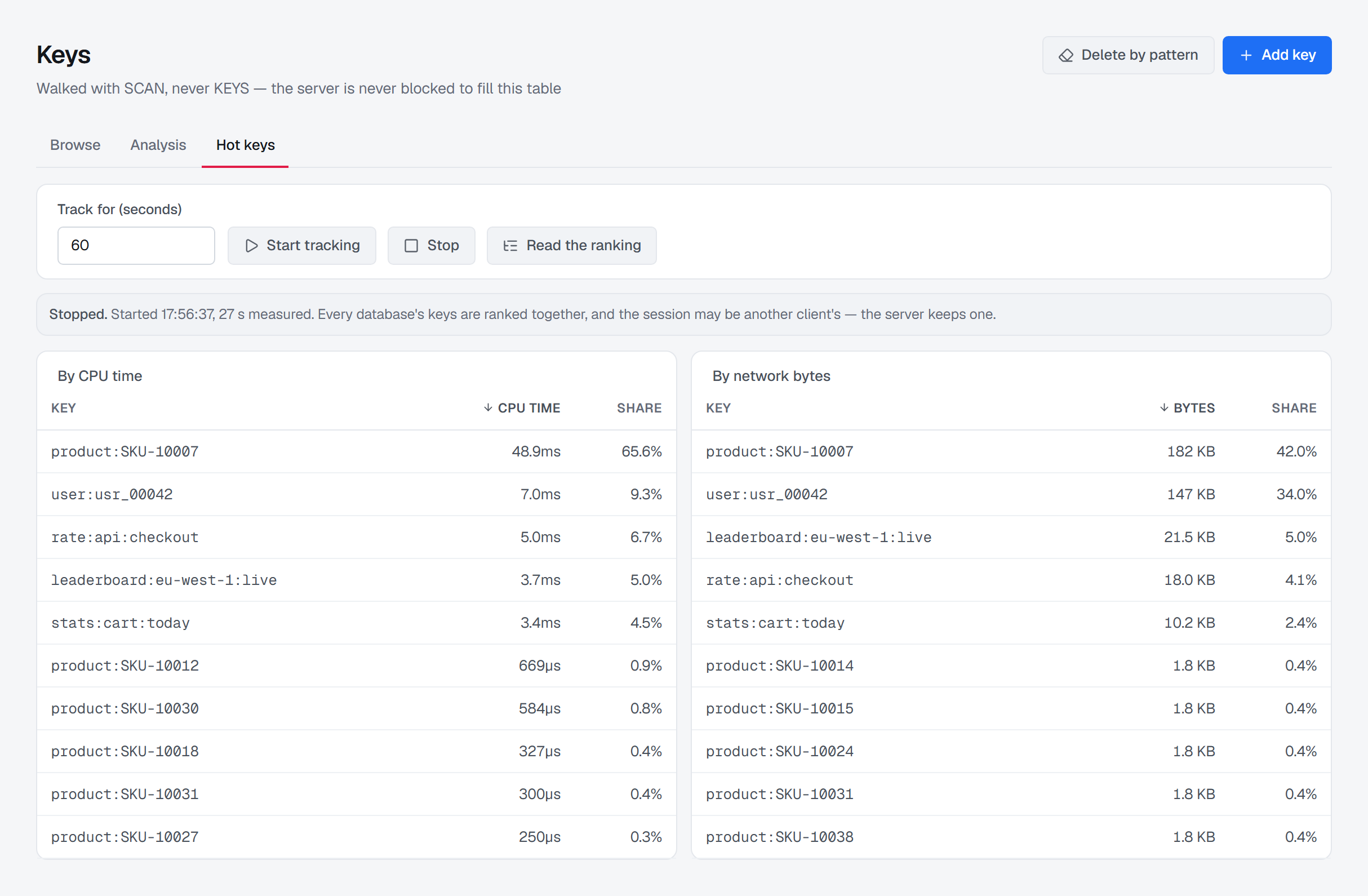
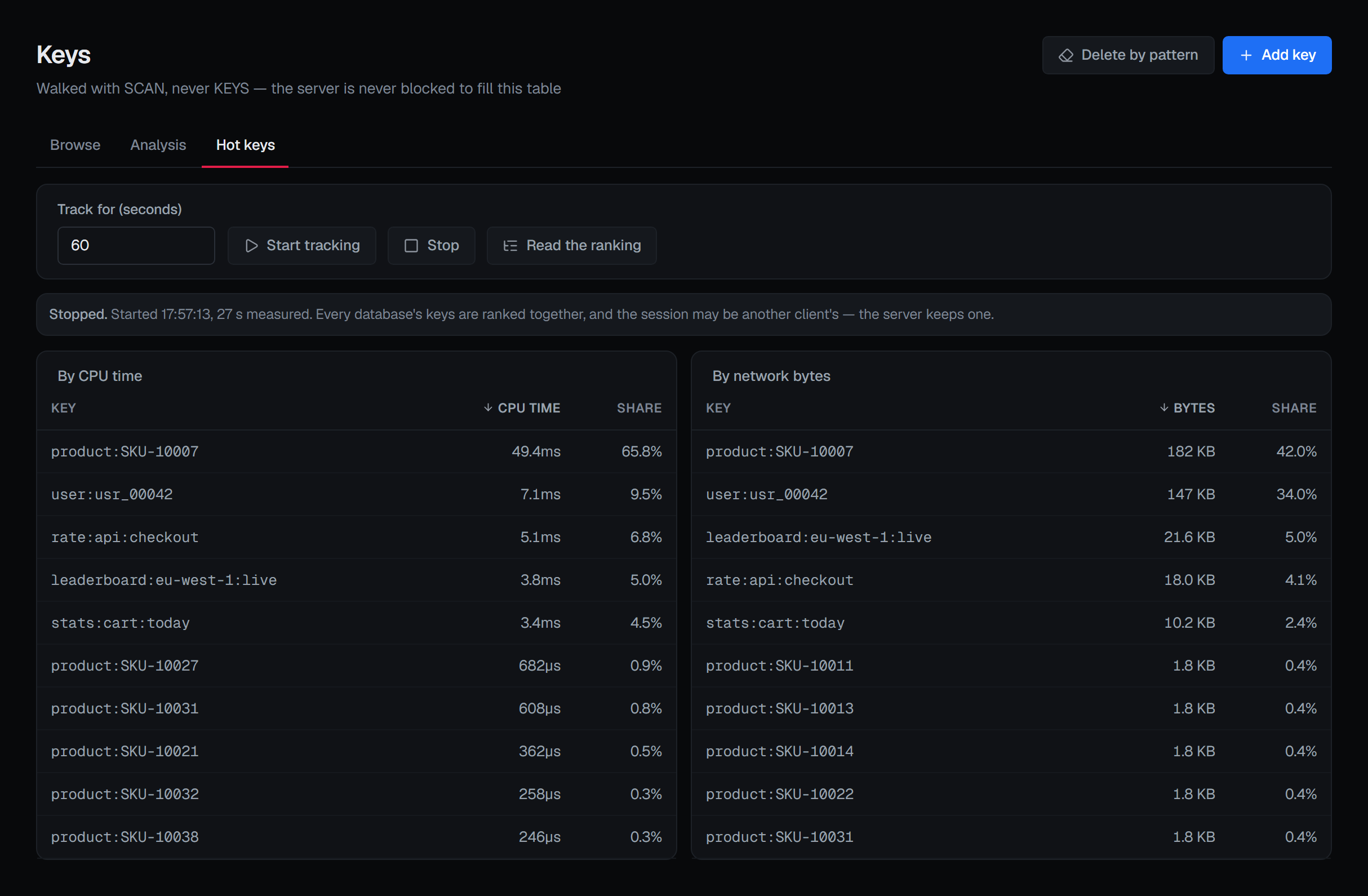
If no session has run on the server, the tab says No session has run on this server: start tracking for a while, then read the ranking. Otherwise a line says whether the session is Still tracking. or Stopped., when it started, and how long it has measured — so far, while it is still running, which makes a later read show later figures. Where the server measured only a share of the commands, the line says one command in how many.
Below it are two tables side by side:
- By CPU time — each key with the CPU time its commands cost, and its Share of what every command cost while the session measured.
- By network bytes — each key with the bytes its commands moved, and its share of the total.
Both open most first, and the key and figure columns sort the ranking in place. A share reads as a dash when the server gave no total to divide by.
When something is missing
- The tab shows Hot keys are not available on this connection. The server is older than Redis 8.6, the connection is a Redis Cluster, or its identity may not use administrative commands; the notice gives the server's reason.
- Start tracking and Stop are not there. The environment or the connection is read-only, or your role may not write to the connection; the line above the tabs says which.
- Starting is refused, saying the session may be another client's. A session is already running on the server. Its ranking can be read while it runs.
- The tab says No session has run on this server. Nothing has been measured yet; start a session, then read the ranking.