

- The first two lessons. A single-node Kafka cluster with KRaft and Topics, partitions and the log underneath explain the words this lesson builds on: broker, listener, topic, partition, offset and key.
- Docker with Compose v2.20 or later. The lesson was tested with Docker 29 and Compose v5.
- A bash-style shell. The commands use bash; on Windows, run them in WSL.
- Java or Python. JDK 21 with Maven 3.9 or later, or Python 3.12 to 3.14 with
pip; one of the two is enough. Every program and command is on the page in both languages: pick yours on any code tab, and the page keeps the choice. The first run downloads the Kafka client, so it needs an internet connection. - On Ubuntu, also under WSL. Ubuntu 24.04 ships Maven 3.8, which fails on this project with "Source option 5 is no longer supported"; install Maven 3.9 from maven.apache.org instead. For Python, install the
python3-venvpackage first. - If you have Python 3.15. Check with
python3 --version. The lab's Kafka client for Python,confluent-kafka2.16.1, has no prebuilt package for Python 3.15, sopiptries to build it from source and usually stops with Failed building wheel for confluent-kafka. Install Python 3.14 as well, for example withbrew install python@3.14on a Mac. Then, in Run it and in One key, two clients, below, create the virtual environment withpython3.14 -m venv --clear .venvinstead ofpython3 -m venv .venv;--clearempties a.venvthat an earlier attempt left behind. - TCP ports 19232 and 19132 free on your machine. The labs of the first two lessons use 19130 and 19131, so all three can run side by side. You can change the ports; the lesson tells you where.
- Room for one broker. The broker uses about 500 MB of memory. The image is the one from the earlier lessons.
What you are about to run
The lab is one Docker Compose project with one container, started from apache/kafka:4.3.2, the image of the earlier lessons: a single node that is broker and controller at once. There is no seed this time. You create the topics yourself, and the records come from two small programs that you run on your machine, in Java or in Python.
- The status producer writes sixteen status changes of four bikes to
bikes.status: each bike is unlocked and locked, twice. The key of every record is its bike. - The search producer writes a thousand searches from the app to
app.searches, with no key at all.
| Topic | Partitions | Records | Key | Value |
|---|---|---|---|---|
bikes.status |
6 | 16 status changes, four for each of four bikes | the bike, for example bike-1042 |
{"bike": "bike-1042", "ride": 1, "status": "unlocked"} |
app.searches |
6 | 1,000 searches | none | {"search": 7, "near": "station-7"} |
The broker has a listener that the earlier labs did not have:
      KAFKA_LISTENERS: INTERNAL://:29092,HOST://:19232,EXTERNAL://:19132,CONTROLLER://:9093
      KAFKA_ADVERTISED_LISTENERS: INTERNAL://kafka:29092,HOST://localhost:${KAFKA_HOST_PORT:-19232},EXTERNAL://${KAFKA_ADVERTISED_HOST:-host.docker.internal}:${KAFKA_PORT:-19132}
As the first lesson showed, a client connects to the address you give it, asks the broker for metadata, and from then on uses the address the broker advertises. EXTERNAL advertises host.docker.internal, a name made for containers. Your machine may not know that name at all; a Mac with Docker Desktop's default settings does not. The producers run on your machine, so they get a listener of their own:
| Listener | Port | Advertised address | For |
|---|---|---|---|
| INTERNAL | 29092, inside the container only | kafka:29092 |
Kafka's tools, run with docker compose exec |
| HOST | 19232 | localhost:19232 |
the producers, and other programs on your machine |
| EXTERNAL | 19132 | host.docker.internal:19132 |
BROKA and other clients in containers |
CONTROLLER, on port 9093, is the quorum's, as before.
Get the lab
git clone https://github.com/orchesta/broka.git
cd broka/learn/kafka/03-producers
ls -A
If you kept the clone from an earlier lesson, run git pull in it instead of cloning again, then change into the new folder.
.env.example
README.md
compose.yml
java
python
compose.yml is the project. java and python hold the same two producers, one folder per language: java is a small Maven project whose one real dependency is the Kafka client, kafka-clients 4.3.2; python has the two scripts and a requirements.txt that names confluent-kafka 2.16.1. .env.example holds the three settings you may want to change, and README.md has the run commands and the connection values.
The settings file is optional. Copy it when you need to change something:
cp .env.example .env# Host port of the HOST listener, for the programs you run on this machine. If you change it, change
# localhost:19232 in the Java and Python code too.
KAFKA_HOST_PORT=19232
# Host port of the EXTERNAL listener, for clients in other containers, such as BROKA.
KAFKA_PORT=19132
# Address the broker hands back to clients on the EXTERNAL listener. Keep host.docker.internal on Docker
# Desktop; on Linux set it to the host's IP address.
KAFKA_ADVERTISED_HOST=host.docker.internalKAFKA_HOST_PORT: change it when 19232 is taken. The producers havelocalhost:19232in their code, so change the port there too.KAFKA_PORT: change it when 19132 is taken.KAFKA_ADVERTISED_HOST: the address the broker hands to clients in other containers. On Linux with Docker Engine, put the IP address of your machine here; the first lesson explains why.
Start it and create the topics
docker compose up -d --wait--wait returns when the broker is healthy. The last lines look like this:
 Network broka-lab-kafka-producers_default  Created
 Volume broka-lab-kafka-producers_kafka-data  Created
 Container broka-lab-kafka-producers-kafka-1  Healthy
As in the earlier labs, the broker does not create a topic when a producer first writes to it: KAFKA_AUTO_CREATE_TOPICS_ENABLE is false. Create both topics, with six partitions each:
docker compose exec kafka /opt/kafka/bin/kafka-topics.sh --bootstrap-server localhost:29092 --create --topic bikes.status --partitions 6 --replication-factor 1
docker compose exec kafka /opt/kafka/bin/kafka-topics.sh --bootstrap-server localhost:29092 --create --topic app.searches --partitions 6 --replication-factor 1WARNING: Due to limitations in metric names, topics with a period ('.') or underscore ('_') could collide. To avoid issues it is best to use either, but not both.
Created topic bikes.status.
WARNING: Due to limitations in metric names, topics with a period ('.') or underscore ('_') could collide. To avoid issues it is best to use either, but not both.
Created topic app.searches.The warning is the one from the second lesson: every topic name with a dot draws it.
A producer started before this step has nowhere to write, and the two clients tell you in different ways. The Java producer waits for the topic inside send(), for up to max.block.ms, 60 seconds by default, and then hands the callback a TimeoutException: Topic bikes.status not present in metadata after 60000 ms. Then it waits again for the next record, so stop it with Ctrl+C. The Python producer accepts all sixteen records, and after about 30 seconds reports each one as failed: Unknown topic or partition.
A producer in a few lines
The status producer is the same program in both languages. Pick yours:
package learn;

import java.util.Properties;
import org.apache.kafka.clients.producer.KafkaProducer;
import org.apache.kafka.clients.producer.ProducerRecord;
import org.apache.kafka.common.serialization.StringSerializer;

public class StatusProducer {
    public static void main(String[] args) {
        var props = new Properties();
        props.put("bootstrap.servers", "localhost:19232");
        props.put("key.serializer", StringSerializer.class.getName());
        props.put("value.serializer", StringSerializer.class.getName());

        String[] bikes = {"bike-1001", "bike-1002", "bike-1042", "bike-1234"};

        try (var producer = new KafkaProducer<String, String>(props)) {
            for (int ride = 1; ride <= 2; ride++) {
                for (String status : new String[] {"unlocked", "locked"}) {
                    for (String bike : bikes) {
                        var value = String.format(
                                "{\"bike\": \"%s\", \"ride\": %d, \"status\": \"%s\"}", bike, ride, status);
                        var label = bike + " ride " + ride + " " + status;
                        // The key is the bike: every record of one bike goes to the same partition.
                        var record = new ProducerRecord<>("bikes.status", bike, value);
                        producer.send(record, (meta, error) -> {
                            if (error != null) {
                                System.out.println(label + " failed: " + error);
                            } else {
                                System.out.println(label + ": partition " + meta.partition()
                                        + ", offset " + meta.offset());
                            }
                        });
                    }
                }
            }
        } // close() waits until every record is sent and its callback has run.
    }
}
import json
from confluent_kafka import Producer
producer = Producer({
"bootstrap.servers": "localhost:19232",
# Hash keys the way the Java client does, so that a key goes to the same partition from either client.
"partitioner": "murmur2_random",
# On by default in the Java client, off by default in this one.
"enable.idempotence": True,
})
def on_delivery(error, msg):
record = json.loads(msg.value())
label = f"{record['bike']} ride {record['ride']} {record['status']}"
if error is not None:
print(f"{label} failed: {error}")
else:
print(f"{label}: partition {msg.partition()}, offset {msg.offset()}")
for ride in (1, 2):
for status in ("unlocked", "locked"):
for bike in ("bike-1001", "bike-1002", "bike-1042", "bike-1234"):
value = json.dumps({"bike": bike, "ride": ride, "status": status})
# The key is the bike: every record of one bike goes to the same partition.
producer.produce("bikes.status", key=bike, value=value, on_delivery=on_delivery)
# flush() waits until every record is sent; the callbacks run inside it.
producer.flush()Six things make it a producer:
- The bootstrap address.
localhost:19232is the HOST listener. The producer connects there first, and the broker tells it which partitions the topic has and which broker leads each one. With one broker, that is always this one. - Bytes. Kafka stores keys and values as bytes. The Java producer turns the strings into bytes with the two serializers it is given; the Python client accepts strings and encodes them as UTF-8.
- The key. Each record's key is its bike. The producer hashes the key to pick the partition, so every record of a bike goes to the same partition.
- Sending does not wait.
send()andproduce()put the record in a buffer and return at once. The client collects the records into batches, one per partition, and sends them in the background. - The callback. When the broker has answered for a record, the client calls the function you passed to
send()orproduce(): with the partition and the offset, or with the error. In Python, callbacks run insideflush()orpoll(). - Closing.
close()in Java andflush()in Python wait until every record is sent and its callback has run. A program that ends without them can lose what is still in the buffer.
The Python producer sets two things the Java one does not: a partitioner and enable.idempotence. The Java client works that way by default; the Python client, which is built on the C library librdkafka, does not. The lesson comes back to both.
Run it
Each block starts and ends in the lab's folder, where the docker compose commands work.
cd java
mvn -q compile exec:java
cd ..
cd python
python3 -m venv .venv
. .venv/bin/activate
pip install -r requirements.txt
python status_producer.py
cd ..The first Maven run downloads the Kafka client and Maven's plugins; -q keeps Maven quiet, so only the program's lines appear. pip installs one package, confluent-kafka, and prints its own lines first (if it stops with Failed building wheel for confluent-kafka, see the Python 3.15 item under Before you start). Then each producer prints one line per record, once the broker has confirmed it:
bike-1234 ride 1 unlocked: partition 0, offset 0
bike-1234 ride 1 locked: partition 0, offset 1
bike-1234 ride 2 unlocked: partition 0, offset 2
bike-1234 ride 2 locked: partition 0, offset 3
bike-1002 ride 1 unlocked: partition 2, offset 0
bike-1042 ride 1 unlocked: partition 2, offset 1
bike-1002 ride 1 locked: partition 2, offset 2
bike-1042 ride 1 locked: partition 2, offset 3
bike-1002 ride 2 unlocked: partition 2, offset 4
bike-1042 ride 2 unlocked: partition 2, offset 5
bike-1002 ride 2 locked: partition 2, offset 6
bike-1042 ride 2 locked: partition 2, offset 7
bike-1001 ride 1 unlocked: partition 4, offset 0
bike-1001 ride 1 locked: partition 4, offset 1
bike-1001 ride 2 unlocked: partition 4, offset 2
bike-1001 ride 2 locked: partition 4, offset 3%4|1793914626.653|GETPID|rdkafka#producer-1| [thrd:main]: Failed to acquire idempotence PID from broker localhost:19232/1: Broker: Coordinator load in progress: retrying
bike-1234 ride 1 unlocked: partition 0, offset 0
bike-1234 ride 1 locked: partition 0, offset 1
bike-1234 ride 2 unlocked: partition 0, offset 2
bike-1234 ride 2 locked: partition 0, offset 3
bike-1002 ride 1 unlocked: partition 2, offset 0
bike-1042 ride 1 unlocked: partition 2, offset 1
bike-1002 ride 1 locked: partition 2, offset 2
bike-1042 ride 1 locked: partition 2, offset 3
bike-1002 ride 2 unlocked: partition 2, offset 4
bike-1042 ride 2 unlocked: partition 2, offset 5
bike-1002 ride 2 locked: partition 2, offset 6
bike-1042 ride 2 locked: partition 2, offset 7
bike-1001 ride 1 unlocked: partition 4, offset 0
bike-1001 ride 1 locked: partition 4, offset 1
bike-1001 ride 2 unlocked: partition 4, offset 2
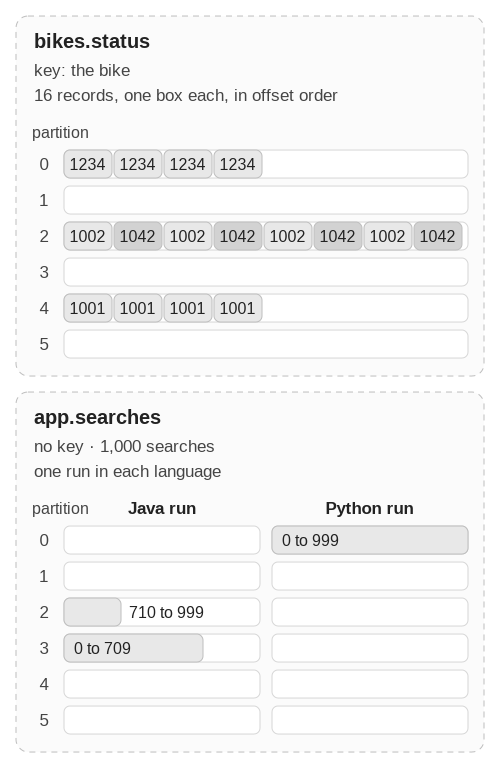
bike-1001 ride 2 locked: partition 4, offset 3Every bike stayed on one partition: bike-1234 on 0, bike-1002 and bike-1042 together on 2, bike-1001 on 4. You get the same placement, because it is computed from the key alone: the remainder of the key's hash divided by six, the partition count. It is also where the second lesson's keys ended up once its topic had six partitions; the console producer used there is a Java producer too. Offsets count per partition: 0 to 3 on partitions 0 and 4, and 0 to 7 on partition 2, which two bikes share.
The lines come grouped by partition, not in the order of sending. The producer sent one batch per partition, and the callbacks of a batch run when the broker has answered for it. Which partition comes first can differ on your machine.
The first line of the Python output is a warning, not an error. On a new broker, the first producer that asks for a producer id has to wait while the broker fetches a block of ids from the controller; the client retries and gets its id. On the test machine the line appeared only when the Python producer was the first to ask on a fresh broker.
Order within a partition
Read partition 2 back, with the offset and the key of each record:
docker compose exec kafka /opt/kafka/bin/kafka-console-consumer.sh --bootstrap-server localhost:29092 --topic bikes.status --partition 2 --offset earliest --max-messages 8 --formatter-property print.offset=true --formatter-property print.key=trueOffset:0 bike-1002 {"bike": "bike-1002", "ride": 1, "status": "unlocked"}
Offset:1 bike-1042 {"bike": "bike-1042", "ride": 1, "status": "unlocked"}
Offset:2 bike-1002 {"bike": "bike-1002", "ride": 1, "status": "locked"}
Offset:3 bike-1042 {"bike": "bike-1042", "ride": 1, "status": "locked"}
Offset:4 bike-1002 {"bike": "bike-1002", "ride": 2, "status": "unlocked"}
Offset:5 bike-1042 {"bike": "bike-1042", "ride": 2, "status": "unlocked"}
Offset:6 bike-1002 {"bike": "bike-1002", "ride": 2, "status": "locked"}
Offset:7 bike-1042 {"bike": "bike-1042", "ride": 2, "status": "locked"}
Processed a total of 8 messagesThe two bikes are interleaved in the order the producer sent their records, and each bike's own records are in order: ride 1 unlocked, ride 1 locked, ride 2 unlocked, ride 2 locked. That is the guarantee Kafka gives: the order of records within a partition. Across partitions there is no order at all. Nothing on the cluster says whether the first record of bike-1001, on partition 4, came before or after the first record of bike-1002, on partition 2. A key keeps one bike's records on one partition, and so in order, which is the reason to choose the key with care.
What the broker keeps about your producer
Ask the broker what it knows about the producers of partition 2:
docker compose exec kafka /opt/kafka/bin/kafka-transactions.sh --bootstrap-server localhost:29092 describe-producers --topic bikes.status --partition 2ProducerId ProducerEpoch LatestCoordinatorEpoch LastSequence LastTimestamp CurrentTransactionStartOffset
0 0 -1 7 1793914581396 None One row, one producer: yours.
- ProducerId
0. Every idempotent producer gets an id from the broker when it starts, and this one was the first on the cluster. Run the producer again and it is a new producer, with a new id. - LastSequence
7. The producer numbers its records per partition, from 0. It wrote eight records to partition 2, numbered 0 to 7. - ProducerEpoch
0. The epoch goes with the id. Transactions use it to fence off an older copy of a producer, which is a subject for a later lesson. - LastTimestamp is when the partition last kept a write from this producer, in milliseconds since 1970. Yours differs.
- LatestCoordinatorEpoch
-1and CurrentTransactionStartOffsetNonebelong to transactions, which this producer does not use.
The tool is called kafka-transactions.sh, but this table is not only about transactions. It exists because the producer is idempotent: idempotence is on by default in the Java client, and the lab turns it on in the Python one. A producer retries a batch when no answer comes in time, for example when the connection drops after the broker has written the batch but before the answer arrives. Without sequence numbers, the broker would write that batch twice. With them, it recognizes a batch it already has and drops the copy. It also refuses a batch whose sequence skips ahead, so a retried batch cannot fall behind the one after it. A producer may have up to five requests on one connection waiting for an answer and still keep the order, because the broker keeps the last five batches of each producer for each partition. That is why five is the limit while idempotence is on.
The second lesson showed the same numbers from the other side: the dump tool printed a producer id and sequence numbers on every batch, and the .snapshot file next to the segments holds this table. The broker forgets a producer that has not written for a day, the default of producer.id.expiration.ms.
The defaults you used
The status producer sets almost nothing, so most of what it did came from defaults, and the two clients start from different ones:
| Setting | Java client | Python client (librdkafka) |
|---|---|---|
enable.idempotence |
true |
false |
acks |
all |
all |
| Partitioner for keyed records | murmur2 hash of the key | consistent_random: CRC32 hash of the key |
linger.ms |
5 | 5 |
batch.size |
16384 bytes | 1,000,000 bytes |
delivery.timeout.ms |
120000, two minutes | 300000, five minutes |
max.in.flight.requests.per.connection |
5 | 1,000,000; 5 with idempotence |
retries |
2147483647 | 2147483647 |
- Idempotence has been on in the Java client since Kafka 3.0, and is off in librdkafka. That is why the Python status producer turns it on: without it, there is no producer id, no sequence numbers and no row in
describe-producers. acks=all. The leader answers only when every in-sync replica has the batch. With one broker, the leader is the only replica.- The partitioner. The two clients hash keys differently. One key, two clients, below, shows what that does, and why the Python status producer sets
murmur2_random. linger.msis how long the producer waits for more records before it sends a batch that is not full. The Java client waited 0 ms before Kafka 4.0; with 5 ms, batches fill better.retriesanddelivery.timeout.ms. The producer retries a failed send almost without limit, but only within the delivery timeout, counted fromsend(): two minutes in Java, five in librdkafka. After that, the callback gets the error.
The Java client prints its whole configuration when it starts, at the INFO level; the lab keeps the client's log quiet, so you do not see it. A later lesson takes these settings apart one by one.
Records without a key
Now the search producer, which sets no key:
cd java
mvn -q compile exec:java -Dexec.mainClass=learn.SearchProducer
cd ..cd python
python search_producer.py
cd ..In the same terminal, the Python virtual environment is still active. In a new terminal, activate it again after cd python, with . .venv/bin/activate.
The program notes the partition of every search and prints each run of consecutive searches that went to the same partition:
records 0 to 709: partition 3
records 710 to 999: partition 2records 0 to 999: partition 0Without a key there is nothing to hash, so the producer picks a partition and stays on it for a while. The records then fill a few large batches instead of many small ones spread over six partitions. When the producer moves on depends on the client:
- The Java client moves on after at least
batch.sizebytes, 16 KB, have gone to the partition, and at the latest after about twice that. A search takes about 45 bytes in the log, so a thousand of them make about 45 KB. In the test run, the Java producer switched once, after 710 searches, about 31 KB. - librdkafka stays on a partition for
sticky.partitioning.linger.ms, 10 ms by default. The Python loop produced all thousand searches in under 2 ms on the test machine, so they all went to one partition.
Your partitions differ, and so does the point where the Java producer switched: both change from run to run. Over many runs, records without a key spread over all partitions. What they do not get is an order: two searches on different partitions have none. When the order matters, give the records a key.
The Python search producer has one line more than the Java one: list_topics fetches the topic's partitions before the first search. The Java client's first send() does that by itself, and waits for it. Without the line, in some runs on the test machine, the first searches were spread one by one over the partitions, and only the rest stayed on one. librdkafka's source suggests why: it does not wait, but holds the records produced before it knows the partitions, and places them once it does. With the line, both clients know the partitions before the first search.
One key, two clients
The partition of a key is the remainder of its hash, so two clients agree on it only if they hash keys the same way. Run the status producer of the other language and check. If you have used Java so far, run the Python one:
cd python
python3 -m venv .venv
. .venv/bin/activate
pip install -r requirements.txt
python status_producer.py
cd ..If you have used Python, run the Java one:
cd java
mvn -q compile exec:java
cd ..
After the Java producer, the Python one prints:
bike-1002 ride 1 unlocked: partition 2, offset 8
bike-1042 ride 1 unlocked: partition 2, offset 9
bike-1002 ride 1 locked: partition 2, offset 10
bike-1042 ride 1 locked: partition 2, offset 11
bike-1002 ride 2 unlocked: partition 2, offset 12
bike-1042 ride 2 unlocked: partition 2, offset 13
bike-1002 ride 2 locked: partition 2, offset 14
bike-1042 ride 2 locked: partition 2, offset 15
bike-1001 ride 1 unlocked: partition 4, offset 4
bike-1001 ride 1 locked: partition 4, offset 5
bike-1001 ride 2 unlocked: partition 4, offset 6
bike-1001 ride 2 locked: partition 4, offset 7
bike-1234 ride 1 unlocked: partition 0, offset 4
bike-1234 ride 1 locked: partition 0, offset 5
bike-1234 ride 2 unlocked: partition 0, offset 6
bike-1234 ride 2 locked: partition 0, offset 7
Every bike went to the partition the first producer chose, and the offsets continue where it stopped. After the Python producer, the Java one prints the same partitions, with offsets 4 to 7 on partitions 0 and 4, and 8 to 15 on partition 2.
That agreement is the partitioner line in the Python producer: murmur2_random hashes keys the way the Java client does. Without it, librdkafka's default, consistent_random, hashes with CRC32 and puts three of the four bikes on partition 0. A bike's records from the two clients would then sit on two partitions, with no order between them. When several programs write the same keys, they have to agree on the partitioner.
The broker now keeps two producers for partition 2:
docker compose exec kafka /opt/kafka/bin/kafka-transactions.sh --bootstrap-server localhost:29092 describe-producers --topic bikes.status --partition 2ProducerId ProducerEpoch LatestCoordinatorEpoch LastSequence LastTimestamp CurrentTransactionStartOffset
0 0 -1 7 1793914581396 None
2 0 -1 7 1793914595005 None Each producer numbered its own records from 0, so both show 7 as their last sequence. The ids depend on the order you ran things in. The broker hands them out one after the other, and every idempotent producer takes one, including the Java search producer, which wrote only to app.searches. If you ran Java first, the status producer got 0, the Java search producer 1 and the Python status producer 2. If you ran Python first, the status producer got 0 and the Java status producer 1: the Python search producer took none, because idempotence is off in it.
Try it yourself
- Set
enable.idempotencetofalsein the status producer and run it. The records are written as before, butdescribe-producersshows no new row: without a producer id, the broker has nothing to check a retry against. - Set
max.in.flight.requests.per.connectionto 6 in the status producer. Both clients refuse to start, because the limit is 5 while idempotence is on. Before Kafka 4.0, the Java client turned idempotence off instead, with a warning in its log. - Delete the
partitionerline from the Python status producer and run it:bike-1001,bike-1042andbike-1234go to partition 0, and onlybike-1002stays on 2. - Delete the
list_topicsline from the Python search producer and run it a few times: in some runs, the first searches spread one by one over the partitions, and the rest stay on one. - Point a producer at port 19132 instead of 19232. On a Mac with Docker Desktop, the Java producer is silent for two minutes and then reports every record as expired; the Python producer logs every few seconds that it cannot resolve
host.docker.internal, until you stop it with Ctrl+C. The first connection works, and the address the broker gives back does not.
What to remember
- A producer needs a bootstrap address, a way to turn keys and values into bytes, and a topic.
send()returns at once, and the callback brings the partition and the offset, or the error. Close or flush the producer before the program ends. - The key decides the partition, so all records with one key go to one partition. Kafka keeps the order of records within a partition, never across partitions.
- Clients can hash keys differently. The Java client uses murmur2; a librdkafka client needs
partitioner=murmur2_randomto put a key where the Java client puts it. - An idempotent producer has an id and numbers its records per partition. The broker keeps the last five batches of each producer, drops a batch it already has and refuses one that skips ahead, so up to five requests can be in flight without losing the order.
- Idempotence is on by default in the Java client and off in librdkafka.
- Records without a key stay on one partition for a while: in the Java client until 16 to 32 KB have gone to it, in librdkafka for 10 ms.
- A client uses the address the broker advertises, so programs on your machine need a listener that advertises an address your machine can reach.
Clean up, or carry on
To remove the lab and its data:
docker compose down -vThe runs left java/target and python/.venv in the lab's folder; delete them too if you want the folder as you cloned it. Or keep everything: nothing in this lab writes on its own, so it stays as you left it, on ports 19232 and 19132, next to the earlier labs if they run too. The lab's README has the short form of these commands and the connection values.