

- The first lesson. A single-node Kafka cluster with KRaft explains the words this lesson builds on: topic, partition, offset, consumer group and replication factor.
- Docker with Compose v2.20 or later. The lesson uses
docker compose wait, added in Compose v2.20, and was tested with Docker 29 and Compose v5. - A bash-style shell. The commands use bash and
grep; on Windows, run them in WSL. - Room for one broker. The broker uses about 500 MB of memory; the lab's second container only writes the starting data and exits. The image is the one from the first lesson and takes about 700 MB of disk.
- TCP port 19131 free on your machine. The first lesson's lab uses 19130, so both labs can run side by side. You can change the port; the lesson tells you where.
- A terminal. Everything runs inside containers.
What you are about to run
The lab is one Docker Compose project with two containers, both started from apache/kafka:4.3.2, the image of the first lesson. It is quiet on purpose: there is no producer and no consumer, so every number you read stays where it is until you change it.
- kafka is the cluster: one node that is broker and controller at once. It is built like the first lesson's, with its own port, 19131, and its own cluster id.
- seed runs once. It starts when the broker is healthy, creates two topics, writes their starting data and exits.
The data comes from the same bike-share service: bikes bike-1000 to bike-1999, keyed by bike.
| Topic | Partitions | Records | Key | Value |
|---|---|---|---|---|
rides.completed |
6 | 3,000 rides, three for every bike | the bike, for example bike-1042 |
{"bike":"bike-1042","from":"station-11","to":"station-03","minutes":20} |
bikes.telemetry |
2, in 1 MB segments | 40,000 positions, forty for every bike | the bike, for example bike-1001 |
{"bike":"bike-1001","lat":52.50100,"lon":13.40100,"battery":99,"seq":1} |
Two settings in the kafka service are new; the last one is kept from the first lesson:
      # What a topic gets when it is created without a partition count or a replication factor.
      KAFKA_NUM_PARTITIONS: "3"
      KAFKA_DEFAULT_REPLICATION_FACTOR: "1"
      # Topics are created on purpose, by the seed or by you.
      KAFKA_AUTO_CREATE_TOPICS_ENABLE: "false"
As in the first lesson, each KAFKA_* variable becomes one line of the broker's configuration. These two become num.partitions and default.replication.factor: the partition count and the replication factor a topic gets when the command that creates it names neither. Kafka's own defaults are one partition and one replica. This lab asks for three partitions, so that you can see the difference when you create a topic without options. Automatic topic creation stays off, as before: a topic exists because someone created it.
Get the lab
git clone https://github.com/orchesta/broka.git
cd broka/learn/kafka/02-topics-and-partitions
ls -A
If you kept the clone from the first lesson, run git pull in it instead of cloning again, then change into the new folder.
.env.example
README.md
compose.yml
scripts
Four entries, four files. compose.yml is the project. scripts/seed.sh creates the two topics and writes their data. .env.example holds the two settings you may want to change. README.md has the run commands and the connection values.
The settings file is optional. Copy it when you need to change something:
cp .env.example .env# Host port of the EXTERNAL listener, for clients outside the lab.
KAFKA_PORT=19131
# Address the broker hands back to clients outside this lab. Keep host.docker.internal on Docker Desktop;
# on Linux set it to the host's IP address.
KAFKA_ADVERTISED_HOST=host.docker.internalKAFKA_PORT: change it when 19131 is taken.KAFKA_ADVERTISED_HOST: the address the broker hands to clients outside the lab. On Linux with Docker Engine, put the IP address of your machine here; the first lesson explains why.
The seed is a short shell script around Kafka's own tools. This is the part that creates the topics:
"$BIN/kafka-topics.sh" --bootstrap-server "$BOOT" --create \
  --topic rides.completed --partitions 6 --replication-factor 1
# Small segments, so that the log of one partition is several files rather than one.
"$BIN/kafka-topics.sh" --bootstrap-server "$BOOT" --create \
  --topic bikes.telemetry --partitions 2 --replication-factor 1 --config segment.bytes=1048576
--config segment.bytes=1048576 sets one property on this topic only: the broker cuts its log into files of 1 MB, the smallest size Kafka 4.3 accepts, instead of the usual 1 GiB. You will see the effect at the end of the lesson, in the topic's directory. The rest of the script writes the records with the console producer, the key and the value separated by |.
Start it
docker compose up -d --wait
docker compose wait seed
On the first run Docker downloads apache/kafka:4.3.2, unless the first lesson already did. --wait returns as soon as the broker is healthy and the seed is running. docker compose wait seed then blocks until the seed has exited and prints how it ended. The last lines look like this:
 Network broka-lab-kafka-topics-and-partitions_default  Created
 Volume broka-lab-kafka-topics-and-partitions_kafka-data  Created
 Container broka-lab-kafka-topics-and-partitions-kafka-1  Healthy
 Container broka-lab-kafka-topics-and-partitions-seed-1  Healthy
container "829b883a4c4c1295f354644c7ab731ee6e42990dbc480d2a2478ba5aca4eea1b" exited with status code 0
The seed shows Healthy because it has no health check: for --wait, a running container without one is ready. It is still writing at that moment, which is why the second command is there. Status code 0 means the seed finished without an error. The long hex string is the id of its container; yours differs. Both commands together took 12 seconds on the test machine.
If another container already publishes port 19131, up stops with an error that says the port is already allocated. Set KAFKA_PORT in .env to a free port and run both commands again.
The seed has exited, so docker compose ps lists only the broker. ps -a shows both:
docker compose ps -aNAME IMAGE COMMAND SERVICE CREATED STATUS PORTS
broka-lab-kafka-topics-and-partitions-kafka-1 apache/kafka:4.3.2 "/__cacert_entrypoin…" kafka 13 seconds ago Up 12 seconds (healthy) 0.0.0.0:19131->19131/tcp, [::]:19131->19131/tcp
broka-lab-kafka-topics-and-partitions-seed-1 apache/kafka:4.3.2 "bash /scripts/seed.…" seed 13 seconds ago Exited (0) Less than a second agoWhat the seed did is in its last log line, and the broker's log shows that it formatted its storage with the cluster id from the compose file and started:
docker compose logs --no-log-prefix seed | tail -1
docker compose logs --no-log-prefix kafka | grep -E 'Using provided cluster id|Kafka Server started'seeded: rides.completed (6 partitions, 3000 rides), bikes.telemetry (2 partitions, 40000 positions, 1 MB segments)
===> Using provided cluster id bCyPSXmsT7KNu1MKXkyhGw ...
[…] INFO [KafkaRaftServer nodeId=1] Kafka Server started (kafka.server.KafkaRaftServer)Read the topics back
Kafka's tools are in the image, under /opt/kafka/bin, as in the first lesson: you run them inside the kafka container with docker compose exec kafka … and point them at localhost:29092.
docker compose exec kafka /opt/kafka/bin/kafka-topics.sh --bootstrap-server localhost:29092 --listbikes.telemetry
rides.completedTwo topics, sorted by name. __consumer_offsets, which you met in the first lesson, is not there yet: no consumer group has used this cluster so far.
docker compose exec kafka /opt/kafka/bin/kafka-topics.sh --bootstrap-server localhost:29092 --describe --topic bikes.telemetryTopic: bikes.telemetry TopicId: pjMudVDpSJu6nF8IcS-ZkA PartitionCount: 2 ReplicationFactor: 1 Configs: min.insync.replicas=1,segment.bytes=1048576
Topic: bikes.telemetry Partition: 0 Leader: 1 Replicas: 1 Isr: 1 Elr: LastKnownElr:
Topic: bikes.telemetry Partition: 1 Leader: 1 Replicas: 1 Isr: 1 Elr: LastKnownElr:The first line is the topic: its name, its id, two partitions with one replica each, and the configuration that is not a static default. segment.bytes=1048576 is the seed's setting; min.insync.replicas=1 is the cluster-level setting the first lesson explained. The topic id is generated when the topic is created, so yours differs. It stays with the topic for its whole life, and a topic that is deleted and created again under the same name gets a new one. You will find it again on disk.
docker compose exec kafka /opt/kafka/bin/kafka-get-offsets.sh --bootstrap-server localhost:29092 --topic bikes.telemetry
docker compose exec kafka /opt/kafka/bin/kafka-get-offsets.sh --bootstrap-server localhost:29092 --topic rides.completedbikes.telemetry:0:21480
bikes.telemetry:1:18520
rides.completed:0:519
rides.completed:1:468
rides.completed:2:507
rides.completed:3:453
rides.completed:4:585
rides.completed:5:468Each line is a topic, a partition and its log end offset: the offset the next record will get, which on these topics is the number of records written. 21,480 and 18,520 make the seed's 40,000 positions; the six partitions of rides.completed add up to 3,000. Neither topic is split evenly. The partition of a keyed record follows from its key, and a thousand bike names do not fall evenly into two or six partitions. Unlike the topic id, these numbers are the same on your machine, because the partition is computed from the key alone.
Create a topic
docker compose exec kafka /opt/kafka/bin/kafka-topics.sh --bootstrap-server localhost:29092 --create --topic bikes.maintenance --partitions 3 --replication-factor 1
docker compose exec kafka /opt/kafka/bin/kafka-topics.sh --bootstrap-server localhost:29092 --describe --topic bikes.maintenanceWARNING: Due to limitations in metric names, topics with a period ('.') or underscore ('_') could collide. To avoid issues it is best to use either, but not both.
Created topic bikes.maintenance.
Topic: bikes.maintenance TopicId: LQXJOTTlSCaBdl_khORmGQ PartitionCount: 3 ReplicationFactor: 1 Configs: min.insync.replicas=1
Topic: bikes.maintenance Partition: 0 Leader: 1 Replicas: 1 Isr: 1 Elr: LastKnownElr:
Topic: bikes.maintenance Partition: 1 Leader: 1 Replicas: 1 Isr: 1 Elr: LastKnownElr:
Topic: bikes.maintenance Partition: 2 Leader: 1 Replicas: 1 Isr: 1 Elr: LastKnownElr:The warning comes with every topic name that contains a dot or an underscore. It is a fair warning, as you will see in a moment. The topic exists with the partition count and the replication factor you asked for.
Now create one with no options at all:
docker compose exec kafka /opt/kafka/bin/kafka-topics.sh --bootstrap-server localhost:29092 --create --topic bikes.alerts
docker compose exec kafka /opt/kafka/bin/kafka-topics.sh --bootstrap-server localhost:29092 --describe --topic bikes.alertsWARNING: Due to limitations in metric names, topics with a period ('.') or underscore ('_') could collide. To avoid issues it is best to use either, but not both.
Created topic bikes.alerts.
Topic: bikes.alerts TopicId: r3WVZ9D4T_64ia-xB2_5_Q PartitionCount: 3 ReplicationFactor: 1 Configs: min.insync.replicas=1
Topic: bikes.alerts Partition: 0 Leader: 1 Replicas: 1 Isr: 1 Elr: LastKnownElr:
Topic: bikes.alerts Partition: 1 Leader: 1 Replicas: 1 Isr: 1 Elr: LastKnownElr:
Topic: bikes.alerts Partition: 2 Leader: 1 Replicas: 1 Isr: 1 Elr: LastKnownElr:Three partitions and one replica, although the command named neither: the two values from the compose file. The tool does not fill them in. It sends the request to a broker, the broker passes it to the controller, and the controller takes num.partitions and default.replication.factor from its own configuration. In this lab one process plays both roles and reads one configuration. In a cluster with separate controllers, these two settings belong in the controllers' configuration.
Creating a topic that already exists is an error:
docker compose exec kafka /opt/kafka/bin/kafka-topics.sh --bootstrap-server localhost:29092 --create --topic bikes.alertsWARNING: Due to limitations in metric names, topics with a period ('.') or underscore ('_') could collide. To avoid issues it is best to use either, but not both.
Error while executing topic command : Topic 'bikes.alerts' already exists.
[…] ERROR org.apache.kafka.common.errors.TopicExistsException: Topic 'bikes.alerts' already exists.
(org.apache.kafka.tools.TopicCommand)A script that runs more than once cannot stop at that error. With --if-not-exists, the command succeeds and changes nothing:
docker compose exec kafka /opt/kafka/bin/kafka-topics.sh --bootstrap-server localhost:29092 --create --topic bikes.alerts --if-not-existsWARNING: Due to limitations in metric names, topics with a period ('.') or underscore ('_') could collide. To avoid issues it is best to use either, but not both.Only the warning: no error, and no topic created. Now the warning comes true. Try the same name with an underscore instead of the dot:
docker compose exec kafka /opt/kafka/bin/kafka-topics.sh --bootstrap-server localhost:29092 --create --topic bikes_alertsWARNING: Due to limitations in metric names, topics with a period ('.') or underscore ('_') could collide. To avoid issues it is best to use either, but not both.
Error while executing topic command : Topic 'bikes_alerts' collides with existing topic: bikes.alerts
[…] ERROR org.apache.kafka.common.errors.InvalidTopicException: Topic 'bikes_alerts' collides with existing topic: bikes.alerts
(org.apache.kafka.tools.TopicCommand)In metric names a dot is written as an underscore, so bikes_alerts and bikes.alerts would report under the same name. Kafka therefore treats the two names as one and refuses the second. Pick one separator for all your topics; this series uses dots.
One more refusal. Ask for two replicas:
docker compose exec kafka /opt/kafka/bin/kafka-topics.sh --bootstrap-server localhost:29092 --create --topic bikes.copies --partitions 1 --replication-factor 2WARNING: Due to limitations in metric names, topics with a period ('.') or underscore ('_') could collide. To avoid issues it is best to use either, but not both.
Error while executing topic command : Unable to replicate the partition 2 time(s): The target replication factor of 2 cannot be reached because only 1 broker(s) are registered or some brokers have all their log directories cordoned.
[…] ERROR org.apache.kafka.common.errors.InvalidReplicationFactorException: Unable to replicate the partition 2 time(s): The target replication factor of 2 cannot be reached because only 1 broker(s) are registered or some brokers have all their log directories cordoned.
(org.apache.kafka.tools.TopicCommand)A replication factor is a number of brokers, and this cluster has one. The second half of the message refers to a feature added in Kafka 4.3: an operator can cordon a log directory so that no new partitions are placed on it, for example before taking a disk out. Nothing is cordoned here; the first half is the reason.
Keys choose partitions
bikes.maintenance is empty. Write six records to it, one per bike, with the bike as the key. The console producer reads lines from its input; parse.key=true and key.separator='|' tell it that everything before the | is the key.
printf '%s\n' \
'bike-1001|{"bike":"bike-1001","action":"brake-check"}' \
'bike-1002|{"bike":"bike-1002","action":"brake-check"}' \
'bike-1003|{"bike":"bike-1003","action":"brake-check"}' \
'bike-1042|{"bike":"bike-1042","action":"brake-check"}' \
'bike-1234|{"bike":"bike-1234","action":"brake-check"}' \
'bike-1777|{"bike":"bike-1777","action":"brake-check"}' \
| docker compose exec -T kafka /opt/kafka/bin/kafka-console-producer.sh --bootstrap-server localhost:29092 \
--topic bikes.maintenance --reader-property parse.key=true --reader-property key.separator='|'The producer prints nothing when it succeeds, and it exits when its input ends. Note the -T. docker compose exec normally attaches a terminal to the command, which is right when you type into it and wrong when its input comes from a pipe. -T leaves the terminal out, so the six lines reach the producer as they are.
docker compose exec kafka /opt/kafka/bin/kafka-get-offsets.sh --bootstrap-server localhost:29092 --topic bikes.maintenancebikes.maintenance:0:2
bikes.maintenance:1:2
bikes.maintenance:2:2Two records on each partition. Read them back with the partition, the offset and the key of each:
docker compose exec kafka /opt/kafka/bin/kafka-console-consumer.sh --bootstrap-server localhost:29092 --topic bikes.maintenance --from-beginning --max-messages 6 --formatter-property print.partition=true --formatter-property print.offset=true --formatter-property print.key=trueThe consumer rebalance protocol (KIP-848) is production-ready! Set group.protocol=consumer to try it out. See https://kafka.apache.org/documentation/#consumer_rebalance_protocol
Partition:1 Offset:0 bike-1001 {"bike":"bike-1001","action":"brake-check"}
Partition:1 Offset:1 bike-1777 {"bike":"bike-1777","action":"brake-check"}
Partition:2 Offset:0 bike-1002 {"bike":"bike-1002","action":"brake-check"}
Partition:2 Offset:1 bike-1042 {"bike":"bike-1042","action":"brake-check"}
Partition:0 Offset:0 bike-1003 {"bike":"bike-1003","action":"brake-check"}
Partition:0 Offset:1 bike-1234 {"bike":"bike-1234","action":"brake-check"}
Processed a total of 6 messagesThe key decided each placement: bike-1001 and bike-1777 on partition 1, bike-1002 and bike-1042 on partition 2, bike-1003 and bike-1234 on partition 0. You get the same placement, because it is computed from the key alone. The partitions may come out in a different order on your machine; within a partition, the order is the order of writing. --max-messages 6 makes the consumer exit after six records, so, unlike in the first lesson, there is no timeout. The first line is a notice that the console consumer prints in Kafka 4.3 when it uses the classic group protocol. Nothing in this lesson depends on it.
The read left a mark on the cluster:
docker compose exec kafka /opt/kafka/bin/kafka-topics.sh --bootstrap-server localhost:29092 --list__consumer_offsets
bikes.alerts
bikes.maintenance
bikes.telemetry
rides.completedThe console consumer joined a consumer group with a generated name, console-consumer- and a number. When that first group appeared, the broker created __consumer_offsets, the topic that keeps group positions, with 50 partitions.
Add partitions
Raise bikes.maintenance from three partitions to six:
docker compose exec kafka /opt/kafka/bin/kafka-topics.sh --bootstrap-server localhost:29092 --alter --topic bikes.maintenance --partitions 6
docker compose exec kafka /opt/kafka/bin/kafka-topics.sh --bootstrap-server localhost:29092 --describe --topic bikes.maintenanceTopic: bikes.maintenance TopicId: LQXJOTTlSCaBdl_khORmGQ PartitionCount: 6 ReplicationFactor: 1 Configs: min.insync.replicas=1
Topic: bikes.maintenance Partition: 0 Leader: 1 Replicas: 1 Isr: 1 Elr: LastKnownElr:
Topic: bikes.maintenance Partition: 1 Leader: 1 Replicas: 1 Isr: 1 Elr: LastKnownElr:
Topic: bikes.maintenance Partition: 2 Leader: 1 Replicas: 1 Isr: 1 Elr: LastKnownElr:
Topic: bikes.maintenance Partition: 3 Leader: 1 Replicas: 1 Isr: 1 Elr: LastKnownElr:
Topic: bikes.maintenance Partition: 4 Leader: 1 Replicas: 1 Isr: 1 Elr: LastKnownElr:
Topic: bikes.maintenance Partition: 5 Leader: 1 Replicas: 1 Isr: 1 Elr: LastKnownElr:--alter prints nothing when it works. The topic has six partitions and the same id: it is the same topic, made wider. The six records you wrote stay where they were, on partitions 0 to 2. Now write the same six keys again:
printf '%s\n' \
  'bike-1001|{"bike":"bike-1001","action":"tyre-change"}' \
  'bike-1002|{"bike":"bike-1002","action":"tyre-change"}' \
  'bike-1003|{"bike":"bike-1003","action":"tyre-change"}' \
  'bike-1042|{"bike":"bike-1042","action":"tyre-change"}' \
  'bike-1234|{"bike":"bike-1234","action":"tyre-change"}' \
  'bike-1777|{"bike":"bike-1777","action":"tyre-change"}' \
  | docker compose exec -T kafka /opt/kafka/bin/kafka-console-producer.sh --bootstrap-server localhost:29092 \
      --topic bikes.maintenance --reader-property parse.key=true --reader-property key.separator='|'
docker compose exec kafka /opt/kafka/bin/kafka-get-offsets.sh --bootstrap-server localhost:29092 --topic bikes.maintenancebikes.maintenance:0:4
bikes.maintenance:1:2
bikes.maintenance:2:4
bikes.maintenance:3:0
bikes.maintenance:4:2
bikes.maintenance:5:0docker compose exec kafka /opt/kafka/bin/kafka-console-consumer.sh --bootstrap-server localhost:29092 --topic bikes.maintenance --from-beginning --max-messages 12 --formatter-property print.partition=true --formatter-property print.offset=true --formatter-property print.key=trueThe consumer rebalance protocol (KIP-848) is production-ready! Set group.protocol=consumer to try it out. See https://kafka.apache.org/documentation/#consumer_rebalance_protocol
Partition:1 Offset:0 bike-1001 {"bike":"bike-1001","action":"brake-check"}
Partition:1 Offset:1 bike-1777 {"bike":"bike-1777","action":"brake-check"}
Partition:2 Offset:0 bike-1002 {"bike":"bike-1002","action":"brake-check"}
Partition:2 Offset:1 bike-1042 {"bike":"bike-1042","action":"brake-check"}
Partition:2 Offset:2 bike-1002 {"bike":"bike-1002","action":"tyre-change"}
Partition:2 Offset:3 bike-1042 {"bike":"bike-1042","action":"tyre-change"}
Partition:4 Offset:0 bike-1001 {"bike":"bike-1001","action":"tyre-change"}
Partition:4 Offset:1 bike-1777 {"bike":"bike-1777","action":"tyre-change"}
Partition:0 Offset:0 bike-1003 {"bike":"bike-1003","action":"brake-check"}
Partition:0 Offset:1 bike-1234 {"bike":"bike-1234","action":"brake-check"}
Partition:0 Offset:2 bike-1003 {"bike":"bike-1003","action":"tyre-change"}
Partition:0 Offset:3 bike-1234 {"bike":"bike-1234","action":"tyre-change"}
Processed a total of 12 messagesFour bikes stayed where they were. bike-1001 and bike-1777 moved from partition 1 to partition 4, and their brake checks stayed behind on partition 1.
The default partitioner hashes the key and takes the remainder of that hash divided by the partition count. With three partitions the remainder is 0, 1 or 2; with six it is 0 to 5. A key whose remainder was 1 now lands on partition 1 or partition 4, and nowhere else: going from three to six, every key either stays or moves exactly three up. Partitions 3 and 5 got nothing, because none of these six keys moved there.
That is the price of adding partitions. Kafka keeps the order of a key's records only while they are on one partition. A consumer reading partition 4 can now see the tyre change of bike-1001 before another consumer, reading partition 1, has handled its brake check. Add partitions before keyed data matters, or accept that the order breaks once.
The count only goes up:
docker compose exec kafka /opt/kafka/bin/kafka-topics.sh --bootstrap-server localhost:29092 --alter --topic bikes.maintenance --partitions 3Error while executing topic command : The topic bikes.maintenance currently has 6 partition(s); 3 would not be an increase.
[…] ERROR org.apache.kafka.common.errors.InvalidPartitionsException: The topic bikes.maintenance currently has 6 partition(s); 3 would not be an increase.
(org.apache.kafka.tools.TopicCommand)Removing a partition would mean deleting its records or moving them, and Kafka does neither. The way back to fewer partitions is a new topic and a copy of the data.
Topic configuration
A topic's configuration is a set of properties, and each value comes from somewhere: the topic itself, the cluster, or Kafka's built-in default. kafka-configs.sh shows where.
docker compose exec kafka /opt/kafka/bin/kafka-configs.sh --bootstrap-server localhost:29092 --describe --entity-type topics --entity-name bikes.telemetryDynamic configs for topic bikes.telemetry are:
segment.bytes=1048576 sensitive=false synonyms={DYNAMIC_TOPIC_CONFIG:segment.bytes=1048576, DEFAULT_CONFIG:log.segment.bytes=1073741824}Without --all, the tool lists only what is set on the topic: here the one property the seed set. synonyms lists the places the value could come from, strongest first. DYNAMIC_TOPIC_CONFIG is the topic's own setting, 1 MB. DEFAULT_CONFIG is the broker property behind it, log.segment.bytes, at its built-in 1 GiB: the value the topic would have without its own. The same command on bikes.maintenance prints only its first line, because nothing is set on that topic.
--all lists every property, more than thirty of them. Keep seven of them:
docker compose exec kafka /opt/kafka/bin/kafka-configs.sh --bootstrap-server localhost:29092 --describe --entity-type topics --entity-name bikes.telemetry --all | grep -E '^ (cleanup.policy|retention.ms|retention.bytes|segment.bytes|segment.ms|min.insync.replicas|file.delete.delay.ms)=' cleanup.policy=delete sensitive=false synonyms={DEFAULT_CONFIG:log.cleanup.policy=delete}
file.delete.delay.ms=60000 sensitive=false synonyms={DEFAULT_CONFIG:log.segment.delete.delay.ms=60000}
min.insync.replicas=1 sensitive=false synonyms={DYNAMIC_DEFAULT_BROKER_CONFIG:min.insync.replicas=1, DEFAULT_CONFIG:min.insync.replicas=1}
retention.bytes=-1 sensitive=false synonyms={DEFAULT_CONFIG:log.retention.bytes=-1}
retention.ms=604800000 sensitive=false synonyms={}
segment.bytes=1048576 sensitive=false synonyms={DYNAMIC_TOPIC_CONFIG:segment.bytes=1048576, DEFAULT_CONFIG:log.segment.bytes=1073741824}
segment.ms=604800000 sensitive=false synonyms={}cleanup.policy=delete. Old data is deleted. The other policy,compact, keeps the latest record of each key instead.retention.ms, 604,800,000 milliseconds: seven days. Its synonyms are empty because nothing in this cluster sets it; the topic uses Kafka's built-in value. The broker deletes whole segments, never single records, so a record can stay longer than seven days, until the newest record in its segment is old enough too.retention.bytes=-1. No size limit for a partition.segment.bytes. 1 MB on this topic, from the seed.segment.ms. Kafka also rolls a segment that is seven days old, full or not, so that retention can remove it.min.insync.replicas=1. Its source isDYNAMIC_DEFAULT_BROKER_CONFIG: a default for all brokers, stored in the cluster.file.delete.delay.ms=60000. A file the broker deletes waits one minute before it leaves the disk. You will see it at work when you delete a topic.
That broker default is the one setting the cluster wrote for itself, the min.insync.replicas from the first lesson:
docker compose exec kafka /opt/kafka/bin/kafka-configs.sh --bootstrap-server localhost:29092 --describe --entity-type brokers --entity-defaultDefault configs for brokers in the cluster are:
min.insync.replicas=1 sensitive=false synonyms={DYNAMIC_DEFAULT_BROKER_CONFIG:min.insync.replicas=1}Now set a property on a topic. Keep the records of bikes.maintenance for one day instead of seven:
docker compose exec kafka /opt/kafka/bin/kafka-configs.sh --bootstrap-server localhost:29092 --alter --entity-type topics --entity-name bikes.maintenance --add-config retention.ms=86400000
docker compose exec kafka /opt/kafka/bin/kafka-configs.sh --bootstrap-server localhost:29092 --describe --entity-type topics --entity-name bikes.maintenance
docker compose exec kafka /opt/kafka/bin/kafka-topics.sh --bootstrap-server localhost:29092 --describe --topic bikes.maintenance | head -1Completed updating config for topic bikes.maintenance.
Dynamic configs for topic bikes.maintenance are:
retention.ms=86400000 sensitive=false synonyms={DYNAMIC_TOPIC_CONFIG:retention.ms=86400000}
Topic: bikes.maintenance TopicId: LQXJOTTlSCaBdl_khORmGQ PartitionCount: 6 ReplicationFactor: 1 Configs: min.insync.replicas=1,retention.ms=86400000The change applies at once, without a restart, and --describe lists it among the topic's settings. To go back, delete the setting:
docker compose exec kafka /opt/kafka/bin/kafka-configs.sh --bootstrap-server localhost:29092 --alter --entity-type topics --entity-name bikes.maintenance --delete-config retention.ms
docker compose exec kafka /opt/kafka/bin/kafka-configs.sh --bootstrap-server localhost:29092 --describe --entity-type topics --entity-name bikes.maintenanceCompleted updating config for topic bikes.maintenance.
Dynamic configs for topic bikes.maintenance are:The topic follows the default again. Deleting a setting is not the same as setting it to the default value. A topic setting equal to today's default stays put, and would not follow the default if it changed.
The log underneath
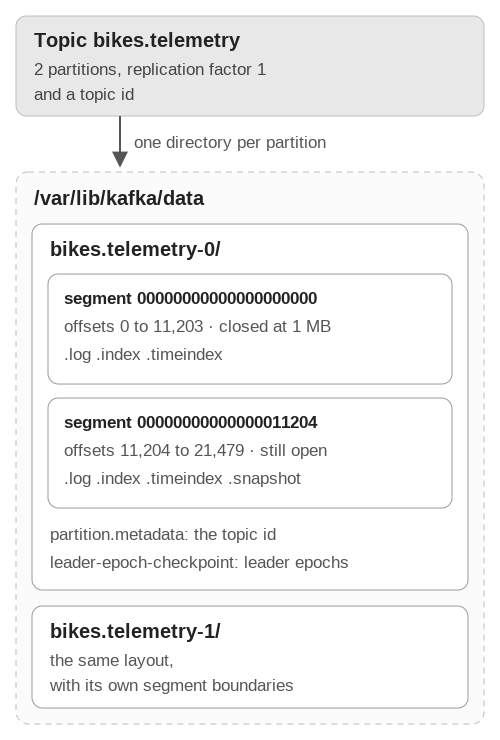
Everything so far went through the broker. Now look at what it keeps on disk: the data directory from KAFKA_LOG_DIRS, /var/lib/kafka/data, on the lab's volume.
docker compose exec kafka sh -c 'ls /var/lib/kafka/data | grep -v __consumer_offsets'__cluster_metadata-0
bikes.alerts-0
bikes.alerts-1
bikes.alerts-2
bikes.maintenance-0
bikes.maintenance-1
bikes.maintenance-2
bikes.maintenance-3
bikes.maintenance-4
bikes.maintenance-5
bikes.telemetry-0
bikes.telemetry-1
bootstrap.checkpoint
cleaner-offset-checkpoint
log-start-offset-checkpoint
meta.properties
recovery-point-offset-checkpoint
replication-offset-checkpoint
rides.completed-0
rides.completed-1
rides.completed-2
rides.completed-3
rides.completed-4
rides.completed-5One directory per partition, named after the topic and the partition number. grep -v hid the directories of __consumer_offsets; count them:
docker compose exec kafka sh -c 'ls /var/lib/kafka/data | grep -c __consumer_offsets'50The files at the top level belong to the broker. The four *-checkpoint files are bookkeeping: for each partition, offsets that the broker writes down so that a restart does not have to work them out again from the data. bootstrap.checkpoint keeps the first metadata the storage was formatted with, such as the metadata version. And meta.properties ties the directory to a cluster and a node:
docker compose exec kafka cat /var/lib/kafka/data/meta.properties#
#Thu Nov 05 17:27:20 GMT 2026
cluster.id=bCyPSXmsT7KNu1MKXkyhGw
directory.id=wxyDZZqhdjd1EGVdAJhR-A
node.id=1
version=1The cluster id from the compose file, node 1, and a directory.id that was generated when the storage was formatted; yours differs.
Now open one partition:
docker compose exec kafka ls -l /var/lib/kafka/data/bikes.telemetry-0total 1996
-rw-r--r-- 1 appuser appuser 504 Nov 5 17:27 00000000000000000000.index
-rw-r--r-- 1 appuser appuser 1045995 Nov 5 17:27 00000000000000000000.log
-rw-r--r-- 1 appuser appuser 744 Nov 5 17:27 00000000000000000000.timeindex
-rw-r--r-- 1 appuser appuser 10485760 Nov 5 17:27 00000000000000011204.index
-rw-r--r-- 1 appuser appuser 964877 Nov 5 17:27 00000000000000011204.log
-rw-r--r-- 1 appuser appuser 56 Nov 5 17:27 00000000000000011204.snapshot
-rw-r--r-- 1 appuser appuser 10485756 Nov 5 17:27 00000000000000011204.timeindex
-rw-r--r-- 1 appuser appuser 8 Nov 5 17:27 leader-epoch-checkpoint
-rw-r--r-- 1 appuser appuser 43 Nov 5 17:27 partition.metadataThe log of a partition is not one file. It is a list of segments, and each segment is a group of files that share a name: the offset of its first record, padded to twenty digits.
- The first segment holds offsets 0 to 11,203: 1,045,995 bytes of records in the
.logfile. The next batch of records would have taken it pastsegment.bytes, 1,048,576, so the broker rolled the log: it closed this segment and started a new one at offset 11,204. - The second segment is the active one, the only one the broker still appends to. Its two indexes show 10,485,760 and 10,485,756 bytes because the broker reserves their full size up front;
total 1996, in kilobytes, is what the directory really uses, about 2 MB. When a segment is closed, its indexes are cut to their real size, like the 504 and 744 bytes of the first one. .snapshotholds the state of the producers that wrote to the partition, taken when the log rolled. After a restart the broker starts from it instead of reading the whole log.- Where the second segment starts depends on how the producer happened to batch the records, so on your machine it may start at a different offset. A command further down finds it without using its name.
docker compose exec kafka cat /var/lib/kafka/data/bikes.telemetry-0/partition.metadataversion: 0
topic_id: pjMudVDpSJu6nF8IcS-ZkApartition.metadata holds the topic id that --describe printed. It is how the broker tells the files of this topic from those of an earlier topic with the same name. The file does not end with a newline, so your prompt may appear right after the id.
docker compose exec kafka cat /var/lib/kafka/data/bikes.telemetry-0/leader-epoch-checkpoint0
1
0 0leader-epoch-checkpoint is a version, the number of entries, and one entry: leader epoch 0 began at offset 0. A leader epoch is a number that goes up each time the partition gets a new leader. With one broker there has only been one leader. With replicas, brokers use these entries to line their copies of the log up after a change of leader.
kafka-dump-log.sh reads segment files directly, without the broker:
docker compose exec kafka sh -c '/opt/kafka/bin/kafka-dump-log.sh --files /var/lib/kafka/data/bikes.telemetry-0/00000000000000000000.log --print-data-log | head -5'Dumping /var/lib/kafka/data/bikes.telemetry-0/00000000000000000000.log
Log starting offset: 0
baseOffset: 0 lastOffset: 178 count: 179 baseSequence: 0 lastSequence: 178 producerId: 1 producerEpoch: 0 partitionLeaderEpoch: 0 isTransactional: false isControl: false deleteHorizonMs: OptionalLong.empty position: 0 CreateTime: 1793899651189 size: 16382 magic: 2 compresscodec: none crc: 1067917861 isvalid: true
| offset: 0 CreateTime: 1793899651181 keySize: 9 valueSize: 71 sequence: 0 headerKeys: [] key: bike-1001 payload: {"bike":"bike-1001","lat":52.50100,"lon":13.40100,"battery":99,"seq":1}
| offset: 1 CreateTime: 1793899651185 keySize: 9 valueSize: 71 sequence: 1 headerKeys: [] key: bike-1002 payload: {"bike":"bike-1002","lat":52.50200,"lon":13.40200,"battery":98,"seq":2}A segment is a sequence of batches. The line that starts with baseOffset is one batch: offsets 0 to 178, 179 records and 16,382 bytes that the producer sent together. The lines that start with | are its records, each with its offset, its timestamp, its key and its value.
producerIdand the sequence numbers. The producer is idempotent, the default for Kafka's producer since Kafka 3.0. Each batch carries the producer's id and the sequence numbers of its records, so that the broker can recognize a batch it has already written when the producer sends it again, and drop the copy.magic: 2is the format of the batch. Kafka 4.0 removed the older formats; version 2 is the only one a broker writes.compresscodec: none. The console producer sends its batches uncompressed, and the topic'scompression.type=producer, which you can find in the--alllist, keeps what the producer sent.CreateTimeis a timestamp in milliseconds. Yours differ, and your batches may be cut at other offsets.
The second segment starts where the first one ended. Its name is the one that differs between machines, so let the shell find it:
docker compose exec kafka sh -c '/opt/kafka/bin/kafka-dump-log.sh --files $(ls /var/lib/kafka/data/bikes.telemetry-0/*.log | tail -1) | head -3'Dumping /var/lib/kafka/data/bikes.telemetry-0/00000000000000011204.log
Log starting offset: 11204
baseOffset: 11204 lastOffset: 11377 count: 174 baseSequence: 11204 lastSequence: 11377 producerId: 1 producerEpoch: 0 partitionLeaderEpoch: 0 isTransactional: false isControl: false deleteHorizonMs: OptionalLong.empty position: 0 CreateTime: 1793899651311 size: 16337 magic: 2 compresscodec: none crc: 4272497000 isvalid: trueThe same producer, the next sequence number, and position: 0: the first byte of a new file. Without --print-data-log the tool prints only the batches.
The two indexes are how the broker finds a record without reading a segment from its start:
docker compose exec kafka sh -c '/opt/kafka/bin/kafka-dump-log.sh --files /var/lib/kafka/data/bikes.telemetry-0/00000000000000000000.index | head -4'
docker compose exec kafka sh -c '/opt/kafka/bin/kafka-dump-log.sh --files /var/lib/kafka/data/bikes.telemetry-0/00000000000000000000.timeindex | head -4'Dumping /var/lib/kafka/data/bikes.telemetry-0/00000000000000000000.index
offset: 356 position: 16382
offset: 534 position: 32742
offset: 710 position: 49097
Dumping /var/lib/kafka/data/bikes.telemetry-0/00000000000000000000.timeindex
timestamp: 1793899651192 offset: 356
timestamp: 1793899651197 offset: 534
timestamp: 1793899651199 offset: 710An entry in the .index file points at a batch: the batch that starts at byte 16,382 of the .log file, the second one, ends at offset 356. The index is sparse. The broker adds an entry only when more than index.interval.bytes, 4,096 bytes, have been written since the last one, which with batches of about 16 KB means one entry for every batch but the first. To find offset 400, the broker takes the last entry at or below it, 356 at byte 16,382, and reads forward from there. The .timeindex does the same for time: it pairs timestamps with offsets, so that a consumer can start from a point in time.
Count both to see the sizes add up:
docker compose exec kafka sh -c '/opt/kafka/bin/kafka-dump-log.sh --files /var/lib/kafka/data/bikes.telemetry-0/00000000000000000000.log | grep -c baseOffset'
docker compose exec kafka sh -c '/opt/kafka/bin/kafka-dump-log.sh --files /var/lib/kafka/data/bikes.telemetry-0/00000000000000000000.index | grep -c position'64
6364 batches and 63 index entries of 8 bytes each: the 504 bytes that ls -l showed for the closed index. The time index has 12-byte entries and adds one only when the newest timestamp is later than the one in its last entry, so it can have fewer: 62 here, the 744 bytes, and 63 in another run of the lab. Your counts can differ a little, as the batches do.
A partition of bikes.maintenance, the topic you wrote to by hand, is short enough to read whole:
docker compose exec kafka sh -c '/opt/kafka/bin/kafka-dump-log.sh --files /var/lib/kafka/data/bikes.maintenance-2/00000000000000000000.log --print-data-log'Dumping /var/lib/kafka/data/bikes.maintenance-2/00000000000000000000.log
Log starting offset: 0
baseOffset: 0 lastOffset: 1 count: 2 baseSequence: 0 lastSequence: 1 producerId: 2 producerEpoch: 0 partitionLeaderEpoch: 0 isTransactional: false isControl: false deleteHorizonMs: OptionalLong.empty position: 0 CreateTime: 1793899665867 size: 179 magic: 2 compresscodec: none crc: 2188462194 isvalid: true
| offset: 0 CreateTime: 1793899665867 keySize: 9 valueSize: 43 sequence: 0 headerKeys: [] key: bike-1002 payload: {"bike":"bike-1002","action":"brake-check"}
| offset: 1 CreateTime: 1793899665867 keySize: 9 valueSize: 43 sequence: 1 headerKeys: [] key: bike-1042 payload: {"bike":"bike-1042","action":"brake-check"}
baseOffset: 2 lastOffset: 3 count: 2 baseSequence: 0 lastSequence: 1 producerId: 3 producerEpoch: 0 partitionLeaderEpoch: 0 isTransactional: false isControl: false deleteHorizonMs: OptionalLong.empty position: 179 CreateTime: 1793899676785 size: 179 magic: 2 compresscodec: none crc: 2469194567 isvalid: true
| offset: 2 CreateTime: 1793899676785 keySize: 9 valueSize: 43 sequence: 0 headerKeys: [] key: bike-1002 payload: {"bike":"bike-1002","action":"tyre-change"}
| offset: 3 CreateTime: 1793899676785 keySize: 9 valueSize: 43 sequence: 1 headerKeys: [] key: bike-1042 payload: {"bike":"bike-1042","action":"tyre-change"}Your two runs of the console producer, as two batches of two records. Each run was a new producer with a new id, 2 and then 3, and each started its sequence at 0. The partition counts its offsets on its own, 0 to 3, whoever writes.
The broker reports the same directories through its own interface:
docker compose exec kafka /opt/kafka/bin/kafka-log-dirs.sh --bootstrap-server localhost:29092 --describe --topic-list bikes.telemetry,bikes.maintenanceQuerying brokers for log directories information
Received log directory information from brokers 1
{"brokers":[{"broker":1,"logDirs":[{"partitions":[{"partition":"bikes.maintenance-1","size":179,"offsetLag":0,"isFuture":false},{"partition":"bikes.maintenance-2","size":358,"offsetLag":0,"isFuture":false},{"partition":"bikes.maintenance-3","size":0,"offsetLag":0,"isFuture":false},{"partition":"bikes.maintenance-4","size":179,"offsetLag":0,"isFuture":false},{"partition":"bikes.maintenance-5","size":0,"offsetLag":0,"isFuture":false},{"partition":"bikes.telemetry-0","size":2010872,"offsetLag":0,"isFuture":false},{"partition":"bikes.telemetry-1","size":1734179,"offsetLag":0,"isFuture":false},{"partition":"bikes.maintenance-0","size":358,"offsetLag":0,"isFuture":false}],"error":null,"logDir":"/var/lib/kafka/data"}]}],"version":1}One line of JSON. size is the sum of a partition's .log files: 1,045,995 and 964,877 bytes make the 2,010,872 of bikes.telemetry-0. Partitions 3 and 5 of bikes.maintenance are empty, as the offsets said.
One directory belongs to a topic that --list never shows. __cluster_metadata-0 is the controller's log:
docker compose exec kafka ls -l /var/lib/kafka/data/__cluster_metadata-0
docker compose exec kafka cat /var/lib/kafka/data/__cluster_metadata-0/quorum-statetotal 36
-rw-r--r-- 1 appuser appuser 10485760 Nov 5 17:28 00000000000000000000.index
-rw-r--r-- 1 appuser appuser 16193 Nov 5 17:28 00000000000000000000.log
-rw-r--r-- 1 appuser appuser 10485756 Nov 5 17:28 00000000000000000000.timeindex
-rw-r--r-- 1 appuser appuser 8 Nov 5 17:27 leader-epoch-checkpoint
-rw-r--r-- 1 appuser appuser 43 Nov 5 17:27 partition.metadata
-rw-r--r-- 1 appuser appuser 125 Nov 5 17:27 quorum-state
{"clusterId":"","leaderId":1,"leaderEpoch":1,"votedId":-1,"appliedOffset":0,"currentVoters":[{"voterId":1}],"data_version":0}Every topic, partition and configuration change in this lesson is a record in that .log file; the HighWatermark you read in the first lesson counts records like these. The directory is laid out like a partition, with a segment and its indexes, plus quorum-state: node 1 is the leader of the quorum, in epoch 1, and the only voter.
Delete a topic
docker compose exec kafka /opt/kafka/bin/kafka-topics.sh --bootstrap-server localhost:29092 --delete --topic bikes.alerts
docker compose exec kafka /opt/kafka/bin/kafka-topics.sh --bootstrap-server localhost:29092 --list
docker compose exec kafka sh -c 'ls /var/lib/kafka/data | grep alerts'__consumer_offsets
bikes.maintenance
bikes.telemetry
rides.completed
bikes.alerts-0.c44a900dfdf84feba1911e41041fdbf6-delete
bikes.alerts-1.40b4928883a341adb9e9908a72e1440f-delete
bikes.alerts-2.6c2ba6ba771645a6aa018d9b9bdb58cf-delete--delete prints nothing, and the topic is gone from the list at once. On disk, the broker first renames each partition directory with a random part and -delete. It removes them after file.delete.delay.ms, the minute you saw in the configuration. Wait a little over a minute, then look again:
docker compose exec kafka sh -c 'ls /var/lib/kafka/data | grep -c alerts'0There is no undo. Create bikes.alerts again and it is a new, empty topic with a new topic id.
What to remember
- A topic is a name, an id and a number of partitions. Kafka's tools create, describe, change and delete it through the broker, and the controller keeps the record.
- The key decides the partition: the remainder of the key's hash divided by the partition count. Same key, same partition, as long as the count stays the same.
- The partition count only goes up. Adding partitions moves keys and leaves their old records where they were, so do it before keyed data matters.
- A topic's configuration is a set of settings on top of the cluster's defaults and Kafka's own.
kafka-configs.shshows which is which, and--delete-configgoes back to the default. - A partition is a directory, and its log is a list of segments, each a
.logfile of batches and two sparse indexes, rolled by size or by age. - Retention and deletion work on whole files: old segments go, and the files of a deleted topic leave the disk after a short delay.
Clean up, or carry on
To remove the lab and its data:
docker compose down -vOr keep it. Nothing in this lab writes on its own, so it stays exactly as you left it, on port 19131, next to the first lesson's lab if that one runs too. The lab's README has the short form of these commands and the connection values.