

- The first three lessons. A single-node Kafka cluster with KRaft, Topics, partitions and the log underneath and Producing: keys, partitions and ordering explain the words this lesson builds on: broker, listener, topic, partition, offset, key and consumer group.
- Docker with Compose v2.20 or later. The lesson was tested with Docker 29 and Compose v5.
- A bash-style shell. The commands use bash and
grep; on Windows, run them in WSL. - Java or Python. JDK 21 with Maven 3.9 or later, or Python 3.12 to 3.14 with
pip; one of the two is enough. The consumer and its commands are on the page in both languages: pick yours on any code tab, and the page keeps the choice. The first run downloads the Kafka client, so it needs an internet connection. - On Ubuntu, also under WSL. Ubuntu 24.04 ships Maven 3.8, which fails on this project with "Source option 5 is no longer supported"; install Maven 3.9 from maven.apache.org instead. For Python, install the
python3-venvpackage first. - If you have Python 3.15. Check with
python3 --version. The lab's Kafka client for Python,confluent-kafka2.16.1, has no prebuilt package for Python 3.15, sopiptries to build it from source and usually stops with Failed building wheel for confluent-kafka. Install Python 3.14 as well, for example withbrew install python@3.14on a Mac. Then, in Run it, below, create the virtual environment withpython3.14 -m venv --clear .venvinstead ofpython3 -m venv .venv;--clearempties a.venvthat an earlier attempt left behind. - TCP ports 19233 and 19133 free on your machine. The labs of the earlier lessons use 19130, 19131, 19232 and 19132, so all four can run side by side. You can change the ports; the lesson tells you where.
- Room for one broker. The broker uses about 500 MB of memory. The image is the one from the earlier lessons.
What you are about to run
The lab is one Docker Compose project with one container, started from apache/kafka:4.3.2, the image of the earlier lessons: a single node that is broker and controller at once. There is no seed and no producer program this time. You create one topic, rides.completed, with three partitions, and write bike rides to it from three small files with the console producer. Then you read them back: with the console consumer, and with a small consumer of your own that you run on your machine, in Java or in Python.
| File | Rides | Written |
|---|---|---|
rides-1.txt |
12, two for each of six bikes | before the first read |
rides-2.txt |
3 | while your consumer runs |
rides-3.txt |
2, both on partition 0 | later, for a new group and a crash |
Each line is a key, a | and a value: the key is the bike, and the value is the ride, in the same shape as the rides of the first lesson. The first two lines of rides-1.txt:
bike-1001|{"bike":"bike-1001","from":"station-03","to":"station-11","minutes":12}
bike-1002|{"bike":"bike-1002","from":"station-07","to":"station-02","minutes":18}
The broker has the three listeners of the third lesson's lab, on ports of its own:
      KAFKA_LISTENERS: INTERNAL://:29092,HOST://:19233,EXTERNAL://:19133,CONTROLLER://:9093
KAFKA_ADVERTISED_LISTENERS: INTERNAL://kafka:29092,HOST://localhost:${KAFKA_HOST_PORT:-19233},EXTERNAL://${KAFKA_ADVERTISED_HOST:-host.docker.internal}:${KAFKA_PORT:-19133}| Listener | Port | Advertised address | For |
|---|---|---|---|
| INTERNAL | 29092, inside the container only | kafka:29092 |
Kafka's tools, run with docker compose exec |
| HOST | 19233 | localhost:19233 |
your consumer, and other programs on your machine |
| EXTERNAL | 19133 | host.docker.internal:19133 |
BROKA and other clients in containers |
CONTROLLER, on port 9093, is the quorum's, as before. As the third lesson explained, programs on your machine need HOST: EXTERNAL advertises host.docker.internal, a name your machine may not know.
Get the lab
git clone https://github.com/orchesta/broka.git
cd broka/learn/kafka/04-consumers
ls -A
If you kept the clone from an earlier lesson, run git pull in it instead of cloning again, then change into the new folder.
.env.example
README.md
compose.yml
java
python
rides-1.txt
rides-2.txt
rides-3.txt
compose.yml is the project. java and python hold the same consumer, one folder per language: java is a small Maven project whose one real dependency is the Kafka client, kafka-clients 4.3.2; python has the script and a requirements.txt that names confluent-kafka 2.16.1. The three rides files hold the rides you write. .env.example holds the three settings you may want to change, and README.md has the run commands and the connection values.
The settings file is optional. Copy it when you need to change something:
cp .env.example .env# Host port of the HOST listener, for the programs you run on this machine. If you change it, change
# localhost:19233 in the Java and Python code too.
KAFKA_HOST_PORT=19233
# Host port of the EXTERNAL listener, for clients in other containers, such as BROKA.
KAFKA_PORT=19133
# Address the broker hands back to clients on the EXTERNAL listener. Keep host.docker.internal on Docker
# Desktop; on Linux set it to the host's IP address.
KAFKA_ADVERTISED_HOST=host.docker.internalKAFKA_HOST_PORT: change it when 19233 is taken. The consumer haslocalhost:19233in its code, so change the port there too.KAFKA_PORT: change it when 19133 is taken.KAFKA_ADVERTISED_HOST: the address the broker hands to clients in other containers. On Linux with Docker Engine, put the IP address of your machine here; the first lesson explains why.
Start it and write the rides
docker compose up -d --wait--wait returns when the broker is healthy. The last lines look like this:
 Network broka-lab-kafka-consumers_default  Created
 Volume broka-lab-kafka-consumers_kafka-data  Created
 Container broka-lab-kafka-consumers-kafka-1  Healthy
As in the earlier labs, the broker does not create a topic when a client first uses it: KAFKA_AUTO_CREATE_TOPICS_ENABLE is false. Create the topic, with three partitions:
docker compose exec kafka /opt/kafka/bin/kafka-topics.sh --bootstrap-server localhost:29092 --create --topic rides.completed --partitions 3 --replication-factor 1WARNING: Due to limitations in metric names, topics with a period ('.') or underscore ('_') could collide. To avoid issues it is best to use either, but not both.
Created topic rides.completed.The warning is the one from the second lesson: every topic name with a dot draws it.
Write the first twelve rides with the console producer:
docker compose exec -T kafka /opt/kafka/bin/kafka-console-producer.sh --bootstrap-server localhost:29092 --topic rides.completed --reader-property parse.key=true --reader-property key.separator='|' < rides-1.txtAs in the second lesson, parse.key=true and key.separator='|' tell the producer that everything before the | is the key. It reads one record per line from the file that < hands it, prints nothing when it succeeds, and exits at the end of the file. The -T is there for the same reason as in the second lesson: it leaves the terminal out, so the lines of the file reach the producer as they are.
The key decides the partition: bike-1003 and bike-1234 go to partition 0, bike-1001 and bike-1777 to partition 1, and bike-1002 and bike-1042 to partition 2. That is the placement of the second lesson, which wrote the same six bikes to a topic with three partitions. Each partition now holds four rides:
docker compose exec kafka /opt/kafka/bin/kafka-get-offsets.sh --bootstrap-server localhost:29092 --topic rides.completedrides.completed:0:4
rides.completed:1:4
rides.completed:2:4As in the second lesson, each line is a topic, a partition and its log end offset: the offset the next record will get. Each partition holds offsets 0 to 3.
Read without a group
Read the topic with the console consumer:
docker compose exec kafka /opt/kafka/bin/kafka-console-consumer.sh --bootstrap-server localhost:29092 --topic rides.completed --timeout-ms 5000The consumer rebalance protocol (KIP-848) is production-ready! Set group.protocol=consumer to try it out. See https://kafka.apache.org/documentation/#consumer_rebalance_protocol
[…] ERROR Error processing message, terminating consumer process: (org.apache.kafka.tools.consumer.ConsoleConsumer)
org.apache.kafka.common.errors.TimeoutException
Processed a total of 0 messagesNothing, although the topic holds twelve rides. A consumer with no committed position to resume from starts where its auto.offset.reset setting tells it to. The console consumer's default is the end: it waits for records written after it started, and none came. The four lines are the ones the first lesson explained: the notice about the newer group protocol, and the idle timeout, reported as an error.
Ask for the beginning, and print the timestamp, partition, offset and key of each record:
docker compose exec kafka /opt/kafka/bin/kafka-console-consumer.sh --bootstrap-server localhost:29092 --topic rides.completed --from-beginning --max-messages 12 --formatter-property print.timestamp=true --formatter-property print.partition=true --formatter-property print.offset=true --formatter-property print.key=trueThe consumer rebalance protocol (KIP-848) is production-ready! Set group.protocol=consumer to try it out. See https://kafka.apache.org/documentation/#consumer_rebalance_protocol
CreateTime:1794698574580 Partition:2 Offset:0 bike-1002 {"bike":"bike-1002","from":"station-07","to":"station-02","minutes":18}
CreateTime:1794698574580 Partition:2 Offset:1 bike-1042 {"bike":"bike-1042","from":"station-11","to":"station-03","minutes":20}
CreateTime:1794698574580 Partition:2 Offset:2 bike-1002 {"bike":"bike-1002","from":"station-02","to":"station-09","minutes":7}
CreateTime:1794698574580 Partition:2 Offset:3 bike-1042 {"bike":"bike-1042","from":"station-03","to":"station-10","minutes":26}
CreateTime:1794698574580 Partition:0 Offset:0 bike-1003 {"bike":"bike-1003","from":"station-12","to":"station-05","minutes":9}
CreateTime:1794698574580 Partition:0 Offset:1 bike-1234 {"bike":"bike-1234","from":"station-01","to":"station-08","minutes":31}
CreateTime:1794698574580 Partition:0 Offset:2 bike-1003 {"bike":"bike-1003","from":"station-05","to":"station-12","minutes":11}
CreateTime:1794698574580 Partition:0 Offset:3 bike-1234 {"bike":"bike-1234","from":"station-08","to":"station-01","minutes":29}
CreateTime:1794698574574 Partition:1 Offset:0 bike-1001 {"bike":"bike-1001","from":"station-03","to":"station-11","minutes":12}
CreateTime:1794698574580 Partition:1 Offset:1 bike-1777 {"bike":"bike-1777","from":"station-06","to":"station-06","minutes":44}
CreateTime:1794698574580 Partition:1 Offset:2 bike-1001 {"bike":"bike-1001","from":"station-11","to":"station-04","minutes":15}
CreateTime:1794698574580 Partition:1 Offset:3 bike-1777 {"bike":"bike-1777","from":"station-06","to":"station-10","minutes":13}
Processed a total of 12 messagesAll twelve rides, partition by partition, and within a partition in offset order. Which partition comes first can differ on your machine. CreateTime is the record's timestamp in milliseconds, as in the second lesson; the producer set it when it sent the record. Your timestamps differ.
Run the same command again, and the same twelve rides come back: nothing remembered where the last run stopped.
As the first lesson showed, the console consumer joins a group with a generated name when you give it none. Each of your three runs made a new one:
docker compose exec kafka /opt/kafka/bin/kafka-consumer-groups.sh --bootstrap-server localhost:29092 --listconsole-consumer-97068
console-consumer-91860
console-consumer-61324Your list may be shorter, or even empty. Every ten minutes, the default of offsets.retention.check.interval.ms, the broker deletes groups with no members and no committed offsets, such as the ones these runs made. If your list is empty, skip to Read as a group, below. Otherwise, describe one of the groups, with a name from your own list:
docker compose exec kafka /opt/kafka/bin/kafka-consumer-groups.sh --bootstrap-server localhost:29092 --describe --group console-consumer-97068Consumer group 'console-consumer-97068' has no active members.No member, and no table: the group has no committed offsets, as the first lesson said. That is because when the console consumer makes up a group's name, it also turns off automatic commits, the commits a consumer makes by itself (more on them below). Each run started in a new, empty group, so nothing was remembered between runs.
If the group does not exist, the command prints an error instead of the line has no active members: Group … not found, followed by a Java stack trace. Either the broker deleted the group after you listed it, or the command still has the name from this page.
The groups in your list do no harm, and the broker deletes them by itself. To delete them now rather than wait, use one command with all their names:
docker compose exec kafka /opt/kafka/bin/kafka-consumer-groups.sh --bootstrap-server localhost:29092 --delete --group console-consumer-97068 --group console-consumer-91860 --group console-consumer-61324Deletion of requested consumer groups ('console-consumer-97068', 'console-consumer-91860', 'console-consumer-61324') was successful.If some of the groups do not exist, the tool says for each of them that it could not be deleted because The group id does not exist, and still deletes the others.
Read as a group
Now give the console consumer a group, ride-audit, and read from the beginning again:
docker compose exec kafka /opt/kafka/bin/kafka-console-consumer.sh --bootstrap-server localhost:29092 --topic rides.completed --group ride-audit --from-beginning --max-messages 12 --formatter-property print.partition=true --formatter-property print.offset=true --formatter-property print.key=trueThe consumer rebalance protocol (KIP-848) is production-ready! Set group.protocol=consumer to try it out. See https://kafka.apache.org/documentation/#consumer_rebalance_protocol
Partition:2 Offset:0 bike-1002 {"bike":"bike-1002","from":"station-07","to":"station-02","minutes":18}
Partition:2 Offset:1 bike-1042 {"bike":"bike-1042","from":"station-11","to":"station-03","minutes":20}
Partition:2 Offset:2 bike-1002 {"bike":"bike-1002","from":"station-02","to":"station-09","minutes":7}
Partition:2 Offset:3 bike-1042 {"bike":"bike-1042","from":"station-03","to":"station-10","minutes":26}
Partition:0 Offset:0 bike-1003 {"bike":"bike-1003","from":"station-12","to":"station-05","minutes":9}
Partition:0 Offset:1 bike-1234 {"bike":"bike-1234","from":"station-01","to":"station-08","minutes":31}
Partition:0 Offset:2 bike-1003 {"bike":"bike-1003","from":"station-05","to":"station-12","minutes":11}
Partition:0 Offset:3 bike-1234 {"bike":"bike-1234","from":"station-08","to":"station-01","minutes":29}
Partition:1 Offset:0 bike-1001 {"bike":"bike-1001","from":"station-03","to":"station-11","minutes":12}
Partition:1 Offset:1 bike-1777 {"bike":"bike-1777","from":"station-06","to":"station-06","minutes":44}
Partition:1 Offset:2 bike-1001 {"bike":"bike-1001","from":"station-11","to":"station-04","minutes":15}
Partition:1 Offset:3 bike-1777 {"bike":"bike-1777","from":"station-06","to":"station-10","minutes":13}
Processed a total of 12 messagesThe same twelve rides. Run it again, with --timeout-ms in place of --max-messages, so that it stops when nothing comes:
docker compose exec kafka /opt/kafka/bin/kafka-console-consumer.sh --bootstrap-server localhost:29092 --topic rides.completed --group ride-audit --from-beginning --timeout-ms 5000 --formatter-property print.partition=true --formatter-property print.offset=true --formatter-property print.key=trueThe consumer rebalance protocol (KIP-848) is production-ready! Set group.protocol=consumer to try it out. See https://kafka.apache.org/documentation/#consumer_rebalance_protocol
[…] ERROR Error processing message, terminating consumer process: (org.apache.kafka.tools.consumer.ConsoleConsumer)
org.apache.kafka.common.errors.TimeoutException
Processed a total of 0 messagesNothing this time, although the command still says --from-beginning. Describe the group:
docker compose exec kafka /opt/kafka/bin/kafka-consumer-groups.sh --bootstrap-server localhost:29092 --describe --group ride-auditConsumer group 'ride-audit' has no active members.
GROUP TOPIC PARTITION CURRENT-OFFSET LOG-END-OFFSET LAG CONSUMER-ID HOST CLIENT-ID
ride-audit rides.completed 0 4 4 0 - - -
ride-audit rides.completed 1 4 4 0 - - -
ride-audit rides.completed 2 4 4 0 - - -The first lesson called CURRENT-OFFSET the position the group last committed. Here you can see what that position is: 4 on every partition, where the group read offsets 0 to 3. A committed offset is not the offset of the last record the group read, but of the next one it will read. The first run committed 4 on each partition when it stopped. The second started there, found nothing, and committed 4 again. --from-beginning only matters where the group has no committed offset, as on the first run of ride-audit.
Where the position is kept
The first lesson said that a group's position is stored on the broker, in __consumer_offsets, the internal topic with 50 partitions that appeared with the first group. Committed offsets are records in that topic, and the console consumer can decode them with a formatter made for it. The formatter prints the records one after the other on a single line; grep -o puts each on a line of its own, and 2>/dev/null drops the tool's notice and timeout lines, which you have seen:
docker compose exec kafka /opt/kafka/bin/kafka-console-consumer.sh --bootstrap-server localhost:29092 --topic __consumer_offsets --from-beginning --timeout-ms 5000 --formatter org.apache.kafka.tools.consumer.OffsetsMessageFormatter 2>/dev/null | grep -o '{"key[^}]*}}[^}]*}}}'{"key":{"type":1,"data":{"group":"ride-audit","topic":"rides.completed","partition":2}},"value":{"version":4,"data":{"offset":4,"leaderEpoch":0,"metadata":"","commitTimestamp":1794698622828,"topicId":"dPhG6G2USIum-zgcgtMmEw"}}}
{"key":{"type":1,"data":{"group":"ride-audit","topic":"rides.completed","partition":0}},"value":{"version":4,"data":{"offset":4,"leaderEpoch":0,"metadata":"","commitTimestamp":1794698622828,"topicId":"dPhG6G2USIum-zgcgtMmEw"}}}
{"key":{"type":1,"data":{"group":"ride-audit","topic":"rides.completed","partition":1}},"value":{"version":4,"data":{"offset":4,"leaderEpoch":0,"metadata":"","commitTimestamp":1794698622828,"topicId":"dPhG6G2USIum-zgcgtMmEw"}}}
{"key":{"type":1,"data":{"group":"ride-audit","topic":"rides.completed","partition":2}},"value":{"version":4,"data":{"offset":4,"leaderEpoch":0,"metadata":"","commitTimestamp":1794698629279,"topicId":"dPhG6G2USIum-zgcgtMmEw"}}}
{"key":{"type":1,"data":{"group":"ride-audit","topic":"rides.completed","partition":0}},"value":{"version":4,"data":{"offset":4,"leaderEpoch":0,"metadata":"","commitTimestamp":1794698629279,"topicId":"dPhG6G2USIum-zgcgtMmEw"}}}
{"key":{"type":1,"data":{"group":"ride-audit","topic":"rides.completed","partition":1}},"value":{"version":4,"data":{"offset":4,"leaderEpoch":0,"metadata":"","commitTimestamp":1794698629279,"topicId":"dPhG6G2USIum-zgcgtMmEw"}}}Each record is one partition's committed offset; a commit writes one record for each partition. The key names the group, the topic and the partition. The value holds the committed offset, the commit time in milliseconds (commitTimestamp) and the id of rides.completed (topicId); your times and topic id differ. Six records: one for each partition at the end of each ride-audit run, even the run that read nothing. You may see more: a run that lasts longer than five seconds can also commit while it runs, because consumers commit every five seconds by default, as A consumer in a few lines shows.
__consumer_offsets is compacted: its cleanup.policy is compact, the policy the first lesson's seed set on stations.status. In time, the broker keeps only the newest record for each key, which here means the latest commit for each group, topic and partition. Once a group has no members, the broker deletes its committed offsets seven days after their last commit. Seven days is the default of offsets.retention.minutes. A group that comes back after that starts like a new one.
A consumer in a few lines
Your own consumer is the same program in both languages. Pick yours:
package learn;

import java.time.Duration;
import java.util.List;
import java.util.Properties;
import org.apache.kafka.clients.consumer.KafkaConsumer;
import org.apache.kafka.common.errors.WakeupException;
import org.apache.kafka.common.serialization.StringDeserializer;

public class RideConsumer {
    public static void main(String[] args) {
        // With a number, the program stops abruptly after reading that many rides, as a crash would.
        int crashAfter = args.length > 0 ? Integer.parseInt(args[0]) : 0;

        var props = new Properties();
        props.put("bootstrap.servers", "localhost:19233");
        props.put("group.id", "ride-receipts");
        // The newer group protocol, in which the broker runs the group; a later lesson compares the two.
        props.put("group.protocol", "consumer");
        props.put("key.deserializer", StringDeserializer.class.getName());
        props.put("value.deserializer", StringDeserializer.class.getName());
        // Where the group starts on a partition it has no committed offset for.
        props.put("auto.offset.reset", "earliest");

        var consumer = new KafkaConsumer<String, String>(props);
        var main = Thread.currentThread();
        // Ctrl+C runs this hook: it wakes poll() up and waits until the loop below has closed the consumer.
        Runtime.getRuntime().addShutdownHook(new Thread(() -> {
            consumer.wakeup();
            try {
                main.join();
            } catch (InterruptedException e) {
                Thread.currentThread().interrupt();
            }
        }));

        try {
            consumer.subscribe(List.of("rides.completed"));
            int read = 0;
            while (true) {
                for (var record : consumer.poll(Duration.ofSeconds(1))) {
                    System.out.println(record.key() + ": partition " + record.partition()
                            + ", offset " + record.offset());
                    if (++read == crashAfter) {
                        System.out.println("crash");
                        Runtime.getRuntime().halt(1); // No close(), no commit.
                    }
                }
            }
        } catch (WakeupException e) {
            // Ctrl+C: leave the loop.
        } finally {
            // Commits the position after the last records poll() returned, then leaves the group.
            consumer.close();
        }
    }
}
import os
import sys
from confluent_kafka import Consumer
# With a number, the program stops abruptly after reading that many rides, as a crash would.
crash_after = int(sys.argv[1]) if len(sys.argv) > 1 else 0
consumer = Consumer({
"bootstrap.servers": "localhost:19233",
"group.id": "ride-receipts",
# The newer group protocol, in which the broker runs the group; a later lesson compares the two.
"group.protocol": "consumer",
# Where the group starts on a partition it has no committed offset for.
"auto.offset.reset": "earliest",
})
consumer.subscribe(["rides.completed"])
read = 0
try:
while True:
msg = consumer.poll(1.0)
if msg is None:
continue
if msg.error():
print(f"error: {msg.error()}")
continue
print(f"{msg.key().decode()}: partition {msg.partition()}, offset {msg.offset()}")
read += 1
if read == crash_after:
print("crash", flush=True)
os._exit(1) # No close(), no commit.
except KeyboardInterrupt:
pass # Ctrl+C: leave the loop.
finally:
# Commits the position after the last records poll() returned, then leaves the group.
consumer.close()Eight things make it a consumer:
- The bootstrap address.
localhost:19233, the HOST listener, as in the third lesson. - The group.
group.idmakes the program a member ofride-receipts, and the group resumes at its committed offsets. - The protocol.
group.protocol=consumerpicks the newer group protocol, in which the broker runs the group and decides which member reads which partition. The console consumer still uses the older one,classic, which is what its notice is about. A later lesson compares the two. - Bytes back to strings. Kafka hands keys and values over as bytes. The Java consumer turns them into strings with the two deserializers it is given; the Python client returns bytes, and the program decodes the key.
subscribe()andpoll().subscribe()names the topic, and the group decides which partitions the program reads.poll()hands over what has arrived, or waits up to a second and returns nothing, and the loop asks again. The Java client returns a batch of records, the Python client one record at a time.- Where to start.
auto.offset.reset=earliestapplies where the group has no committed offset. The client's default islatest, the same starting point that made the first read print nothing. Where a new group starts, below, comes back to it. - Automatic commits. Nothing in the program commits. Both clients commit by themselves every five seconds, because
enable.auto.commitistrueandauto.commit.interval.msis 5000 by default. Each commit saves the position after the last recordspoll()returned. - Closing. On Ctrl+C,
close()commits once more and leaves the group. In Java, a shutdown hook callswakeup(),poll()throwsWakeupException, andfinallycloses the consumer. In Python, Ctrl+C raisesKeyboardInterrupt, andfinallycloses it the same way.
Both programs take an optional number. Given one, the program stops abruptly after reading that many rides, with Runtime.getRuntime().halt(1) in Java and os._exit(1) in Python: no close(), and no commit. The lesson uses this later to imitate a crash.
Run it
Your consumer keeps running until you stop it, so use two terminals. Run the consumer in the first, in its language's folder. Open a second terminal for the docker compose commands, and change into the lab's folder in it: learn/kafka/04-consumers in your clone. In the first terminal:
cd java
mvn -q compile exec:java
cd python
python3 -m venv .venv
. .venv/bin/activate
pip install -r requirements.txt
python ride_consumer.pyThe first Maven run downloads the Kafka client and Maven's plugins; -q keeps Maven quiet, so only the program's lines appear. pip installs one package, confluent-kafka, and prints its own lines first (if it stops with Failed building wheel for confluent-kafka, see the Python 3.15 item under Before you start). Then the consumer prints the twelve rides and keeps polling:
bike-1002: partition 2, offset 0
bike-1042: partition 2, offset 1
bike-1002: partition 2, offset 2
bike-1042: partition 2, offset 3
bike-1003: partition 0, offset 0
bike-1234: partition 0, offset 1
bike-1003: partition 0, offset 2
bike-1234: partition 0, offset 3
bike-1001: partition 1, offset 0
bike-1777: partition 1, offset 1
bike-1001: partition 1, offset 2
bike-1777: partition 1, offset 3
bike-1002: partition 2, offset 0
bike-1042: partition 2, offset 1
bike-1002: partition 2, offset 2
bike-1042: partition 2, offset 3
bike-1001: partition 1, offset 0
bike-1777: partition 1, offset 1
bike-1001: partition 1, offset 2
bike-1777: partition 1, offset 3
bike-1003: partition 0, offset 0
bike-1234: partition 0, offset 1
bike-1003: partition 0, offset 2
bike-1234: partition 0, offset 3The group had no committed offset yet, so earliest started each partition at offset 0. Which partition comes first can differ.
In the second terminal, write the next three rides:
docker compose exec -T kafka /opt/kafka/bin/kafka-console-producer.sh --bootstrap-server localhost:29092 --topic rides.completed --reader-property parse.key=true --reader-property key.separator='|' < rides-2.txtWithin a second or so, the consumer in the first terminal prints them, one on each partition, at offset 4. The partitions can come in another order:
bike-1042: partition 2, offset 4
bike-1003: partition 0, offset 4
bike-1001: partition 1, offset 4
bike-1003: partition 0, offset 4
bike-1042: partition 2, offset 4
bike-1001: partition 1, offset 4Stop the consumer with Ctrl+C: close() commits the position and leaves the group. Start it again:
mvn -q compile exec:javapython ride_consumer.pyIt prints nothing: the group resumes at its committed offsets, and nothing new has come. Stop it with Ctrl+C again, and look at the group from the second terminal:
docker compose exec kafka /opt/kafka/bin/kafka-consumer-groups.sh --bootstrap-server localhost:29092 --describe --group ride-receiptsConsumer group 'ride-receipts' has no active members.
GROUP TOPIC PARTITION CURRENT-OFFSET LOG-END-OFFSET LAG CONSUMER-ID HOST CLIENT-ID
ride-receipts rides.completed 0 5 5 0 - - -
ride-receipts rides.completed 1 5 5 0 - - -
ride-receipts rides.completed 2 5 5 0 - - -Five on every partition: offsets 0 to 4 have been read, and 5 is the next. Add --state to see the group itself:
docker compose exec kafka /opt/kafka/bin/kafka-consumer-groups.sh --bootstrap-server localhost:29092 --describe --group ride-receipts --stateConsumer group 'ride-receipts' has no active members.
GROUP COORDINATOR (ID) ASSIGNMENT-STRATEGY STATE #MEMBERS
ride-receipts kafka:29092 (1) uniform Empty 0The state is Empty: the group has no members; its committed offsets stay. ASSIGNMENT-STRATEGY says uniform, even with no members; the first lesson's group showed range while it ran, and - once it had stopped. With the newer protocol, the broker assigns the partitions, and uniform is its default strategy. A later lesson looks at both strategies.
Where a new group starts
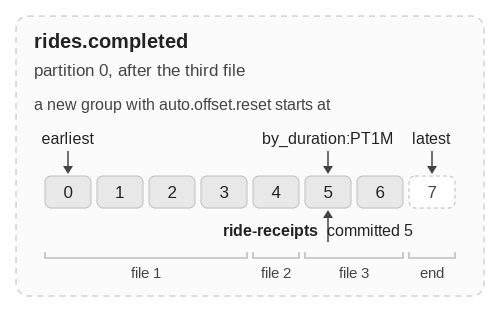
Your consumer started at offset 0 because the group was new and the program asked for earliest. auto.offset.reset, the reset policy, decides where a consumer starts on a partition for which its group has no committed offset:
auto.offset.reset |
A new group starts each partition |
|---|---|
latest, the default |
at the end: it reads only records written after it started |
earliest |
at the first record still in the partition |
by_duration:<duration>, the duration in ISO 8601: PT1M is one minute, PT1H one hour |
at the first record no older than the duration; Kafka 4.0 and later |
none |
nowhere: the consumer fails |
The committed offset wins. The reset policy applies only where the group has no committed offset, or where the committed offset is no longer in the partition, for example because retention deleted those records. --from-beginning is the console consumer's way of saying earliest.
Try none with a new group, ride-ledger. --command-property passes a setting to the consumer inside the tool:
docker compose exec kafka /opt/kafka/bin/kafka-console-consumer.sh --bootstrap-server localhost:29092 --topic rides.completed --group ride-ledger --command-property auto.offset.reset=none --timeout-ms 5000 2>&1 | grep Exceptionorg.apache.kafka.clients.consumer.NoOffsetForPartitionException: Undefined offset with no reset policy for partitions: [rides.completed-2, rides.completed-0, rides.completed-1]2>&1 sends the error output into the pipe too, and grep keeps only the line that names the exception and drops the long stack trace. The partitions can come in another order. The consumer found no committed offset and no reset policy to fall back on, so it stopped instead of guessing. none is for a consumer that must not guess: one that would rather fail than skip records or read them twice.
by_duration starts by time. In the second terminal, write the last two rides; both go to partition 0:
docker compose exec -T kafka /opt/kafka/bin/kafka-console-producer.sh --bootstrap-server localhost:29092 --topic rides.completed --reader-property parse.key=true --reader-property key.separator='|' < rides-3.txtWithin a minute, read the topic as another new group, ride-stats, that starts one minute back:
docker compose exec kafka /opt/kafka/bin/kafka-console-consumer.sh --bootstrap-server localhost:29092 --topic rides.completed --group ride-stats --command-property auto.offset.reset=by_duration:PT1M --timeout-ms 5000 --formatter-property print.partition=true --formatter-property print.offset=true --formatter-property print.key=trueThe consumer rebalance protocol (KIP-848) is production-ready! Set group.protocol=consumer to try it out. See https://kafka.apache.org/documentation/#consumer_rebalance_protocol
Partition:0 Offset:5 bike-1234 {"bike":"bike-1234","from":"station-01","to":"station-05","minutes":14}
Partition:0 Offset:6 bike-1003 {"bike":"bike-1003","from":"station-01","to":"station-07","minutes":25}
[…] ERROR Error processing message, terminating consumer process: (org.apache.kafka.tools.consumer.ConsoleConsumer)
org.apache.kafka.common.errors.TimeoutException
Processed a total of 2 messagesOnly the two rides of the last minute. If you wrote rides-2.txt less than a minute before, its three rides come too. Describe the group:
docker compose exec kafka /opt/kafka/bin/kafka-consumer-groups.sh --bootstrap-server localhost:29092 --describe --group ride-statsConsumer group 'ride-stats' has no active members.
GROUP TOPIC PARTITION CURRENT-OFFSET LOG-END-OFFSET LAG CONSUMER-ID HOST CLIENT-ID
ride-stats rides.completed 0 7 7 0 - - -One row, for partition 0. Partitions 1 and 2 had no record in the last minute. On Kafka 4.3.2, the consumer then gets no starting position on them, not even the end. It reads nothing there and commits nothing, so the group has no committed offset for them.
The Python client takes neither by_duration nor none: it refuses both when the consumer is created. Its equivalent of none is error: poll() hands the program an error for each partition with no committed offset, and the program decides what to do.
What auto-commit does
In this lab, your consumer commits at two moments: every five seconds while it runs, and once more in close(). Each time, it commits the position after the last records poll() returned. Watch what that means when a consumer stops without close(). In the first terminal, start the consumer with the number 1. If you have closed that terminal, open a new one, change into java or python in the lab's folder, and for Python activate the virtual environment again with . .venv/bin/activate:
mvn -q compile exec:java -Dexec.args=1python ride_consumer.py 1It reads one ride and stops:
bike-1234: partition 0, offset 5
crash
The group had committed 5 on partition 0, so the consumer started there, read the first of the two new rides, and stopped before its first automatic commit. Describe the group right away, within 45 seconds of the crash:
docker compose exec kafka /opt/kafka/bin/kafka-consumer-groups.sh --bootstrap-server localhost:29092 --describe --group ride-receiptsGROUP TOPIC PARTITION CURRENT-OFFSET LOG-END-OFFSET LAG CONSUMER-ID HOST CLIENT-ID
ride-receipts rides.completed 0 5 7 2 MvOgVVZTRfqCdzrY9fTrDQ /192.168.65.1 consumer-ride-receipts-1
ride-receipts rides.completed 1 5 5 0 MvOgVVZTRfqCdzrY9fTrDQ /192.168.65.1 consumer-ride-receipts-1
ride-receipts rides.completed 2 5 5 0 MvOgVVZTRfqCdzrY9fTrDQ /192.168.65.1 consumer-ride-receipts-1The line has no active members is gone: for the broker, the consumer that crashed is still a member, and it still holds all three partitions. Partition 0 still shows 5, with a lag of 2. --members shows the member:
docker compose exec kafka /opt/kafka/bin/kafka-consumer-groups.sh --bootstrap-server localhost:29092 --describe --group ride-receipts --membersGROUP CONSUMER-ID HOST CLIENT-ID #PARTITIONS
ride-receipts MvOgVVZTRfqCdzrY9fTrDQ /192.168.65.1 consumer-ride-receipts-1 3CONSUMER-ID is random, so yours differs; HOST is the address the broker saw the consumer come from, so it may differ too. With the Python consumer, CLIENT-ID is rdkafka. If a command still prints the line has no active members, more than 45 seconds have passed since the crash, and the broker has already removed the member; you will see why below. Start the consumer again, without the number:
mvn -q compile exec:javapython ride_consumer.pyIf you started it within 45 seconds of the crash, nothing comes for a while. The broker removes a member when it has heard nothing from the member for group.consumer.session.timeout.ms, 45 seconds by default. Until then, the partitions stay with the member that crashed. Then the new consumer gets them and prints the two rides; if you started it later, they come at once:
bike-1234: partition 0, offset 5
bike-1003: partition 0, offset 6
The ride at offset 5 comes a second time. The consumer that crashed had read it but had not committed past it, so the group resumed at 5. That is the catch with automatic commits: a record can come twice, when a consumer stops after reading it and before the next commit. A program that must not handle a record twice needs more than automatic commits; a later lesson covers the choices. Stop the consumer with Ctrl+C.
Try it yourself
- Read the topic as a new group with
by_duration:PT1H, an hour back: if you wrote all three files within the hour, it reads all seventeen rides, and--describeshows a committed offset on every partition. - In the Java consumer, set
auto.offset.resettononeandgroup.idto a new name, and run it: Maven stops with[ERROR] Failed to execute goal …and the same message as the console consumer, Undefined offset with no reset policy for partitions. - In the Python consumer, set
auto.offset.resettononeorby_duration:PT1M: the client refuses the setting when the consumer is created, Invalid value … for configuration property "auto.offset.reset". Set it toerrorwith a newgroup.idinstead:poll()returns an error for each partition, no previously committed offset available, and the program prints each one. - Run the
ride-statscommand with another new group more than a minute after your last write: it prints no rides, only the notice and the timeout lines, and a--describeright after it shows no committed offset. - Add
--command-property auto.offset.reset=noneto a console consumer command that has--from-beginning: the tool refuses to start, Can't simultaneously specify --from-beginning and 'auto.offset.reset=none'. Without--from-beginning, tryauto.offset.reset=by_duration:1m: the consumer fails, and the message lists the values it accepts, with the formatby_duration:<PnDTnHnMn.nS.>.
What to remember
- A consumer that has no committed position starts where the reset policy says, and that is the end,
latest, unless you ask for the beginning. Without--group, the console consumer makes up a group that never commits, so it remembers nothing between runs. - A group commits an offset per partition, and the committed offset is the next record to read, not the last one read. A group with a committed offset resumes there, as long as that offset is still in the partition.
- Committed offsets are records in
__consumer_offsets, keyed by group, topic and partition, and compacted, so the latest commit stays. Once a group has no members, the broker deletes its committed offsets seven days after their last commit, by default. - The reset policy,
auto.offset.reset, applies only where the group has no committed offset, or where the committed offset is no longer in the partition:latestby default,earliest,by_duration:since Kafka 4.0, ornone, which fails. The Python client has neitherby_durationnornone, but haserror. - Automatic commits run every five seconds and once more in
close(). Stop a consumer withclose(), or the records it read after its last commit come again. - A crashed consumer stays a member until its session times out, 45 seconds by default, and its partitions wait. Then the group resumes at the last commit, and the records read after it come a second time.
Clean up, or carry on
To remove the lab and its data, run this in the lab's folder:
docker compose down -vYour runs left java/target or python/.venv in the lab's folder; delete it too if you want the folder as you cloned it. Or keep everything: nothing in this lab writes on its own, so it stays as you left it, on ports 19233 and 19133, next to the earlier labs if they run too. The lab's README has the short form of these commands and the connection values.