

- Docker with Compose v2.20 or later. Docker Desktop on macOS, Windows or Linux, or Docker Engine with the Compose plugin. The lesson was tested with Docker 29 and Compose v5.
- A bash-style shell. The commands use bash,
grep,awkandnc; on Windows, run them in WSL. - Room for four containers. Together they use about 700 MB of memory, and the Kafka image takes about 700 MB of disk.
- TCP port 19130 free on your machine. You can change it; the lesson tells you where.
- A terminal. Everything runs inside containers. You do not install Kafka or Java on your machine.
- No Kafka experience. Each term is explained the first time it comes up.
What you are about to run
The lab is one Docker Compose project: four containers started from the same image, apache/kafka:4.3.2. One of them is the cluster; the other three give it something to do.
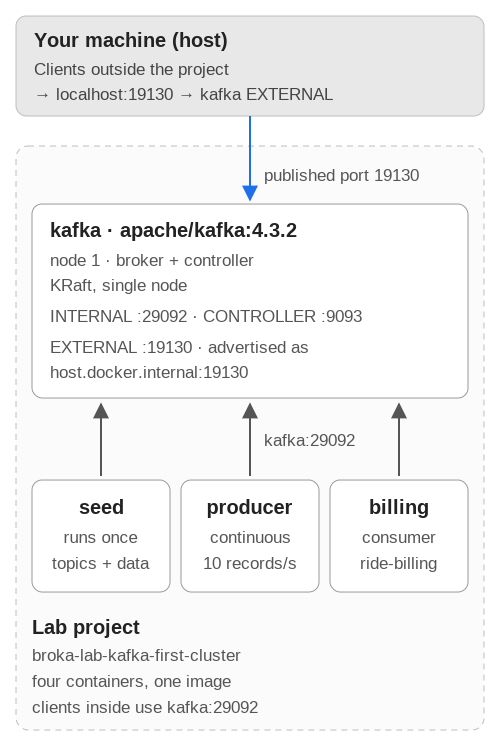
- kafka is the cluster. It is a single Apache Kafka node that is both the broker, the process that stores records and serves them to clients, and the controller, the process that keeps the cluster's metadata: which topics exist, who leads which partition, which consumer groups are known. Kafka calls this KRaft mode: the controllers agree on the metadata among themselves with the Raft protocol, and ZooKeeper is not involved. With one node, the controller quorum is that node voting for itself.
- seed runs once. It waits for the broker, creates two topics, writes the data the lab starts with and exits.
- producer starts after seed has finished and writes ten finished rides per second, for as long as the lab runs.
- billing is a consumer. It is the only member of the consumer group
ride-billing: it readsrides.completedand commits its position every two seconds.
The data is a small bike-share service. Bikes bike-1000 to bike-1999 ride between stations station-01 to station-12.
| Topic | Partitions | Cleanup policy | Key | Value |
|---|---|---|---|---|
rides.completed |
6 | delete (the default) |
the bike, for example bike-1042 |
{"bike":"bike-1042","from":"station-11","to":"station-03","minutes":20} |
stations.status |
3 | compact |
the station, for example station-07 |
{"station":"station-07","bikesAvailable":12,"docksFree":4} |
Five words carry the rest of the lesson:
- A topic is a named stream of records. A record is a key, a value and a timestamp.
- A topic is split into partitions. Each partition is an ordered, append-only sequence of records, and the broker keeps that order. The key of a record decides which partition it lands on, so records with the same key stay in one partition, in the order they were written.
- The offset of a record is its position in its partition, counted from zero.
- A consumer group is a named set of consumers that share the partitions of a topic between them. The position of the group in each partition is stored on the broker, not in the consumer. That is why a consumer can stop and later continue where it left off.
- The replication factor is the number of brokers that hold a copy of a partition. With one broker it can only be 1, and several lines in the compose file exist only to say so.
Check your machine
docker version --format '{{.Client.Version}} {{.Server.Version}} {{.Server.Os}}/{{.Server.Arch}}'
docker compose version
nc -zv localhost 1913029.9.2 29.9.2 linux/arm64
Docker Compose version v5.6.0
nc: connectx to localhost port 19130 (tcp) failed: Connection refusedThe third line is good news: nothing is listening on port 19130 yet. The wording of nc differs between systems; what matters is "refused". If it reports a connection instead, another program owns the port, and you will change KAFKA_PORT in the next section. If you do not have nc, skip the check: Compose stops with a "port is already allocated" error if the port is taken.
Get the lab
git clone https://github.com/orchesta/broka.git
cd broka/learn/kafka/01-single-node-kraft
ls -A.env.example
README.md
compose.yml
scriptsFour entries, five files. compose.yml is the project. scripts/seed.sh writes the starting data and scripts/load.sh is the producer; both are short shell scripts that call Kafka's own tools. .env.example holds the three settings you may want to change. README.md has the run commands and the connection values.
The settings file is optional. Copy it when you need to change something:
cp .env.example .env# Host port of the EXTERNAL listener, for clients outside the lab.
KAFKA_PORT=19130
# Address the broker hands back to clients outside this lab. Keep host.docker.internal on Docker Desktop;
# on Linux set it to the host's IP address.
KAFKA_ADVERTISED_HOST=host.docker.internal
# Finished rides per second written to rides.completed.
RATE=10KAFKA_PORT: change it when 19130 is taken. Everything else follows.KAFKA_ADVERTISED_HOST: on Linux with Docker Engine,host.docker.internaldoes not resolve by default. Put the IP address of your machine here. The section Reach it from outside the lab explains what this value does.RATE: rides per second from the producer. Ten is enough to watch the numbers move.
Read the compose file before you start it
Open compose.yml. The kafka service is the part worth reading slowly; the rest is plumbing.
  # One container is both the broker and the controller, and the only voter of its quorum.
  kafka:
    image: apache/kafka:4.3.2
    hostname: kafka
    ports:
      - "${KAFKA_PORT:-19130}:19130"
    environment:
      KAFKA_NODE_ID: "1"
      KAFKA_PROCESS_ROLES: broker,controller
      KAFKA_CONTROLLER_QUORUM_VOTERS: 1@localhost:9093
      # Fixed, so the cluster keeps the same id on every start.
      CLUSTER_ID: cAJ-Vh4LTPKLR4UVabyyQg
      # INTERNAL serves the lab's own containers, EXTERNAL serves clients outside the project, CONTROLLER the quorum.
      KAFKA_LISTENERS: INTERNAL://:29092,EXTERNAL://:19130,CONTROLLER://:9093
      KAFKA_ADVERTISED_LISTENERS: INTERNAL://kafka:29092,EXTERNAL://${KAFKA_ADVERTISED_HOST:-host.docker.internal}:${KAFKA_PORT:-19130}
      KAFKA_LISTENER_SECURITY_PROTOCOL_MAP: INTERNAL:PLAINTEXT,EXTERNAL:PLAINTEXT,CONTROLLER:PLAINTEXT
      KAFKA_CONTROLLER_LISTENER_NAMES: CONTROLLER
      KAFKA_INTER_BROKER_LISTENER_NAME: INTERNAL
      # The internal topics default to three replicas, which one broker cannot provide.
      KAFKA_OFFSETS_TOPIC_REPLICATION_FACTOR: "1"
      KAFKA_TRANSACTION_STATE_LOG_REPLICATION_FACTOR: "1"
      KAFKA_TRANSACTION_STATE_LOG_MIN_ISR: "1"
      # Topics are created on purpose, by the seed or by you.
      KAFKA_AUTO_CREATE_TOPICS_ENABLE: "false"
      KAFKA_GROUP_INITIAL_REBALANCE_DELAY_MS: "0"
      KAFKA_LOG_DIRS: /var/lib/kafka/data
      KAFKA_HEAP_OPTS: -Xms384m -Xmx384m
    volumes:
      - kafka-data:/var/lib/kafka/data
    restart: unless-stopped
    healthcheck:
      test: ["CMD-SHELL", "/opt/kafka/bin/kafka-broker-api-versions.sh --bootstrap-server localhost:29092 > /dev/null 2>&1"]
      interval: 10s
      timeout: 20s
      retries: 12
      start_period: 20s
Every KAFKA_* variable becomes one line of the broker's configuration: the image's entrypoint lowercases the name, turns _ into . and writes it to the properties file. KAFKA_PROCESS_ROLES becomes process.roles, and so on.
- One process, two roles.
process.roles=broker,controllermakes this node both.controller.quorum.voterslists every controller of the cluster with its id and controller address; with one entry, node 1 is the only voter and therefore the leader of the quorum. - A fixed cluster id. Every Kafka cluster has an id. The image formats the storage directory with it on the first start. It is fixed in the file so that the cluster keeps the same id every time you recreate it.
- Three listeners. A listener is a name plus a port the broker accepts connections on.
INTERNAL(29092) serves the lab's own containers,EXTERNAL(19130) serves anything outside the project, andCONTROLLER(9093) carries the quorum traffic. All three arePLAINTEXT: no encryption, no authentication. That is fine on your laptop and nowhere else. - Advertised listeners. This is the setting that bites most people on day one. A client connects to the address you gave it, asks the broker for metadata, and the broker answers with the addresses in
advertised.listeners. From then on the client uses those. Inside the Compose network the broker advertiseskafka:29092, a name every container in the project can resolve. Outside it advertiseshost.docker.internal:19130: the name a container on Docker Desktop uses to reach your machine, plus the port that Compose publishes withports:. If the advertised address were wrong, every client would connect fine and then fail on the next step. - Replication 1, spelled out three times. The broker creates two internal topics on its own, one for consumer group offsets and one for transactions, and by default wants three copies of each. One broker cannot provide that, so both factors and the minimum in-sync count are set to 1.
- No automatic topics. With
auto.create.topics.enable=false, writing to a topic that does not exist is an error, not a silent creation. The lab creates its topics on purpose, in the seed. - A small heap. 384 MB is plenty for this workload.
The two long-running clients, producer and billing, share one anchor. It is written above services:, at the top of the file:
x-client: &client
  image: apache/kafka:4.3.2
  depends_on:
    seed:
      condition: service_completed_successfully
  restart: unless-stopped
seed depends on kafka being healthy, where healthy means that kafka-broker-api-versions.sh gets an answer on port 29092. producer and billing depend on seed having exited with status 0. Compose turns that chain into the start order you will see in a moment.
Start it
docker compose up -d --waitOn the first run Docker downloads apache/kafka:4.3.2, about 230 MB compressed. Compose then creates a network, a volume and four containers, and --wait keeps the command in the foreground until every service is healthy or has exited. The last lines look like this:
 Network broka-lab-kafka-first-cluster_default  Created
 Volume broka-lab-kafka-first-cluster_kafka-data  Created
 Container broka-lab-kafka-first-cluster-kafka-1  Healthy
 Container broka-lab-kafka-first-cluster-seed-1  Exited
 Container broka-lab-kafka-first-cluster-producer-1  Healthy
 Container broka-lab-kafka-first-cluster-billing-1  Healthy
The whole start took 14 seconds on the test machine: the broker reports itself healthy after about 6 seconds, the seed needs 7 more to write its data, then the two clients come up.
docker compose psNAME IMAGE COMMAND SERVICE CREATED STATUS PORTS
broka-lab-kafka-first-cluster-billing-1 apache/kafka:4.3.2 "/bin/bash -c 'exec …" billing 14 seconds ago Up Less than a second 9092/tcp
broka-lab-kafka-first-cluster-kafka-1 apache/kafka:4.3.2 "/__cacert_entrypoin…" kafka 14 seconds ago Up 14 seconds (healthy) 0.0.0.0:19130->19130/tcp, [::]:19130->19130/tcp
broka-lab-kafka-first-cluster-producer-1 apache/kafka:4.3.2 "bash /scripts/load.…" producer 14 seconds ago Up Less than a second 9092/tcpThree containers are running, and only kafka publishes a port: 19130 on your machine leads to 19130 in the container. The 9092/tcp on the other two is a port the image declares, not one that is reachable from outside. The seed is missing from the list because it has exited; docker compose ps -a shows it with Exited (0).
What the seed did is in its last log line:
docker compose logs --no-log-prefix seed | tail -1seeded: stations.status (3 partitions, compacted, 240 updates), rides.completed (6 partitions, 3000 rides), ride-billing positioned at the endAnd the broker's log shows the two lines that matter on a first start: it formatted its storage with the cluster id from the compose file, and it started.
docker compose logs --no-log-prefix kafka | grep -E 'Using provided cluster id|Kafka Server started'===> Using provided cluster id cAJ-Vh4LTPKLR4UVabyyQg ...
[…] INFO [KafkaRaftServer nodeId=1] Kafka Server started (kafka.server.KafkaRaftServer)Read the cluster back
Kafka ships its command-line tools in the same image, under /opt/kafka/bin. You run them inside the kafka container with docker compose exec kafka …, and you point them at the INTERNAL listener: seen from inside the container, the broker is localhost:29092. Each tool starts a small Java process, so every command takes a second or two.
Topics
docker compose exec kafka /opt/kafka/bin/kafka-topics.sh --bootstrap-server localhost:29092 --describe --exclude-internalTopic: stations.status TopicId: HM_PAypsRKuDmDOEkCdNFg PartitionCount: 3 ReplicationFactor: 1 Configs: min.insync.replicas=1,cleanup.policy=compact
Topic: stations.status Partition: 0 Leader: 1 Replicas: 1 Isr: 1 Elr: LastKnownElr:
Topic: stations.status Partition: 1 Leader: 1 Replicas: 1 Isr: 1 Elr: LastKnownElr:
Topic: stations.status Partition: 2 Leader: 1 Replicas: 1 Isr: 1 Elr: LastKnownElr:
Topic: rides.completed TopicId: o_yM5G07TAC81AZerT-1pw PartitionCount: 6 ReplicationFactor: 1 Configs: min.insync.replicas=1
Topic: rides.completed Partition: 0 Leader: 1 Replicas: 1 Isr: 1 Elr: LastKnownElr:
Topic: rides.completed Partition: 1 Leader: 1 Replicas: 1 Isr: 1 Elr: LastKnownElr:
Topic: rides.completed Partition: 2 Leader: 1 Replicas: 1 Isr: 1 Elr: LastKnownElr:
Topic: rides.completed Partition: 3 Leader: 1 Replicas: 1 Isr: 1 Elr: LastKnownElr:
Topic: rides.completed Partition: 4 Leader: 1 Replicas: 1 Isr: 1 Elr: LastKnownElr:
Topic: rides.completed Partition: 5 Leader: 1 Replicas: 1 Isr: 1 Elr: LastKnownElr:Your topic ids differ; they are generated when a topic is created. The first line of each topic gives the partition count, the replication factor and the configuration that is not a static default: cleanup.policy=compact is what the seed asked for on stations.status. min.insync.replicas=1 appears on both topics although the seed never set it. From Kafka 4.1 a new cluster enables eligible leader replicas, a feature you will meet again under Features, and that feature records min.insync.replicas once, as a cluster-level setting; --describe lists it on every topic because it is no longer a static default. Then one line per partition. Leader: 1 is the broker that serves the partition, Replicas: 1 the brokers that hold a copy, Isr: 1 the replicas that are in sync with the leader. All three say broker 1, because there is no other. Elr and LastKnownElr, the eligible leader replicas, only mean something with more than one replica; here they stay empty.
--exclude-internal hid one topic. Without it:
docker compose exec kafka /opt/kafka/bin/kafka-topics.sh --bootstrap-server localhost:29092 --list__consumer_offsets
rides.completed
stations.status__consumer_offsets is where the broker stores the committed positions of every consumer group. The broker created it when the first consumer group appeared, with 50 partitions and, because of the compose file, one replica each.
The consumer group
docker compose exec kafka /opt/kafka/bin/kafka-consumer-groups.sh --bootstrap-server localhost:29092 --describe --group ride-billingGROUP TOPIC PARTITION CURRENT-OFFSET LOG-END-OFFSET LAG CONSUMER-ID HOST CLIENT-ID
ride-billing rides.completed 0 522 525 3 ride-billing-1-99e2db34-a19c-42f5-bec9-2a8baf22811f /172.20.0.4 ride-billing-1
ride-billing rides.completed 1 474 477 3 ride-billing-1-99e2db34-a19c-42f5-bec9-2a8baf22811f /172.20.0.4 ride-billing-1
ride-billing rides.completed 2 512 512 0 ride-billing-1-99e2db34-a19c-42f5-bec9-2a8baf22811f /172.20.0.4 ride-billing-1
ride-billing rides.completed 3 456 457 1 ride-billing-1-99e2db34-a19c-42f5-bec9-2a8baf22811f /172.20.0.4 ride-billing-1
ride-billing rides.completed 4 590 592 2 ride-billing-1-99e2db34-a19c-42f5-bec9-2a8baf22811f /172.20.0.4 ride-billing-1
ride-billing rides.completed 5 476 477 1 ride-billing-1-99e2db34-a19c-42f5-bec9-2a8baf22811f /172.20.0.4 ride-billing-1One row per partition of rides.completed, all six assigned to the same member. CURRENT-OFFSET is the position the group last committed, LOG-END-OFFSET is the end of the partition, and LAG is the difference: how many records the group has not yet confirmed. A lag between 0 and 20 is normal here, because the consumer commits every two seconds and the producer writes ten records a second across the six partitions. CONSUMER-ID is the member: the client id ride-billing-1 from the compose file plus a random suffix for this session. HOST is the IP address of the billing container inside the Compose network; yours will differ.
docker compose exec kafka /opt/kafka/bin/kafka-consumer-groups.sh --bootstrap-server localhost:29092 --describe --group ride-billing --stateGROUP COORDINATOR (ID) ASSIGNMENT-STRATEGY STATE #MEMBERS
ride-billing kafka:29092 (1) range Stable 1Stable means the members have agreed on who reads which partitions. The coordinator is the broker that manages this group, which can only be broker 1. range is the strategy it used to hand the partitions out; with one member there was nothing to divide.
The quorum
docker compose exec kafka /opt/kafka/bin/kafka-metadata-quorum.sh --bootstrap-server localhost:29092 describe --statusClusterId: cAJ-Vh4LTPKLR4UVabyyQg
LeaderId: 1
LeaderEpoch: 1
HighWatermark: 116
MaxFollowerLag: 0
MaxFollowerLagTimeMs: 0
CurrentVoters: [{"id": 1, "endpoints": ["CONTROLLER://localhost:9093"]}]
CurrentObservers: []This is the controller side of the node. The cluster id is the one from the compose file. Node 1 is the leader of a quorum whose only voter is node 1, on the CONTROLLER listener. HighWatermark counts the metadata records the quorum has committed so far: every topic, partition and group change adds to it, so your number differs and grows. LeaderEpoch: 1 says there has been exactly one election. Observers would be brokers that follow the metadata without voting; in a combined node there are none.
Features
docker compose exec kafka /opt/kafka/bin/kafka-features.sh --bootstrap-server localhost:29092 describeFeature: eligible.leader.replicas.version SupportedMinVersion: 0 SupportedMaxVersion: 1 FinalizedVersionLevel: 1 Epoch: 117
Feature: group.version SupportedMinVersion: 0 SupportedMaxVersion: 1 FinalizedVersionLevel: 1 Epoch: 117
Feature: kraft.version SupportedMinVersion: 0 SupportedMaxVersion: 1 FinalizedVersionLevel: 0 Epoch: 117
Feature: metadata.version SupportedMinVersion: 3.3-IV3 SupportedMaxVersion: 4.3-IV0 FinalizedVersionLevel: 4.3-IV0 Epoch: 117
Feature: share.version SupportedMinVersion: 0 SupportedMaxVersion: 1 FinalizedVersionLevel: 1 Epoch: 117
Feature: streams.version SupportedMinVersion: 0 SupportedMaxVersion: 1 FinalizedVersionLevel: 1 Epoch: 117
Feature: transaction.version SupportedMinVersion: 0 SupportedMaxVersion: 2 FinalizedVersionLevel: 2 Epoch: 117A Kafka cluster does not simply "run version 4.3"; it runs at a set of feature levels, each finalized by the controller, so that a rolling upgrade can bring the binaries up first and switch the behaviour on later. metadata.version is the important one: 4.3-IV0 is the newest format this broker knows, and the cluster was formatted at it. kraft.version is 0 because the quorum is static: the voters are written in the compose file rather than added at run time. The other levels switch on eligible leader replicas, the newer consumer group protocol, queues, Kafka Streams integration and transaction improvements. You will not touch any of them in this lab.
Offsets
The log end offset of a partition is the offset the next record will get, so for a topic that has never lost data it is the number of records written.
docker compose exec kafka /opt/kafka/bin/kafka-get-offsets.sh --bootstrap-server localhost:29092 --topic stations.statusstations.status:0:60
stations.status:1:60
stations.status:2:120240 records: 20 updates for each of the 12 stations, exactly what the seed reported. They are not spread evenly, and that is the key at work: the partition of a record is derived from its key, and 6 of the 12 station names happen to land on partition 2. The topic is compacted, which means the broker will eventually keep only the latest record per key, but compaction never touches the segment that is still being written, so all 240 are still there.
docker compose exec kafka /opt/kafka/bin/kafka-get-offsets.sh --bootstrap-server localhost:29092 --topic rides.completed | awk -F: '{ s += $NF } END { print s }'30903,000 rides from the seed plus ten a second from the producer. Run it again and the number has grown.
Reach it from outside the lab
So far every command ran inside the kafka container. Clients outside the project, whether a tool on your machine or a container in another Compose project, must come in through the published port and the EXTERNAL listener.
nc -zv localhost 19130Connection to localhost port 19130 [tcp/*] succeeded!The port is open on your machine. A quick test of the whole path is a throwaway container that is not part of the lab:
docker run --rm apache/kafka:4.3.2 /opt/kafka/bin/kafka-broker-api-versions.sh --bootstrap-server host.docker.internal:19130 | head -1host.docker.internal:19130 (id: 1 rack: null isFenced: false) -> (This container has no access to the lab's network. It reaches your machine as host.docker.internal, your machine forwards port 19130 to the kafka container, and the broker answers. The first line of the output is the broker describing itself, and the address in it is the one from advertised.listeners: that is how you know the advertised address is right. Had it been wrong, the connection would still succeed, and the next request would go to an address nobody answers. On Linux with Docker Engine, host.docker.internal does not exist by default; set KAFKA_ADVERTISED_HOST to the IP address of your machine in .env, restart the lab and use that IP in the command.
Before moving on, check that the broker has nothing to complain about:
docker compose logs --no-log-prefix kafka | grep -c ERROR0Follow one bike
The key decides the partition, and a partition keeps its order. Both facts can be seen with the console consumer, if you prepare one thing: stop the producer first.
docker compose stop producer
docker compose exec kafka /opt/kafka/bin/kafka-console-consumer.sh --bootstrap-server localhost:29092 --topic rides.completed --from-beginning --timeout-ms 10000 --formatter-property print.partition=true --formatter-property print.key=true | grep bike-1042The consumer rebalance protocol (KIP-848) is production-ready! Set group.protocol=consumer to try it out. See https://kafka.apache.org/documentation/#consumer_rebalance_protocol
Partition:2 bike-1042 {"bike":"bike-1042","from":"station-07","to":"station-07","minutes":55}
Partition:2 bike-1042 {"bike":"bike-1042","from":"station-11","to":"station-03","minutes":20}
Partition:2 bike-1042 {"bike":"bike-1042","from":"station-03","to":"station-11","minutes":40}
[…] ERROR Error processing message, terminating consumer process: (org.apache.kafka.tools.consumer.ConsoleConsumer)
org.apache.kafka.common.errors.TimeoutException
Processed a total of 3140 messagesThe first three rides are the ones the seed wrote for this bike; any after them were added by the producer before you stopped it, about one every 100 seconds. All of them are on partition 2, in the order they were written, and every later ride for bike-1042 will land there too. Records of other bikes sit on that partition as well, interleaved; the order Kafka promises is the order within the partition.
The other four lines are not a problem. The first is a notice: the console consumer still uses the classic group protocol, and it points out the newer one that group.version switched on. The three at the end come from --timeout-ms, which is an idle timeout: the console consumer exits when no new record has arrived for ten seconds, and it reports that exit as an error and a TimeoutException. That is also why the producer had to be stopped: with ten new records a second the consumer would never be idle, and the command would run until you interrupt it. The total is the number of records in the topic at that moment; yours differs.
Start the producer again:
docker compose start producerCompose runs the seed once more before it, because the producer depends on it. The seed finds the group ride-billing and prints ride-billing already exists; nothing to seed.
The scan left one trace. The console consumer joined a consumer group with a generated name, and that group stays in the list for a while after the consumer has gone:
docker compose exec kafka /opt/kafka/bin/kafka-consumer-groups.sh --bootstrap-server localhost:29092 --listconsole-consumer-14834
ride-billingIt is empty, holds no committed position and does no harm. If you want it gone now rather than later:
docker compose exec kafka /opt/kafka/bin/kafka-consumer-groups.sh --bootstrap-server localhost:29092 --delete --group console-consumer-14834Deletion of requested consumer groups ('console-consumer-14834') was successful.Stop and start
The position of a consumer group lives on the broker. Stop the only member of ride-billing and look at the group:
docker compose stop billing
docker compose exec kafka /opt/kafka/bin/kafka-consumer-groups.sh --bootstrap-server localhost:29092 --describe --group ride-billing --state
docker compose exec kafka /opt/kafka/bin/kafka-consumer-groups.sh --bootstrap-server localhost:29092 --describe --group ride-billingConsumer group 'ride-billing' has no active members.
GROUP COORDINATOR (ID) ASSIGNMENT-STRATEGY STATE #MEMBERS
ride-billing kafka:29092 (1) - Empty 0
Consumer group 'ride-billing' has no active members.
GROUP TOPIC PARTITION CURRENT-OFFSET LOG-END-OFFSET LAG CONSUMER-ID HOST CLIENT-ID
ride-billing rides.completed 0 549 552 3 - - -
ride-billing rides.completed 1 503 511 8 - - -
ride-billing rides.completed 2 536 538 2 - - -
ride-billing rides.completed 3 483 484 1 - - -
ride-billing rides.completed 4 619 622 3 - - -
ride-billing rides.completed 5 490 493 3 - - -The group is Empty: it has no members, which the tool also prints above each table. It still has a committed position in every partition, and the lag grows by ten a second while nobody reads. The consumer left cleanly because the compose file starts it with exec, so the stop signal reached the Java process itself.
docker compose start billing
docker compose exec kafka /opt/kafka/bin/kafka-consumer-groups.sh --bootstrap-server localhost:29092 --describe --group ride-billingGROUP TOPIC PARTITION CURRENT-OFFSET LOG-END-OFFSET LAG CONSUMER-ID HOST CLIENT-ID
ride-billing rides.completed 0 563 563 0 ride-billing-1-de5bd48b-3936-4cf9-9ff7-c2b767237648 /172.20.0.4 ride-billing-1
ride-billing rides.completed 1 523 523 0 ride-billing-1-de5bd48b-3936-4cf9-9ff7-c2b767237648 /172.20.0.4 ride-billing-1
ride-billing rides.completed 2 550 550 0 ride-billing-1-de5bd48b-3936-4cf9-9ff7-c2b767237648 /172.20.0.4 ride-billing-1
ride-billing rides.completed 3 498 498 0 ride-billing-1-de5bd48b-3936-4cf9-9ff7-c2b767237648 /172.20.0.4 ride-billing-1
ride-billing rides.completed 4 633 633 0 ride-billing-1-de5bd48b-3936-4cf9-9ff7-c2b767237648 /172.20.0.4 ride-billing-1
ride-billing rides.completed 5 513 513 0 ride-billing-1-de5bd48b-3936-4cf9-9ff7-c2b767237648 /172.20.0.4 ride-billing-1A new member, with a new suffix, picked up at the committed offsets and caught up within seconds. Nothing was read twice and nothing was skipped. That is the whole point of the group: the consumer is replaceable, the position is not.
The same idea decides what each Compose command keeps:
| Command | What it keeps |
|---|---|
docker compose stop |
Everything. The containers stop; the volume, the topics and the group's position stay. |
docker compose start, docker compose up -d |
Continues. The seed runs again, finds the group and prints ride-billing already exists; nothing to seed. |
docker compose down |
The containers and the network go, the volume stays. The next up has the same topics and data. |
docker compose down -v |
Nothing. The next up formats the storage with the same cluster id and the seed writes the data again. |
What to remember
- A Kafka cluster can be one process. In KRaft mode the node is broker and controller at once, and the controller quorum is a list of voters, here a list of one.
- Clients use the address the broker advertises, not the one they first connected to.
advertised.listenersis the setting to check when a connection works and the next step does not. - The key of a record decides its partition, and Kafka keeps order within a partition. One bike, one partition, rides in order.
- A consumer group's position belongs to the group, on the broker. Stop the consumer, start another, and it continues.
- With one broker the replication factor is 1, and the internal topics have to be told so.
- Kafka's tools live in the image.
docker compose exec kafka /opt/kafka/bin/…with--bootstrap-server localhost:29092reads everything the broker knows.
Clean up, or carry on
To remove the lab and its data:
docker compose down -vOr keep it running. The producer keeps writing, every number in this lesson keeps moving, and the cluster is reachable on port 19130 for any client you point at it. The lab's README has the short form of these commands and the connection values.