

Single sign-on
Updated 15 October 2026 · applies to 1.3.0 · Commercial
Single sign-on lets people sign in to BROKA through your organisation's identity provider — over OpenID Connect, or with their directory password over LDAP — instead of with a password BROKA keeps. Providers are set up in Settings ▸ Security ▸ Single sign-on, and the password form stays on the sign-in page whatever is set there.
Two ways in
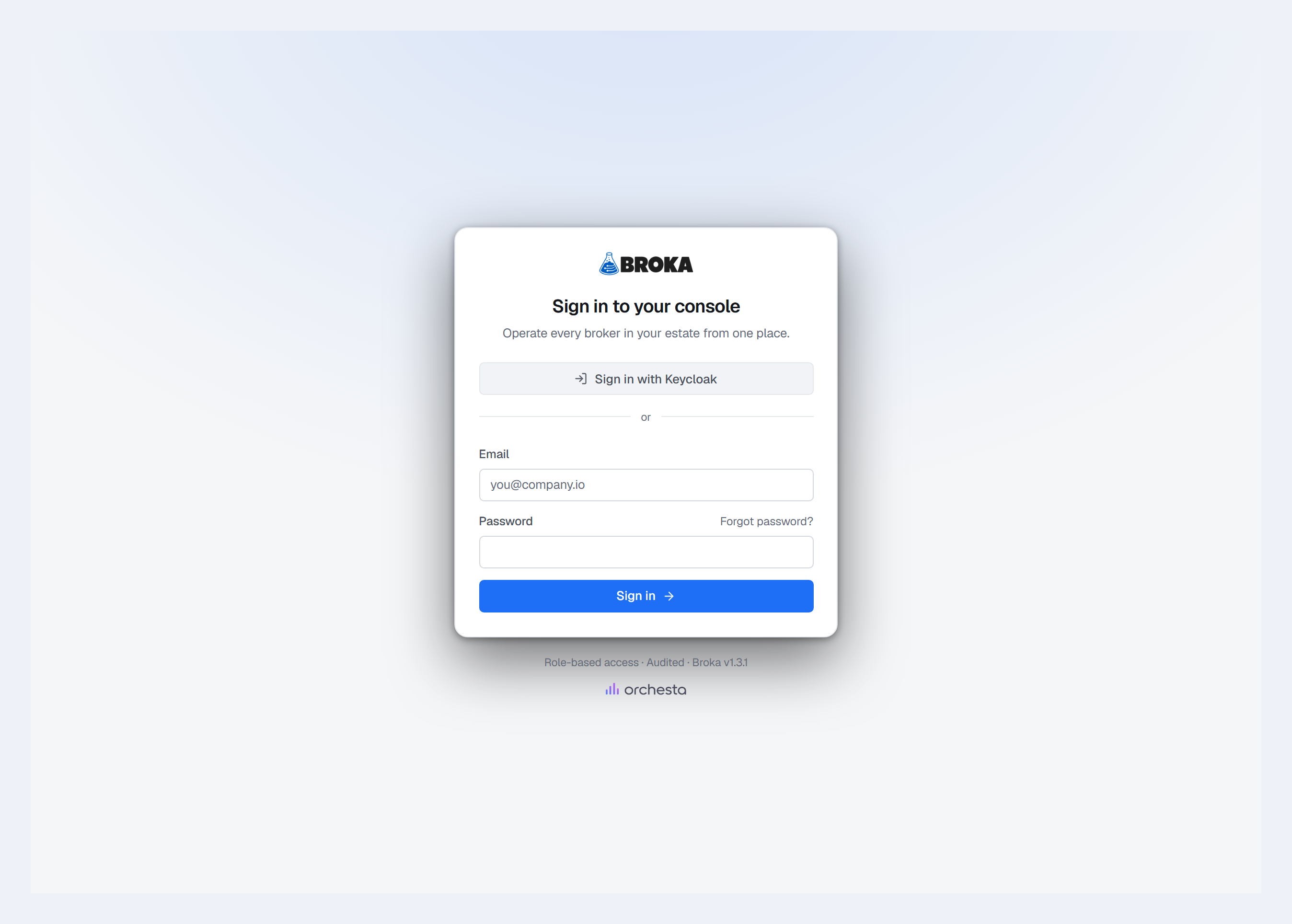
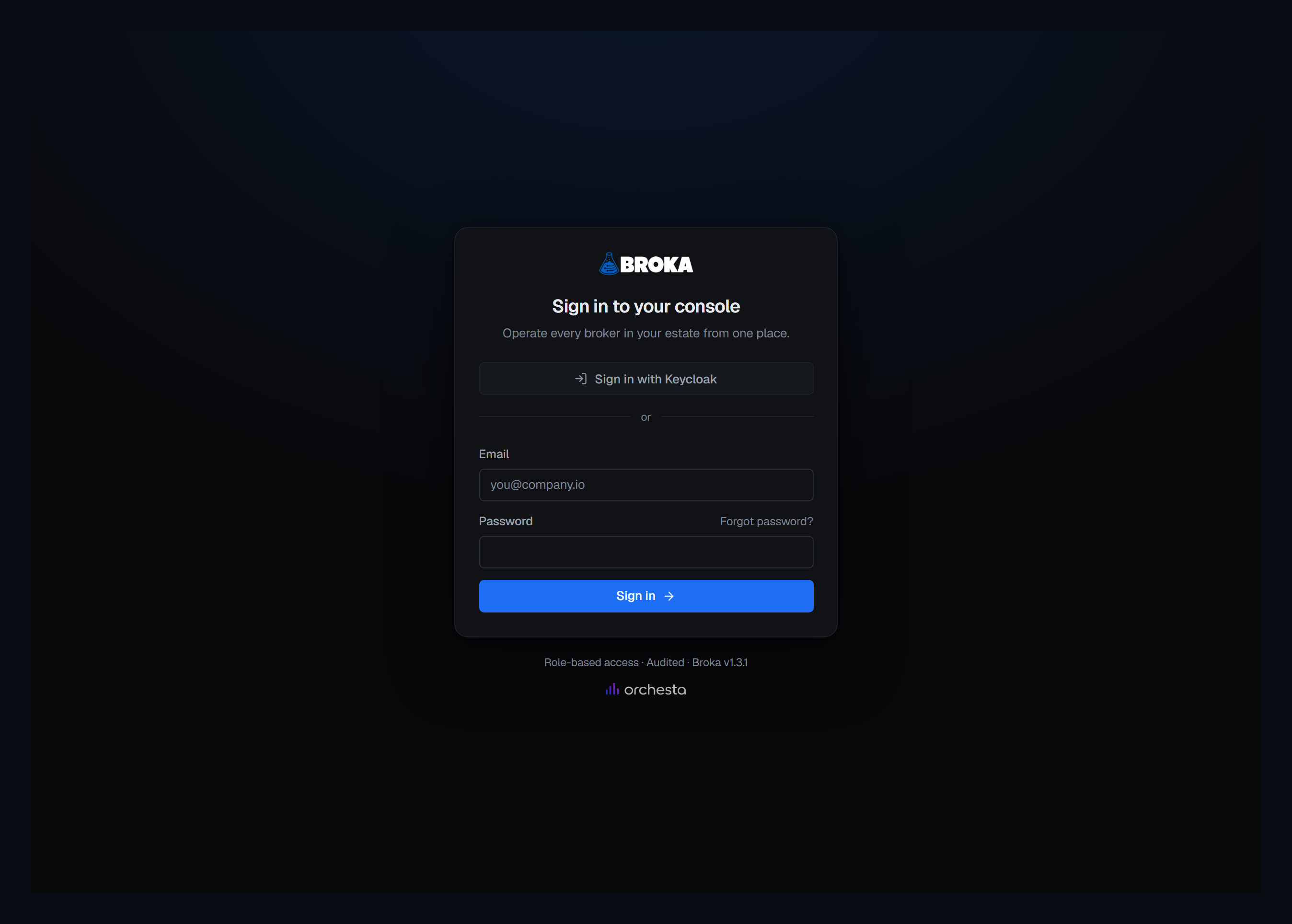
OpenID Connect. Okta, Microsoft Entra ID, Google, Keycloak, or any provider that speaks OpenID Connect. The sign-in page shows one button per enabled provider — Sign in with and the provider's name — above the password form. The person signs in at the provider, comes back to BROKA, and is signed in.
LDAP. Active Directory, OpenLDAP or another directory. There is no button: the person types their e-mail address and their directory password into the ordinary sign-in form, and BROKA checks the password against the directory. The field takes an e-mail address, never a user name. A wrong password, a locked or disabled directory account and a directory that does not answer all get the same answer as a wrong BROKA password.
Several providers can be enabled at once, of either kind. The sign-in page never sends anyone to a provider on its own: a person always chooses.
Each provider's guide says what to set up on its side: Okta, Microsoft Entra ID, Google, Keycloak and Active Directory or OpenLDAP. A provider that speaks only SAML is reached through an identity provider of your own that speaks both — see SAML through a bridge.
Password sign-in is always there
There is no setting that turns password sign-in off, and none will be added: it is the way back in when a provider is down or misconfigured. With every provider unreachable, the sign-in page still loads, the password form answers as quickly as ever, and a provider's button brings the person back to the sign-in page with a short reason within seconds rather than leaving them waiting.
A way back in needs someone able to use it, so BROKA keeps one: at least one enabled account that can sign in with a BROKA password, is not linked to a directory, and holds both Manage users and Manage security settings. A change that would leave none — linking the last such account to a directory, a group mapping, a role, team or permission change, disabling or deleting an account — is refused, and the refusal is recorded. Keep that account's password wherever your organisation keeps its break-glass credentials.
Setting up a provider
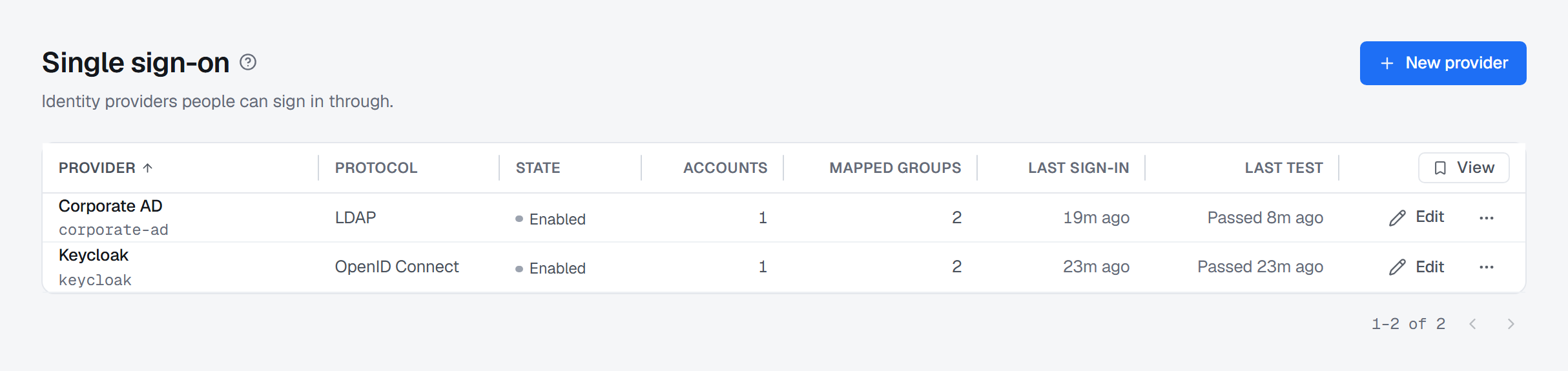
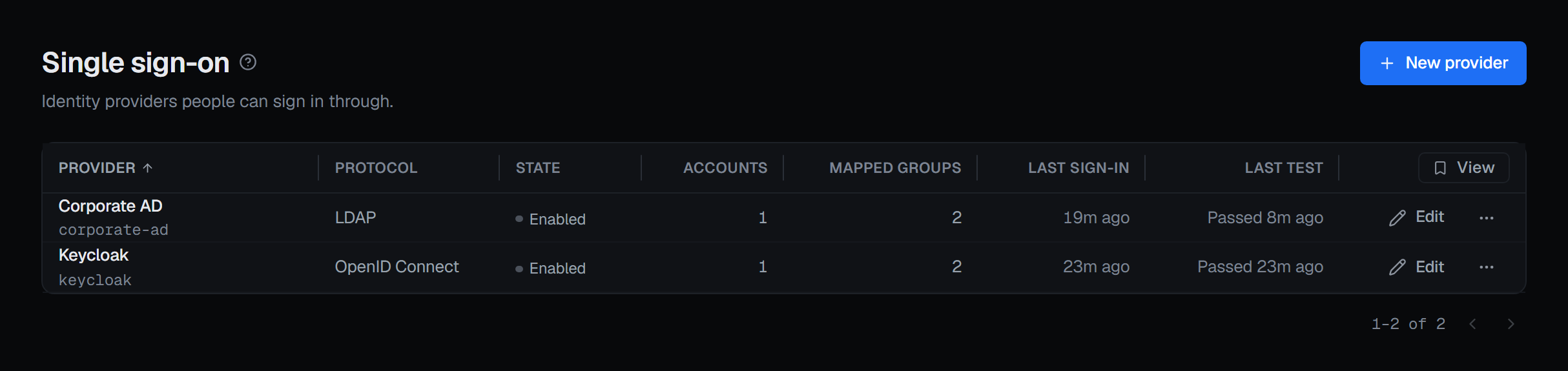
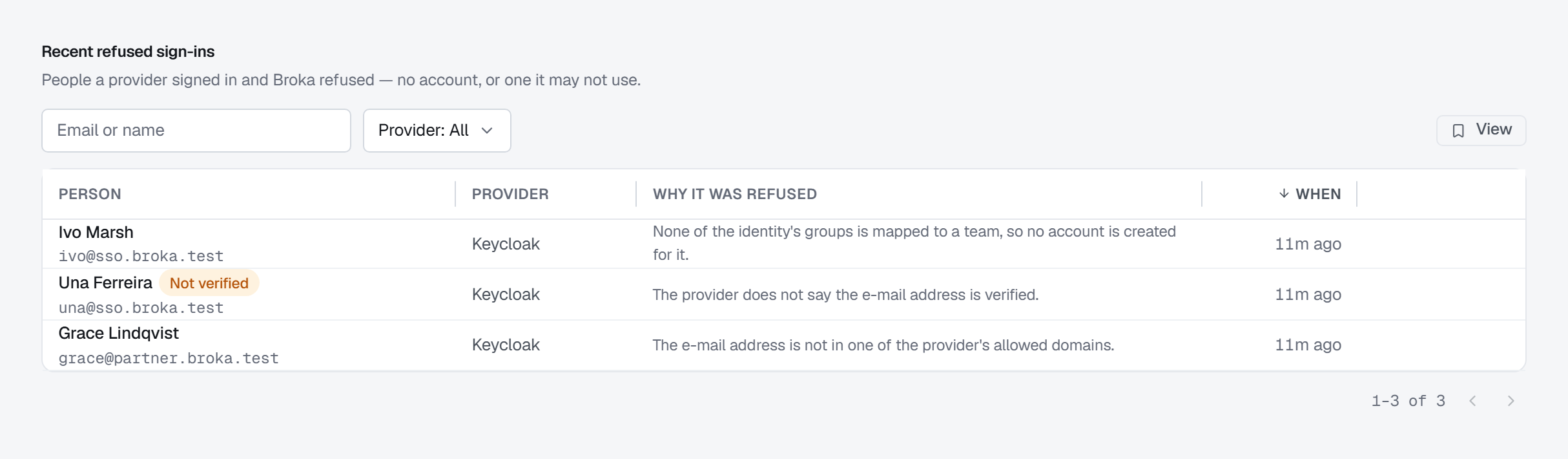
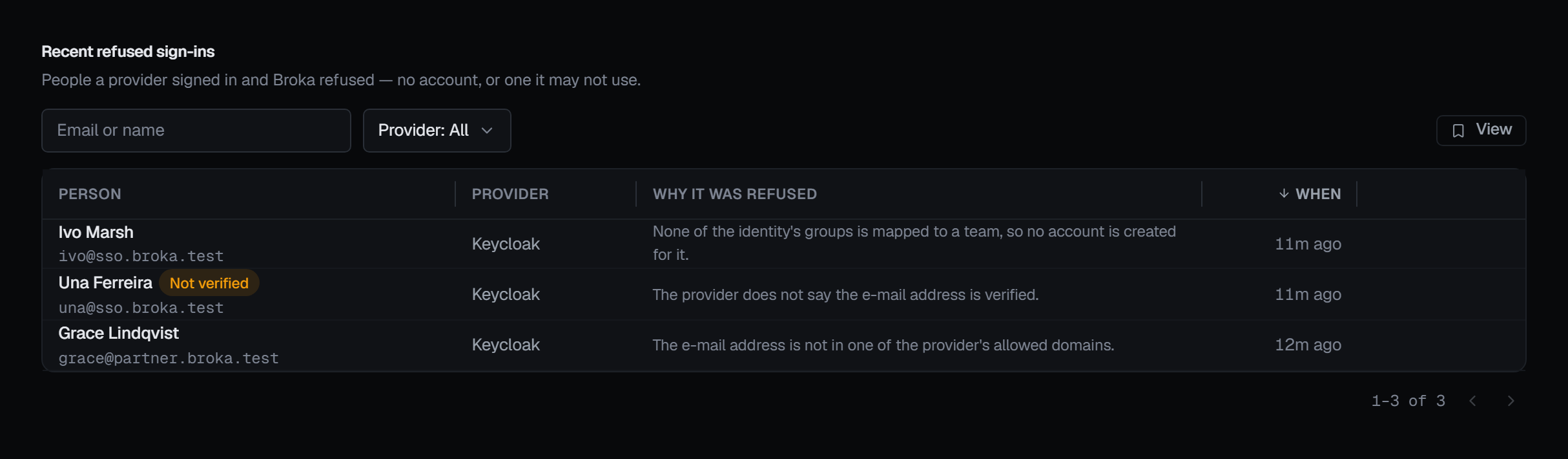
Providers are managed by people holding Manage security settings. In Settings ▸ Security, the Single sign-on card says how many providers are enabled, and Manage providers opens the list of them: each provider's name, its protocol, whether it is enabled, how many accounts are linked to it, its mapped groups, its last sign-in and its last test, with Edit and a ⋯ menu at the end of its row. Edit, or the provider's name, opens its sheet; New provider opens an empty one — in the page header, or, before there is any provider, in the empty list itself. A new provider is saved disabled. Below the list, Recent refused sign-ins shows the people a provider signed in and BROKA refused, with why each was refused.
BROKA reaches a provider itself, from the server it runs on: an OpenID Connect provider's published configuration, its signing keys and its token endpoint over HTTPS — and its user-information endpoint when the ID token carries no groups — and a directory over LDAPS or StartTLS, signing in as its service account to search and as the person to check their password. The person's browser goes to the provider's own sign-in page.
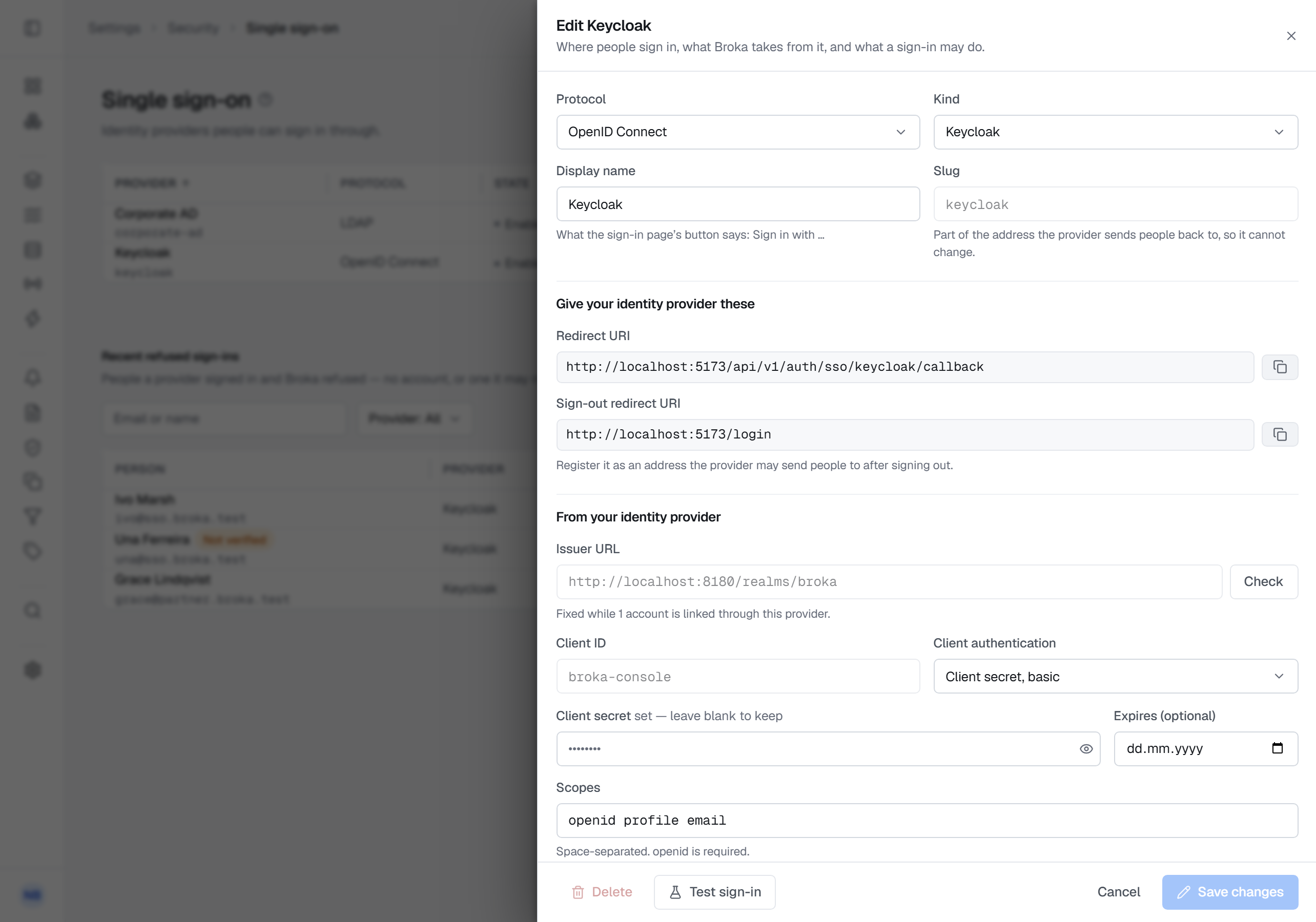
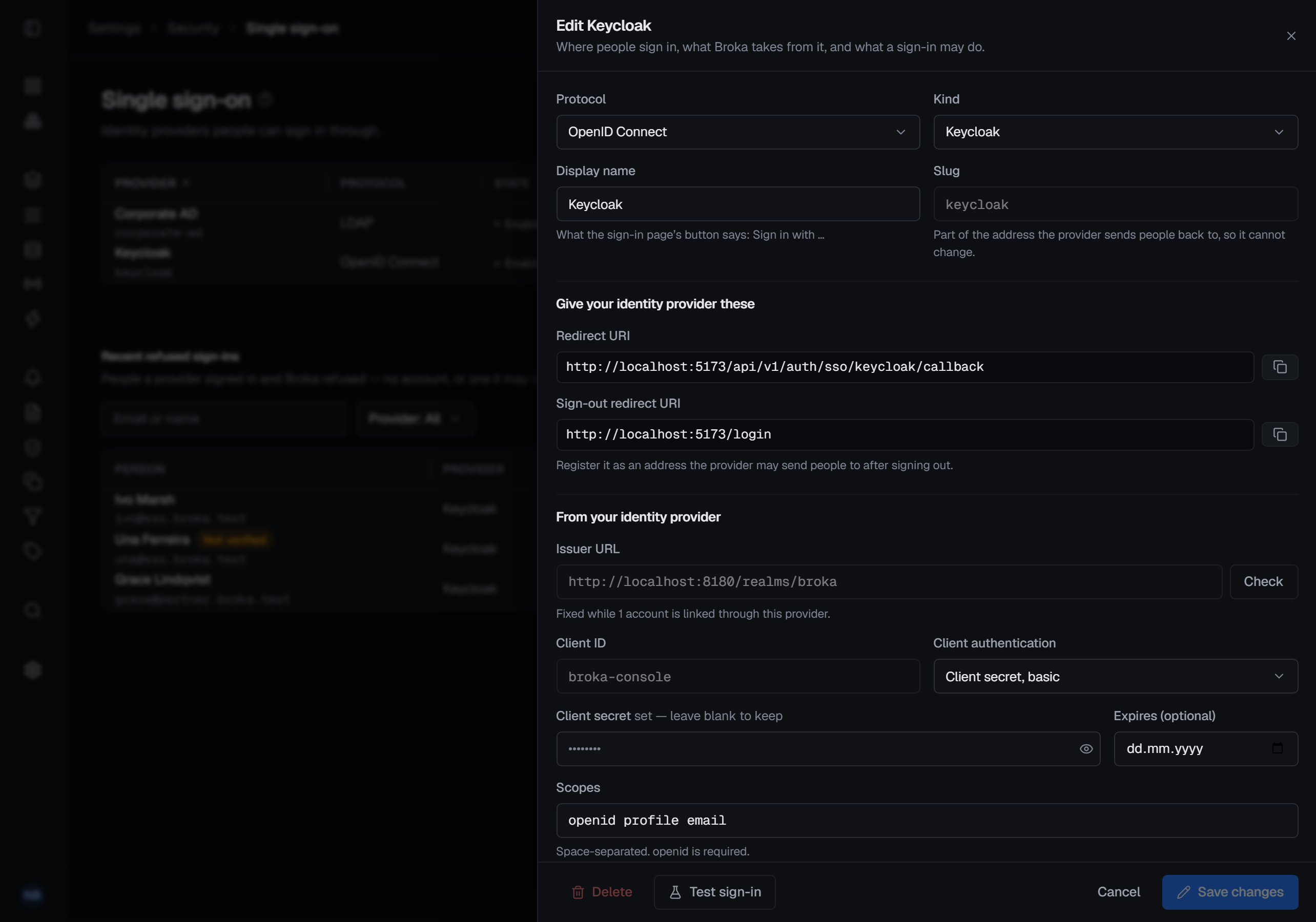
The sheet, in order:
- First, the Protocol, OpenID Connect or LDAP; the Kind of provider — Okta, Microsoft Entra ID, Google, Keycloak or Generic for OpenID Connect, Active Directory or Generic for LDAP; the Display name shown on the sign-in page; and the Slug, set once, which identifies the provider in BROKA and, for OpenID Connect, is part of the address the provider sends people back to.
- Give your identity provider these (OpenID Connect). The Redirect URI to register at the provider, with a
copy button, and the Sign-out redirect URI when BROKA also signs people out of the provider. If BROKA does not
know the address people reach it at, the section says so instead: that address is a deployment setting,
BROKA_PUBLIC_URL, set by whoever installs and runs BROKA, and an OpenID Connect provider cannot be enabled until it is set. - From your identity provider. For OpenID Connect: the Issuer URL, which Check compares with the
configuration the provider publishes; the Client ID; the Client authentication, which sends the client
secret either basic or in the body; the Client secret, with an optional expiry date; the Scopes,
openid profile emailby default; for Microsoft Entra ID, the Allowed tenants; for Google, the Allowed hosted domains, which once set refuse anyone outside those Google Workspace domains, accounts already linked included; and, folded away under Claim names, the names of the claims BROKA reads and whether Groups are sent as ids or names. For LDAP: the Server and Port; the Connection, LDAPS or StartTLS; the Certificate authority that signed the directory's certificate, uploaded as PEM; the Bind DN and Bind password of the service account BROKA searches the directory as; the User search base and User filter; the Group search base and the Directory lockout threshold; and Nested groups. - Accounts. For LDAP, Only directory administrators can change mail; then the Allowed domains; Create an account at first sign-in and Link existing accounts by e-mail, both limited to those domains; and Accounts created per hour, at most.
- Session. Maximum length (hours), the longest a session started through the provider may last, and API tokens stop after (days) without a sign-in through it, for an account that signs in only through it.
- Sign-out (OpenID Connect). Also sign out of the provider.
The client secret and the bind password are write-only: once saved, the field says one is set, and left empty it keeps it. A secret can carry an expiry date. When the address a secret is sent to changes — the issuer, or the directory's server, port, connection, certificate authority or bind DN — the secret has to be entered again, so a stored secret is never sent anywhere it was not saved for.
Once accounts are linked to a provider, its issuer, its client ID, its kind and the claim it identifies people by can no longer be changed: together they are what ties each person to their account. A directory's server, port, connection and certificate authority can then be changed only by an administrator.
Test, then enable
Enable stays locked until a test has passed with the settings as saved. Changing anything the test depends on — the address, the client, the secret, the claims — locks it again.
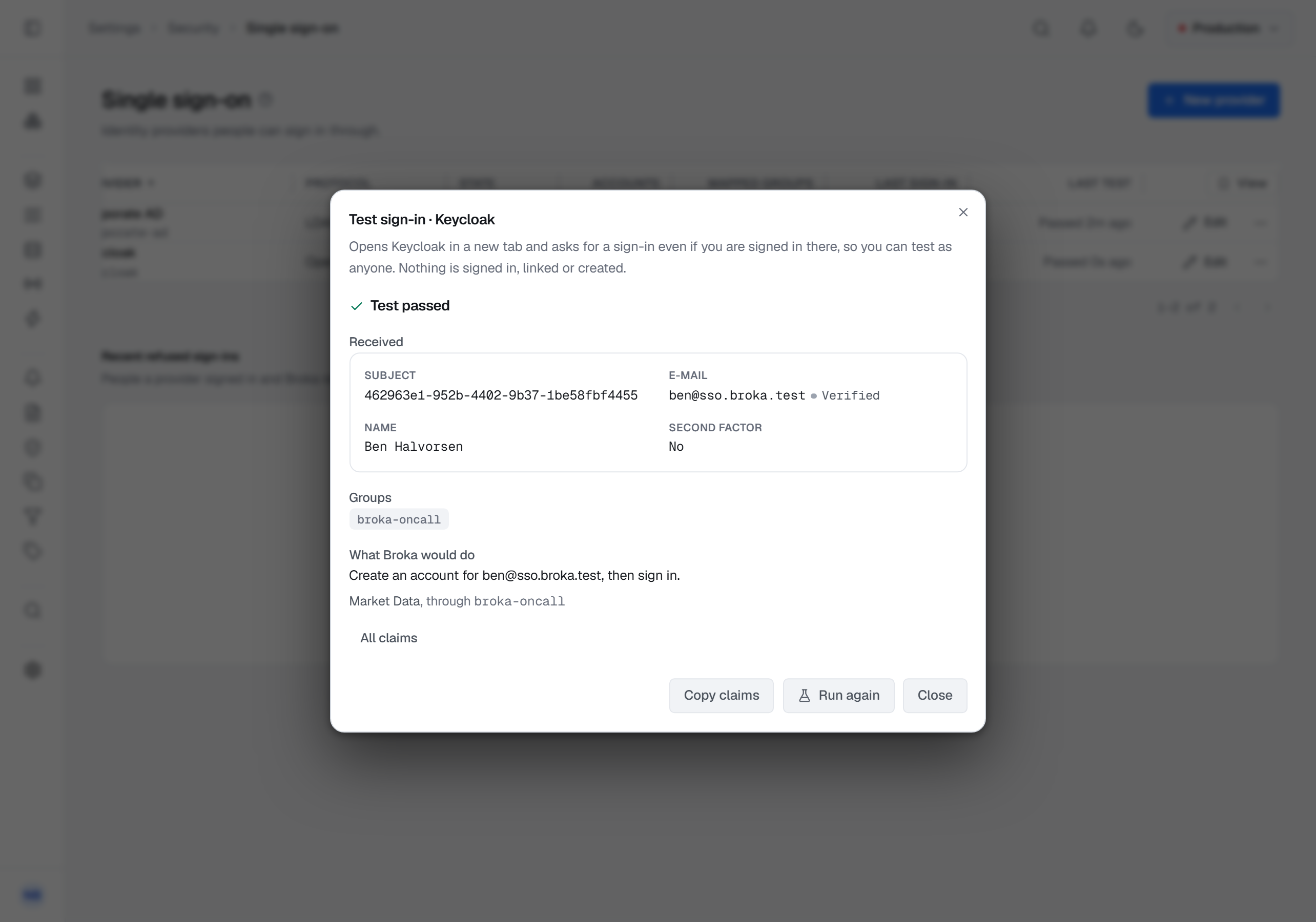
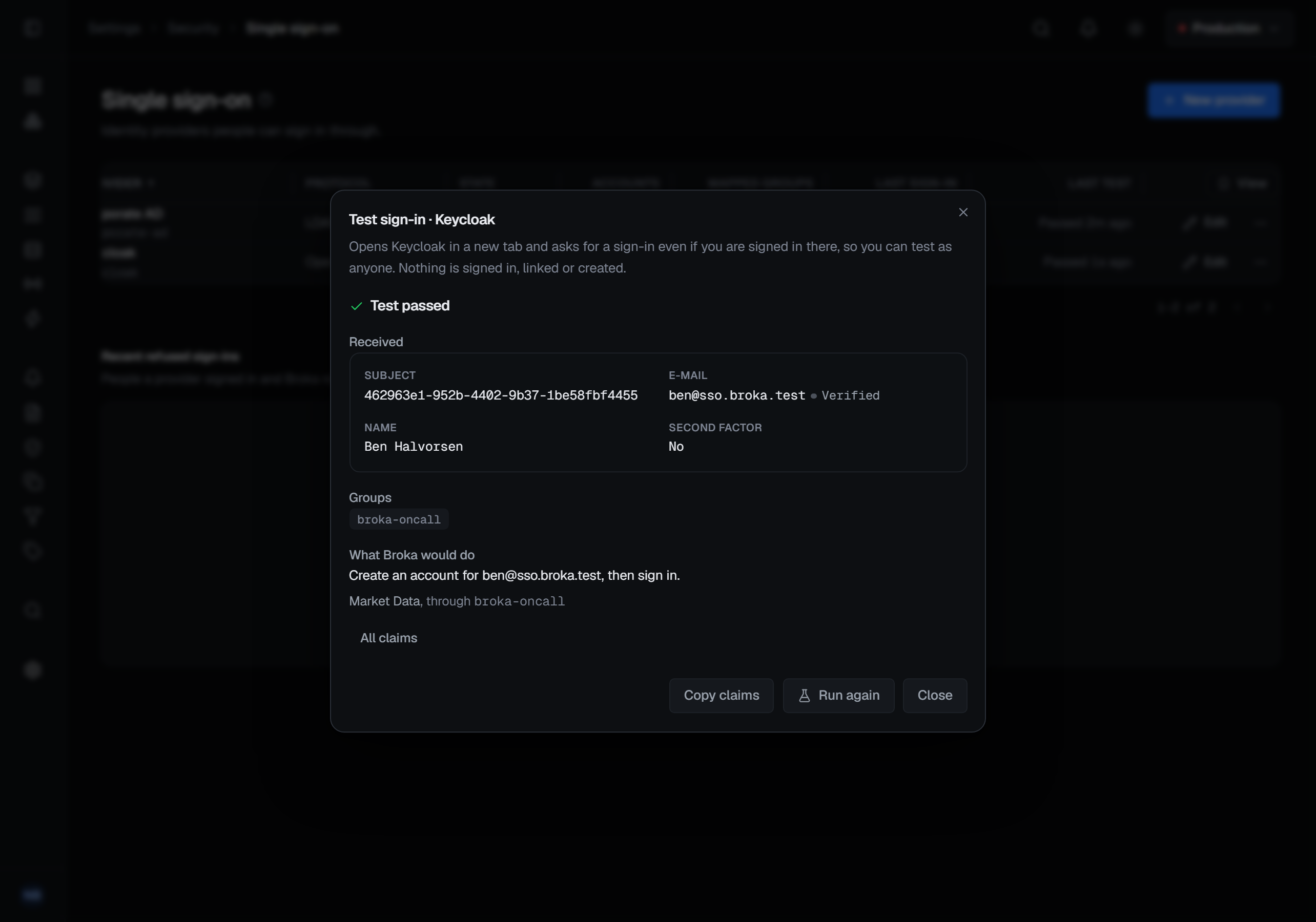
Test sign-in (OpenID Connect) opens the provider in a new tab and, where the provider supports it, asks for a sign-in even if you are signed in there already, so you can test as anyone. It works on a provider that is not enabled yet, and nothing is signed in, linked or created. The tab ends on a page saying the test has finished; the result is in BROKA's own window:
- what the provider sent — the person's identifier, their e-mail address and whether the provider says it is verified, and their groups, or a warning when they were left out;
- what BROKA would do with that person, in one sentence — Sign in as …, Link the Broka account … by its e-mail address, then sign in, Create an account for …, then sign in, or Refuse: and the reason, such as an address outside the allowed domains — and the teams their groups would put them in;
- every claim, folded away. The token itself is never shown.
A test passes when the provider signed somebody in and every check held, even when BROKA would refuse that particular person: the refusal is about the person, not the provider.
For LDAP, Test connection connects to the directory, checks its certificate, signs in as the service account and checks the search base. In the same dialog, Look up a person takes an e-mail address, and Look up searches the directory for it, as the service account, and says what BROKA would do with that person; it asks for no password.
Enable, Disable and Delete each ask for a reason. From the moment a provider is enabled, the sign-in page offers Sign in with its name.
Which account a sign-in reaches
Everyone who signs in through a provider signs in as one BROKA account, found in this order:
- An identity already linked to an account signs in as that account. The link is to the provider's own identifier for the person — never their e-mail address or user name, which can change hands.
- Link existing accounts by e-mail, when it is on: the account with the same e-mail address, if the provider says the address is verified and its domain is one of the allowed domains. An account that holds any permission to manage something in BROKA is never linked this way, and neither is one that is disabled or already linked.
- Create an account at first sign-in, when it is on and every rule in the next section holds.
- Otherwise the person is refused — You signed in to …, but that account has no access to Broka. Ask a Broka administrator to set it up. — and an administrator can link them from the refused sign-in.
Both switches are off until you turn them on, and neither can be turned on without at least one allowed domain. List each domain exactly: a sub-domain of one is not included.
What counts as a verified address differs by provider, and each guide says what BROKA reads. A directory sends no such
signal at all, so for an LDAP provider both switches stay unavailable until you state, on the provider, that only
directory administrators can change people's mail attribute.
A disabled account is refused, and signing in through a provider never enables one. A BROKA password locked after failed attempts does not stop its owner signing in through an OpenID Connect provider: the lockout protects the password.
Accounts created at a first sign-in
With Create an account at first sign-in on, a person with no BROKA account gets one at their first sign-in through the provider — when all of these hold:
- They belong to your organisation at the provider. For Microsoft Entra ID, the application admits only your tenant, or the person's tenant is one of the provider's allowed tenants. Any other provider's people are taken to be your organisation's own.
- Their e-mail address is verified and in an allowed domain. An address another account already holds is never given a second account.
- At least one of their groups is mapped to a team. A provider that sends no groups — Google — therefore never creates accounts.
- The provider is under its ceiling — 20 new accounts an hour by default. Past it, creation pauses for that provider and the notification bell says so; existing accounts keep signing in, and creation resumes as the hour passes.
The account takes the e-mail address as its sign-in name and the provider's display name, and has no password, no role and no permission: what it may do comes from the teams its groups map to. Like every account, it can see the list of users and make API tokens of its own. Accounts are not counted against the licence.
At later sign-ins the display name follows the provider's, and the e-mail address does not: an address changed at the provider is recorded, and the account keeps the one it was created with.
In Settings ▸ Users, the Sign-in column shows how each account signs in: Password, the providers linked to it, or No sign-in.
Linking, unlinking and blocking
An account's Sign-in tab — in the panel beside a user in Settings ▸ Users, or Sign-in in the row's menu — shows how it signs in: whether it has a BROKA password, and each identity linked to it, with the provider, the identifier the provider gave the person, how and when it was linked, and its last sign-in. Changing any of it takes Manage users.
Link from a refused sign-in. There is nowhere to type an identifier: an administrator links an account to an identity that has actually signed in and been refused. Each provider keeps its recent refused sign-ins — the latest for each person, up to 100 people, for seven days. Pick one, give a reason and confirm. An address the provider did not say was verified is marked as such, and linking it asks you to confirm that too. You can link only an account no more privileged than your own.
Unlink, in a linked identity's ⋯ menu, asks for a reason, and ends at once the team memberships that provider's groups gave the account. Its confirmation says which, whether the account is left with no way to sign in, and whether linking by e-mail would link the identity again at its next sign-in.
Deleting an account blocks its identities. Its address becomes free, but signing in again through the provider does not create a new account for the same person: the sign-in is refused until an administrator lifts the block from it, with a reason.
Link to the directory (LDAP), once you choose the directory, looks the account's e-mail address up in it and removes the account's BROKA password: from then on it signs in with its directory password only, and Reset password is not available while it is linked. It is refused when it would leave no administrator able to sign in with a password.
An account created at a first sign-in through an OpenID Connect provider has no password. Reset password gives it one, as for any account, if it ever needs to sign in without the provider. One created at a first sign-in through a directory is linked to that directory, as above.
Groups and teams
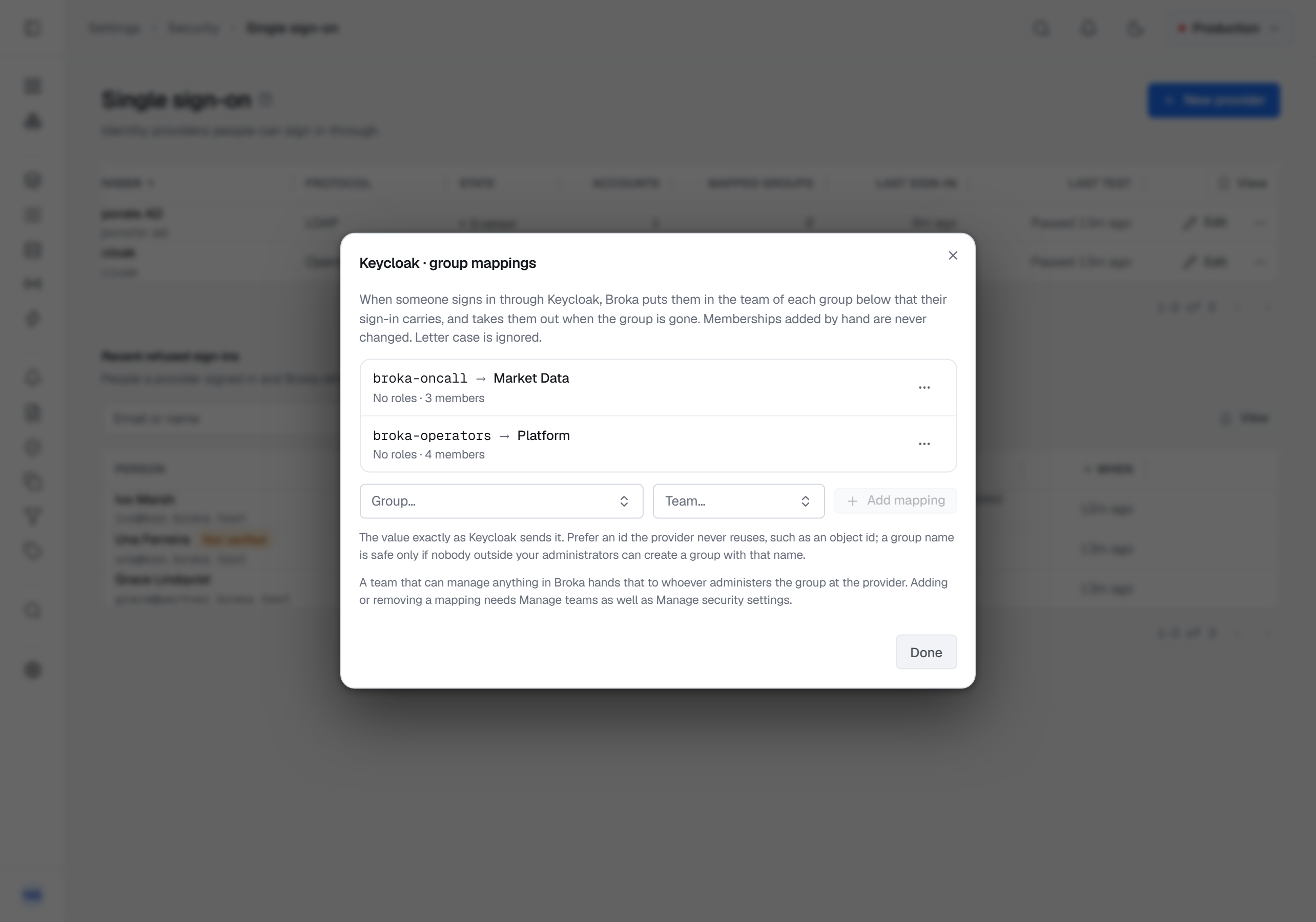
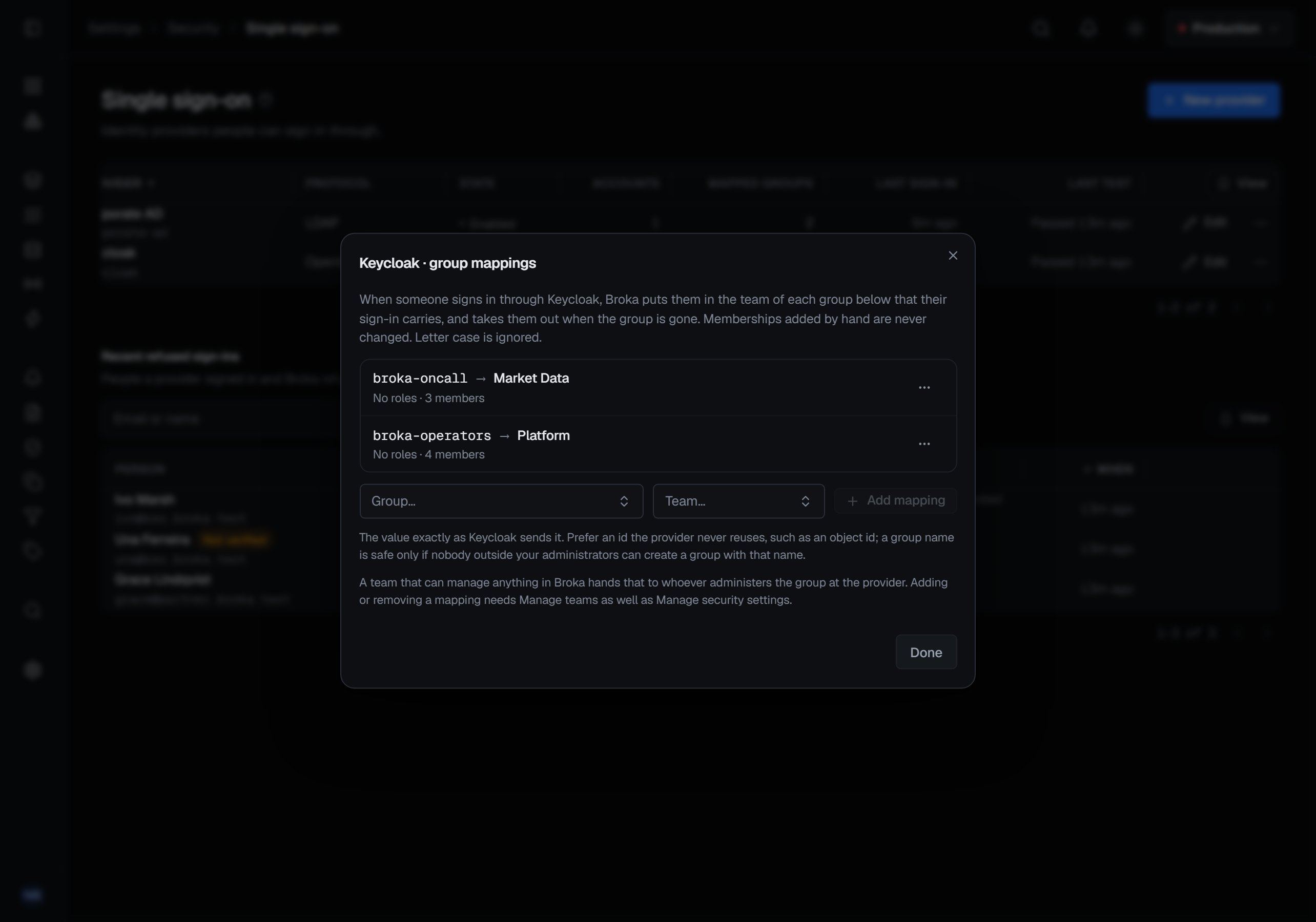
A provider's Group mappings, in its row's menu, each pair a group — exactly as the provider sends it — with a BROKA team. At every sign-in through the provider, BROKA puts the person in the team of each mapped group their sign-in carries, and takes them out of a team once a sign-in's groups no longer include its group.
- Memberships added by hand are never changed. Someone added to a team by hand and by a group stays in it until both are gone. In the team's Members, a membership that only a group gives is marked via the provider, and cannot be removed there: remove the mapping, or remove the person from the group at the provider — but see the last point below. Removing by hand someone a group also keeps in the team takes away only the hand-added half, and the dialog names the provider that still keeps them there.
- Letter case is ignored, and so are spaces around the value.
- Prefer an identifier the provider never reuses, such as a group's object ID. A group name is safe only if nobody outside your administrators can create a group with that name.
- A directory's groups are full distinguished names, compared as names rather than as text, so escaping, letter case and spaces around separators do not matter; a space inside a value does. A mapping is checked against the directory when you save it.
- A sign-in that carries no groups removes nothing. When the groups are missing — from any provider but one of the Keycloak kind, below — cut short because the person is in too many, or cannot be read, or the directory cannot be searched, every membership stays as it is. The mappings dialog warns when the last sign-in's groups were left out.
- Removing someone from their last mapped group may change nothing. Some providers, Okta and Microsoft Entra ID among them, send no groups at all for someone in none of the groups they are set to send, and such a sign-in removes nothing. To take that person's team access away, disable their account in BROKA, unlink it, or remove the mapping. Keycloak sends no groups for someone in none of them either, and a provider of the Keycloak kind reads that as no groups: at their next sign-in, the person leaves the teams its mappings put them in.
A mapping hands team membership to whoever is in that group, so writing one takes Manage security settings and Manage teams, and the same check as adding a member by hand: you cannot map a group onto a team that confers more than you hold, and only an administrator can map one onto a team that carries a deny. Mapping onto a team that holds a permission to manage anything hands that administration to whoever administers the group at the provider; the dialog says so beside such a team.
A new mapping takes effect at each person's next sign-in. Remove, in a mapping's ⋯ menu, asks for a reason and takes effect at once: the memberships it alone gave end there and then.
How long a session lasts
A session started through a provider has a maximum length, set per provider — 12 hours by default, from 1 to 72 — counted from the sign-in, however busy the session has been. When it is reached:
- through an OpenID Connect provider, the console sends the person back through the provider — usually with no prompt, since they are still signed in there — and the new sign-in applies their groups again;
- through a directory, the person is returned to the sign-in page: Your session ended. Sign in again.
Someone removed or disabled at the provider cannot start a new session, and keeps an open one at most until its maximum length. Sign out after inactivity, in Settings ▸ Security, applies to these sessions as to any other. A password's expiry, and a password issued by Reset password, apply only to sessions signed in with a BROKA password, never to one a provider started.
API tokens. An account that signs in only through a provider — one with no BROKA password — keeps its API tokens working while it keeps signing in. After a number of days without a sign-in through the provider, 30 by default and set per provider, its tokens stop until it signs in again.
When someone leaves, disable their account in Settings ▸ Users to stop them at once: that ends their sessions and stops their API tokens the moment you confirm. Nothing is pushed to BROKA from the provider, so a removal there reaches BROKA only through the limits above.
Signing out
Signing out of BROKA ends the BROKA session. With Also sign out of the provider switched on — it is off by default — it also ends the provider's session in that browser, which signs the person out of the other applications that use it there. Google offers no such sign-out, so the switch is disabled for it, and a directory has no session to end.
Disabling and deleting a provider
Disable stops every new sign-in through the provider and ends, at once, every session it started; the confirmation says how many, and how many accounts sign in only through it. Those accounts cannot sign in until it is enabled again. Their API tokens are not stopped by it: they run out their days without a sign-in, as above.
Delete needs the provider disabled first. It removes the provider's settings, its group mappings and its linked identities — the blocked ones too, so a provider created again can create an account for someone deleted under this one — and the team memberships it added that nothing else gives. The accounts it created stay, as ordinary accounts. An account that signed in only through the provider is left with no way to sign in until an administrator's Reset password gives it one, and its API tokens stop. The audit trail keeps every change.
A second factor
BROKA has no second factor of its own: require one at your identity provider. When the provider says the person used one to sign in, the sign-in and everything done in that session are recorded as made with a second factor, naming the provider. Microsoft Entra ID does not say so: its tokens carry no claim about a second factor, so BROKA records every Entra sign-in as made without one. Require the second factor in Entra itself.
What single sign-on does not do
- SAML. BROKA speaks OpenID Connect and LDAP. A provider that speaks only SAML is reached through an identity provider of your own that speaks both, such as Keycloak, which accepts that provider's sign-ins and hands BROKA an OpenID Connect one. SAML through a bridge shows how, with Keycloak.
- Provisioning. Nothing is pushed to BROKA from the provider, by SCIM or otherwise: accounts are created and updated when people sign in, and a removal at the provider reaches BROKA as How long a session lasts describes.
What is recorded
- Every sign-in through a provider, with how it was made — OpenID Connect, or a directory password — the provider, and whether a second factor was used.
- Every refused sign-in, with the rule that refused it. The person is told only a short reason — the sign-in was cancelled, did not complete, took too long, the provider is not available, there were too many attempts, or there is no access — and nothing about any account.
- An account created at a first sign-in, as
identity.user.createof typesso, made by single sign-on rather than by a person, and each identity it links, asauthentication.external-identity.link. - Each team membership a group adds or removes, by the single sign-on sync — a removal with the reason Removed by single sign-on: the group is no longer sent by …
- A session ended at its maximum length, or because its provider was disabled.
- Every change to a provider, a mapping, a link or a block, with its reason.
No password, token or secret, and nothing the provider sends to complete a sign-in, is written to the audit trail or to a log.
Permissions
- Manage security settings (
security.manage) — the providers: creating, changing, testing, enabling, disabling and deleting them. - Manage security settings and Manage teams (
teams.manage) — group mappings. - Manage users (
users.manage) — an account's Sign-in tab: linking, unlinking, linking to a directory and lifting a block. The recent refused sign-ins can be read with either Manage users or Manage security settings.
Edition and licence
Single sign-on is BROKA Commercial: the sign-in through providers, the providers and these screens are compiled only into the Commercial images. In Community the sign-in page shows the password form alone, and Security's Single sign-on card and the user panel's Sign-in tab are shown locked, naming the edition.
No licence state turns single sign-on off. It keeps signing people in whatever the licence says — on the day a licence is renewed, someone has to be able to sign in to renew it.
Moving an installation from the Commercial images to Community's removes sign-in through providers. Accounts with no BROKA password — created at a first sign-in, or linked to a directory — sign in again once an administrator's Reset password gives them one, and BROKA always keeps an administrator able to do that. Sessions a provider started before the move go on without a maximum length until they end or an administrator ends them, and the API tokens of accounts that signed in only through a provider no longer stop on their own.