

Users and permissions
Updated 3 October 2026 · applies to 1.0.0 · Commercial
Users & Permissions, under RabbitMQ in the sidebar, lists the broker's own accounts with their tags, per-vhost permissions and caps, and edits them. The Columns control in the header shows, hides and reorders the Tags, Permissions and Limits columns.
These are RabbitMQ's own accounts, not BROKA logins. They are read from the broker and written back to it; BROKA keeps no copy. To write users and permissions in bulk, or take a copy of them, use Definitions.
Tags and permissions are different axes
Tags decide console access — whether the account may use the management API at all, and at what level. Permissions decide messaging — what it may configure, write to and read from, per virtual host.
An account can have full messaging permissions and no tag, which is correct for an application and a lockout for a person. BROKA marks a tagless account so that state is visible rather than inferred from an empty cell.
An empty permission pattern denies everything
This is the detail worth the page.
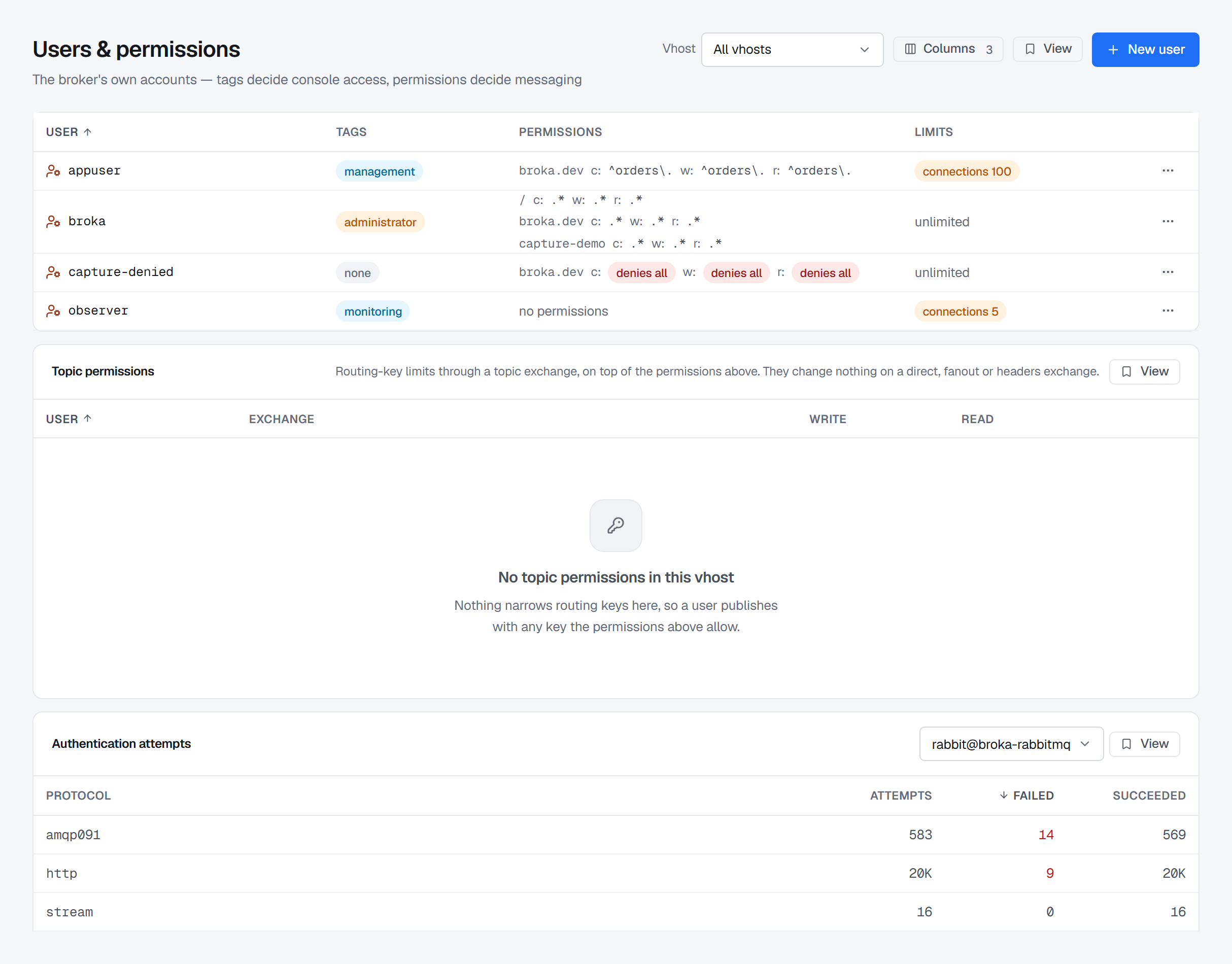
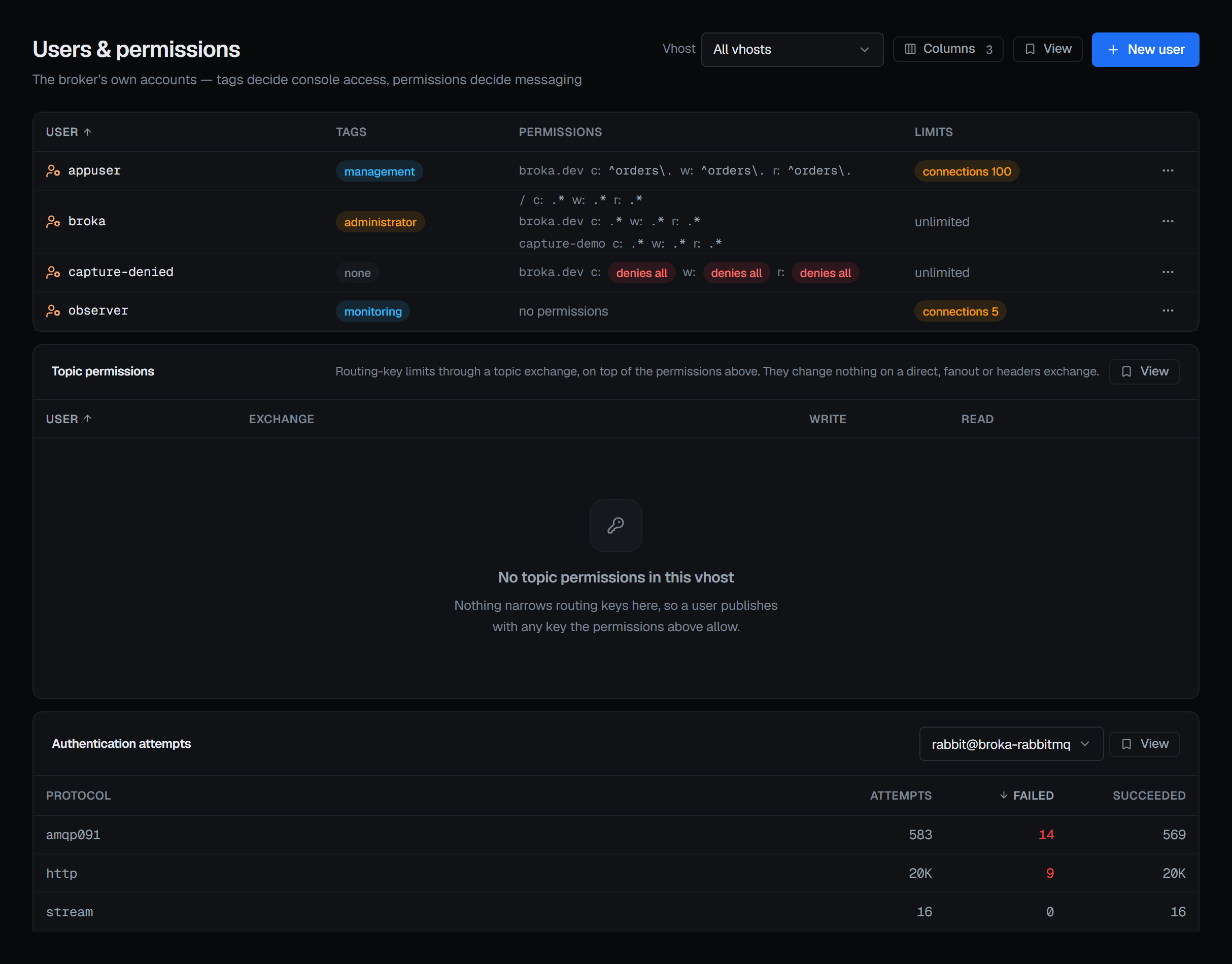
A permission is three regular expressions — configure, write, read — and an empty one matches no resource name at all. It is a deliberate deny, not an unset field, and it is the single easiest thing to misread in RabbitMQ's own management UI.
BROKA renders it as denies all, in a warning colour, rather than as blank space.
Setting a permission, and removing one
RabbitMQ has no grant verb. A permission is its three patterns, so saving replaces all three at once — there is nothing to add to it and nothing to subtract from it. Permissions on a user's row opens them, filled with what is in force in the virtual host you are scoped to.
Two shortcuts sit under the fields, because they are what people mean rather than what they type:
Everything fills all three with .*, and Nothing empties all three.
Emptying all three is not the same act as having no entry, and the dialog says so before you can save it: three empty patterns are an entry that denies every verb, and a user with no entry at all is a different thing to the broker. Remove entry is that other act, and it appears only when there is an entry to remove.
Both the set and the removal are written per user and per virtual host, and both are audited with the patterns that were applied.
Topic permissions narrow routing keys
A permission decides which resources an account may touch. A topic permission decides which routing keys it may use through one topic exchange — the second layer of RabbitMQ's authorisation, and the one that decides whether a publisher can reach one routing key out of a thousand.
They have their own table under the users rather than a column on it, because the two do not line up: an account has at most one permission per virtual host, and any number of topic entries. Topic on a user's row creates their first entry; the table below edits the ones that already exist.
An entry is an exchange and two patterns — write for publishing with a matching routing key, read for binding a queue with one. There is no configure here; the broker does not offer one.
Two things are worth knowing before setting any:
- On a direct, fanout or headers exchange they do nothing at all, and the broker accepts them without complaint. Nothing tells you afterwards either, which is why the dialog says it in advance.
- Removing them is per user and per virtual host, not per exchange. The broker has no way to drop one exchange's entry and keep another's, so the control reads Remove all entries rather than looking like a row delete — because that is what it does.
An empty pattern reads denies all here too, for the same reason and meaning the same thing.
Creating and editing an account
New user in the header, and Edit in a user's row menu, open the same form: a username, a password and the tags, as a comma-separated list. A name that already exists is refused with a sentence pointing at that account's Edit, because creating over it would replace its tags and its credentials. When none of the tags lets the account use the management API, the form says so — correct for an application, a lockout for a person.
Editing locks the username and asks what to do with the password, because the broker replaces the whole user record on every save: Keep the current password — the default, so changing a tag leaves the credential where it was — Set a new password, or Remove the password, for an account that authenticates only through an external backend.
New user and the row menu appear only for someone allowed to change this cluster, and not in a read-only environment or on a read-only connection.
Passwords are never shown, and passwordless is explicit
A password is sent once for the broker to hash. It is never stored by BROKA, never returned, and never recorded in the audit trail.
An account with no password at all is a real configuration — it is how external authentication works — and creating one is an explicit choice rather than something you get by leaving a field empty. Such an account is marked, so "authenticates elsewhere" and "somebody forgot" do not look the same.
Per-user caps
A user takes two caps: connections and channels. (A virtual host takes connections and queues — a different pair, and the broker refuses each other's odd one.)
No caps reads as unlimited, because that is the consequence. A cap of zero is a real cap that allows none at all, and it is marked as such; removing a cap is a separate action from setting it to zero.
Deleting an account disconnects nothing by itself
Deleting a user takes its permissions with it — but connections already authenticated as that user keep working until they close. The same is true of changing its password. Applications do not stop the moment you confirm; they stop the next time they reconnect.
Close connections, in the user's row menu, is what makes either take effect now. Every application connected as that user is disconnected at once, with all of its channels. Most clients reconnect on their own — and succeed, unless the user has been deleted or its password changed, which is the point of doing it after one of those.
The dialog asks for a reason, and it goes two places: RabbitMQ passes it to every disconnected client, and it is recorded in the audit trail as you typed it. The clients' copy is plain ASCII — accents dropped, other scripts percent-encoded — as on a single connection's close, and the connections are closed whatever language the reason is in. The broker does not say how many connections it closed, so the console does not claim a count.
Authentication attempts
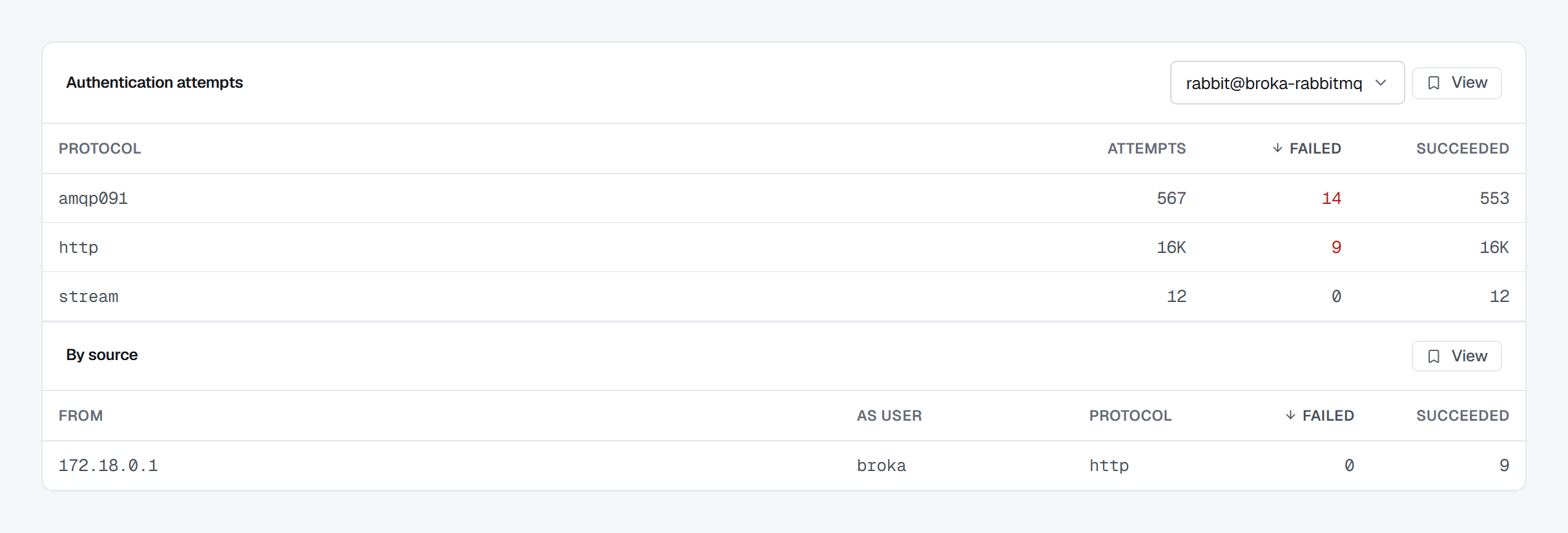
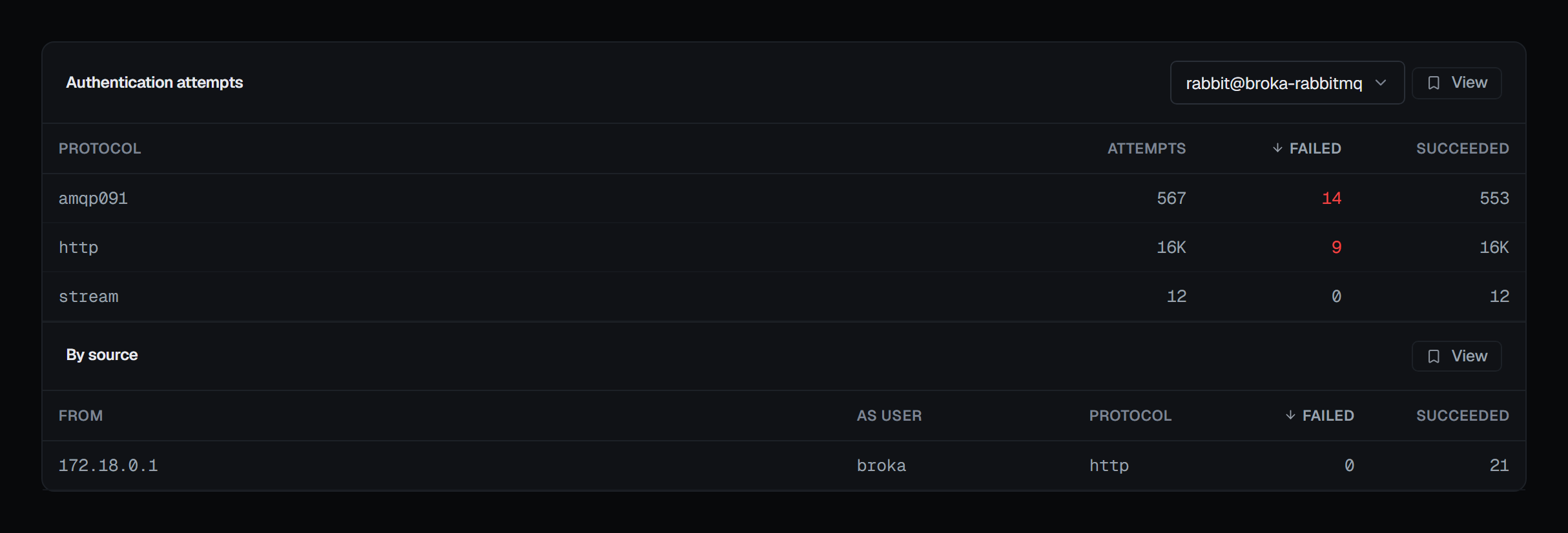
At the foot of the page, below the topic permissions, Authentication attempts counts sign-ins against one node, by protocol: Attempts, Failed and Succeeded, with a failed count above zero coloured. Each node keeps its own counts, so the node is chosen at the top of the card.
The failed count is the reason it is here. A client retrying with a rotated password, or something guessing at the AMQP port, shows nowhere else — the connection list holds only those that got in.
Where the broker is set to track where attempts come from, a second table breaks them down by address From, As user and protocol. RabbitMQ does not track that by default, and without it only the per-protocol counts appear.
Definitions
Exporting the cluster's users and permissions with the rest of its topology, and importing them back in bulk, is done on Definitions, together with what an import does to passwords and what it never deletes.