

Connecting and authentication
Updated 29 September 2026 · applies to 1.0.0 · Commercial
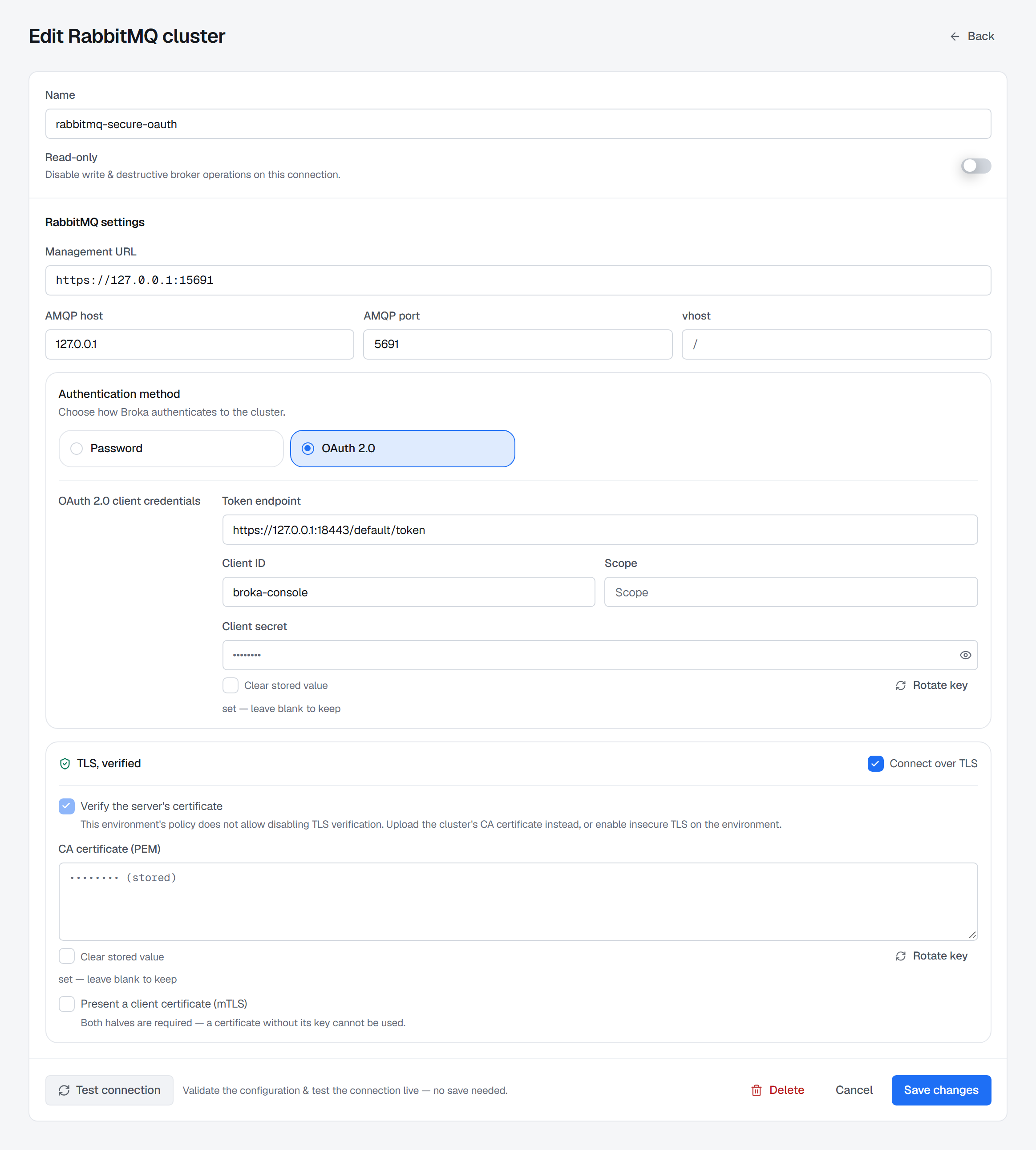
A RabbitMQ connection, created with New RabbitMQ cluster in the cluster switcher, tells BROKA where the management API and AMQP are and how to sign in to both. The form is the same when you edit a saved connection from Manage clusters. Its name, its read-only switch and the environment it joins are common to every platform and are described on Connections; this page covers the RabbitMQ settings below them, and what the connection test proves.
Management URL and AMQP endpoint
Management URL is the address RabbitMQ's management UI runs on, usually port 15672 — for example
https://host:15672. Paste what your browser shows: the UI address and the API root (ending in /api)
are both accepted. Every screen BROKA shows reads through this API, so a connection without it cannot
be used. The address must be http or https, must not carry credentials in it, and must not point
at a link-local or cloud-metadata address.
AMQP host, AMQP port and vhost are where publishing, purging and reading a stream go,
because those three are made over AMQP rather than over the management API. Left empty, the AMQP host
is the management URL's host, the port is 5671 over TLS or 5672 without, and the virtual host is /.
Each of the three is kept on its own: a port or a virtual host typed with the host left empty applies to
the management URL's host.
Authentication method
The Authentication method card offers Password or OAuth 2.0, and the choice applies to the management API and to AMQP alike.
- Password — a Username and a Password. The management API receives them as HTTP basic authentication, and AMQP as a plain username and password.
- OAuth 2.0 — a Token endpoint, a Client ID, an optional Scope and a Client
secret. The token endpoint must be an absolute
httporhttpsaddress; the connection cannot be saved without it and the client ID.
With OAuth 2.0, BROKA runs the client-credentials grant against the token endpoint, authenticating the client with its ID and secret. It presents the access token it receives as the bearer token on the management API, and as the password on AMQP. A token is reused until shortly before it expires; a changed endpoint, client, scope or secret fetches a new one. Leave Scope empty to receive the client's default scope.
The token endpoint receives the client secret, so its certificate is always verified — against the
standard public authorities and the connection's own CA, if it has one — whatever the connection's own
verification switch says. Use an https endpoint: over http the secret travels unencrypted.
RabbitMQ has to accept the token too: it must be set up for your identity provider (its resource server
id and signing keys), and the token must carry the scopes each request needs — a rabbitmq.tag scope
such as rabbitmq.tag:monitoring for the management API.
Transport security
The Transport security card's heading says what its switches add up to: Plaintext, TLS, verified, or TLS, unverified — insecure.
- Connect over TLS — AMQP is dialled over TLS. The management API follows its own URL: an
httpsaddress is dialled with the same CA, client certificate and verification setting as AMQP. - Verify the server's certificate — on by default. The form's own words: "Off trusts any certificate at all, including one an attacker presents. Uploading a CA below is the alternative, not the same thing." With it on, AMQP also checks that the certificate names the host dialled.
- CA certificate (PEM) — the authority your cluster's certificate is signed by, for a private or self-signed one. It does not relax verification; it adds one more authority to trust.
- Present a client certificate (mTLS) — a Client certificate (PEM), a Client private key (PEM, PKCS#8) and an optional Key passphrase. Both halves are required: a certificate without its key, or a key without its certificate, is refused with a sentence saying which is missing.
- Authenticate AMQP with this certificate (SASL EXTERNAL) — offered inside the client-certificate block. AMQP then takes its identity from the client certificate instead of the method above. The management API still uses the method above, because it takes no certificate as an identity.
An environment whose Insecure TLS setting is off locks the verification switch on, and says why: "This environment's policy does not allow disabling TLS verification. Upload the cluster's CA certificate instead, or enable insecure TLS on the environment." The server refuses the save in the same case, so the lock cannot be bypassed. A connection that already had verification off keeps it.
Every secret on this form — the password, the client secret, the CA, the certificate, its key and the passphrase — is stored write-only and never shown back. Editing a connection shows a stored secret as set rather than as its value, and a field left blank keeps what is stored.
What the connection test proves
Test connection runs against what is on the form, before anything is saved; the line beside it reads "Validate the configuration & test the connection live — no save needed." The test is made by BROKA's broker service, never by the console's API.
It proves the management API first, by doing the work: it reads the cluster overview and the node list. That proves in one step that the management port answers, that the credentials are accepted and that the account's tag is enough to read anything at all. A pass reads OK with the round trip in milliseconds.
A test that passes then does two more things, and speaks only when it finds a problem: it asks the broker who the credentials sign in as, and it dials AMQP with the connection's own host, port, TLS and virtual host, allowing five seconds. The verdict stays the management API's, and what these two find is shown after OK, in amber rather than green:
- "Signed in as …, tagged … — not an administrator, so the broker refuses this account changes to users, virtual hosts and the cluster." The account reads everything and meets refusals on those writes, so it is said at test time rather than at the first refused change.
- "AMQP on host:port did not accept the connection: … Publishing, purging and stream reads go over AMQP." The reads work; those three will not until the AMQP endpoint does.
A healthy connection gets no sentence at all. Once saved, the connection's own page also lists the features its server supports, as described on Connections.
When the test fails
A failed test shows an error code and then one sentence. The sentence names the cause:
| The test says | What it means |
|---|---|
| RabbitMQ rejected these credentials. Either the username/password is wrong, or the user has no management tag … | RabbitMQ answers both with the same refusal: check the password, then the account's tags — the management API is closed to an account without one |
| RabbitMQ refused this connection's OAuth 2.0 access token … | The identity provider issued a token RabbitMQ does not accept: RabbitMQ is not set up for that provider, or the token lacks the scopes the request needs |
| The identity provider at … refused this connection's client credentials (…). Check the client id and secret. | The client ID or secret is wrong; the parentheses carry the provider's own words, such as invalid_client |
| The identity provider at … refused the requested scope (…). | The provider does not grant that scope to this client; correct it, or leave it empty for the default |
| Could not reach the identity provider at … | The token endpoint's address or port is wrong, or the network does not reach it |
| The cluster's certificate is not signed by a certificate authority BROKA trusts … | A private or self-signed certificate: upload its CA in CA certificate (PEM) |
| The cluster's certificate has expired. | Renew the certificate on the broker |
| The certificate does not cover the address you connected to: … | The certificate does not name the host in the URL; connect with a name it carries |
| Could not reach the RabbitMQ management API (…) | The host or port is wrong, or nothing listens there; "connection refused" usually means the port — the management port is usually 15672 |
| This connection has no RabbitMQ management URL … | Fill in Management URL; an AMQP host alone is not enough |
| This connection has a client certificate but no private key … (or the reverse) | Supply both halves of the client certificate, or neither |
| Refusing to connect to a link-local / metadata address … | The address resolves to a link-local or cloud-metadata address, which BROKA never dials |
A problem that only AMQP meets — a firewall that lets the management port through and not the AMQP one, a wrong AMQP host, an account refused on the virtual host, a certificate the AMQP listener rejects — does not fail the test. It arrives inside the amber AMQP sentence above, in the broker's or the network's own words.