

Definitions
Updated 1 October 2026 · applies to 1.0.0 · Commercial
Definitions, under RabbitMQ in the sidebar, exports a cluster's or one virtual host's topology as a JSON document and imports one back as a merge. It is for a migration, a review or a rebuild, and it is the one screen that writes users and permissions in bulk; one account at a time is done on Users and permissions.
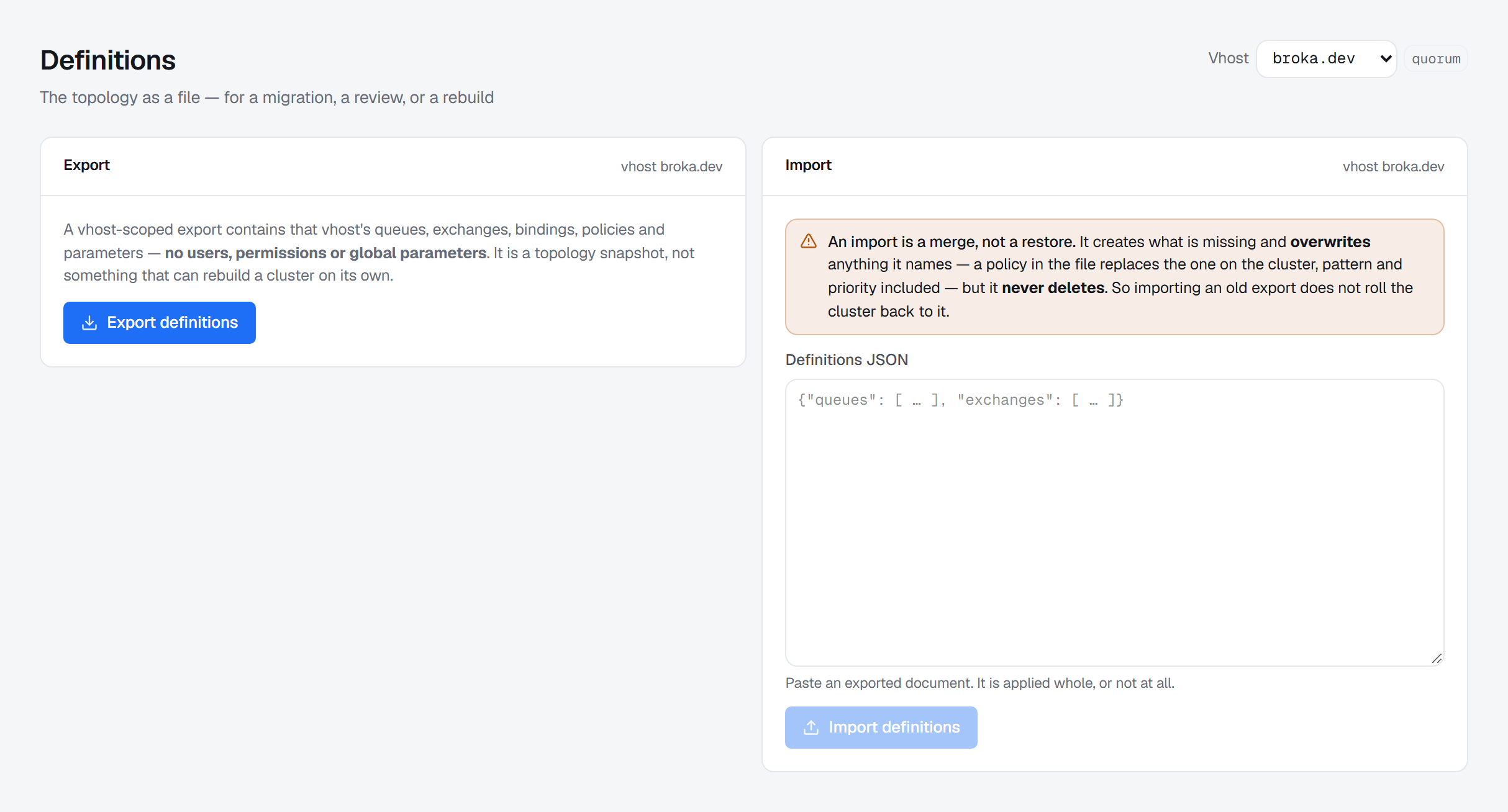
Both halves act on the scope chosen with Vhost in the page header: a virtual host, or All vhosts, which is the whole cluster. Each card names the scope it is working on.
Definitions: export
An export is the cluster's topology as a document — vhosts, users, permissions, queues, exchanges, bindings, policies and parameters — and BROKA always scrubs it. There is no unscrubbed option.
A vhost-scoped export is a topology snapshot and says what it is not — that virtual host's queues, exchanges, bindings, policies and parameters, and no users, permissions or global parameters. It cannot rebuild a cluster on its own.
Export definitions runs it. The card then counts what the document holds, by kind, and offers
Download JSON — a file named rabbitmq-definitions-cluster.json, or after the virtual host — Copy,
and the document itself to read in place.
What the export removes
The broker's own export carries every account's password hash and the passwords inside shovel and federation URIs. BROKA removes them before the document leaves the broker service, because a definitions file is the kind of thing that gets attached to tickets and committed to repositories.
What is removed, precisely:
- Every account's password hash. The account, its tags and its limits stay; the hash is deleted rather than blanked.
- The passwords inside shovel and federation URIs. The username stays — a topology export with no destinations in it would be useless. A URI given as a list, which is how failover across several brokers is written, is cleaned element by element.
- A secret carried in a URI's query, such as a TLS key's
password, is removed with its parameter. - A URI that is not plainly
scheme://user:password@host…is emptied, not passed through — one with an@anywhere outside the user part, say — because a URI it cannot read for certain is one it cannot promise it cleaned.
When anything was removed, the card says how many — N credential(s) removed — and what an import of that file does with them, which the import section below describes.
An export of the whole cluster carries its users and permissions, so it also needs the grant to view ACLs on that connection; without it the export is refused, not quietly trimmed. A virtual host's export carries neither, and does not need it.
Every export is recorded in the audit trail as a privileged read: who took it, of which scope, how many objects of each kind and how many credentials were removed. The document itself is not recorded.
Definitions: import is a merge, not a restore
The single most important sentence on that screen, and the one people reach for "import" expecting the opposite of:
An import is a merge, not a restore. It creates what is missing and overwrites anything it names — a policy in the file replaces the one on the cluster, pattern and priority included — but it never deletes. So importing an old export does not roll the cluster back to it.
The confirmation adds the part that is RabbitMQ's own guarantee: if any single object cannot be applied, the whole import is rejected and the cluster is left as it is — a queue in a virtual host that does not exist is enough. That is the broker's behaviour, not BROKA's — there is no staging, no partial apply and no rollback on this side.
The document is pasted into Definitions JSON; there is no file picker. Before anything is sent, it is parsed and its contents counted — This document would apply: and a count per kind — so you can see what it would apply while it is still just text in a box. Text that is not JSON, or JSON that is not an object, is named under the field, and Import definitions stays disabled until there is a document.
With a virtual host chosen, the document is imported into that virtual host. With All vhosts, it is imported into the cluster, each object into the virtual host it names.
Passwords on import
An exported file has no passwords in it, and an import puts back what the export took out wherever the cluster still has it:
- A user the cluster already has, arriving without a password, keeps the password hash the cluster has stored. The file's tags and limits still apply to it.
- A shovel or federation URI left exactly as exported gets its stored password back. A URI that differs in any way — another host, another user, a password typed into the file — is an edit, and goes through as written. Each URI in a failover list is matched on its own.
- A user or link the cluster does not have arrives without a password, and somebody has to set one.
- A URI the export had to leave empty stops the import before anything is sent. The message names the shovel or federation upstream and its virtual host; put the real URI back in the file, or remove that shovel or upstream from it.
Who may import, and what is recorded
An import overwrites what it names with no undo, so it is treated as a destructive write. The Import card shows the field only where that write is allowed; where it is not, the card says why in its place — the environment is read-only, the connection is marked read-only, or your role is not permitted to perform it.
Import definitions opens a confirmation titled Import definitions into the scope, which repeats what the import will do and asks for a Reason; Import stays disabled until there is one.
An import that carries users, permissions or topic permissions changes who may do what on the broker, so it also needs the grant to manage ACLs on that connection. Without it the import is refused as a whole — it is not applied with those parts stripped out.
The audit trail records the import with its scope, your reason and how many objects of each kind the file held — not the file, which names every queue and user it carries.
When an import does not do what you expected
| What you see | Why |
|---|---|
| Objects that are not in the file are still on the cluster | An import never deletes; it is a merge |
| A policy, queue or user changed to what the file says | An import overwrites every object it names |
| The import was rejected and nothing changed | One object in the file could not be applied, so the broker rejected all of it |
| The import is refused, naming a shovel or federation upstream with an empty URI | The export could not clean that URI and left it empty; put the real URI back or remove the entry |
| The import is refused because the file carries users or permissions | That part needs the grant to manage ACLs; without it nothing is applied |
| The whole-cluster export is refused | Exporting users and permissions needs the grant to view ACLs; a virtual host's export does not |
| An imported account cannot sign in | It was new to the cluster, so it arrived without a password; set one on Users and permissions |
| The Import card shows a sentence instead of the field | The environment or the connection is read-only, or your role may not make this write |