
Replication flows
Updated 6 November 2026 · applies to 1.4.0 · Commercial
Kafka ▸ Replication shows the MirrorMaker 2 flows into and out of a Kafka cluster — each flow's state, lag, heartbeat, topics and consumer-group checkpoints — creates a flow into it from two registered Kafka connections, and pauses, resumes, restarts, stops or removes a flow as one.
It opens from Kafka ▸ Replication, beside Connect. In Broka Community the entry is there, tagged Commercial, and opens a page that says what replication flows are. Where the Kafka Connect clusters registered on the cluster lack MirrorMaker 2's connectors, the entry is disabled, with the reason on hover. A cluster with no Kafka Connect cluster registered — a flow's source, typically — keeps the entry: its page lists the flows leaving it.
What a flow is
MirrorMaker 2 runs on Kafka Connect as three connectors: MirrorSourceConnector copies topics from the source
cluster, MirrorCheckpointConnector translates consumer groups' committed offsets for the target, and
MirrorHeartbeatConnector writes a heartbeat to the target at a fixed interval. A flow is those three on one
Kafka Connect cluster under one source and target alias — source.cluster.alias and target.cluster.alias — read and
acted on as one, and named by its aliases: edge-us → core-eu.
BROKA finds a flow's connectors by their class and their aliases, never by their names, so a flow created by hand, by a script or by another tool is found as it is. A flow without its source, checkpoint or heartbeat connector is listed as Incomplete, and a second connector in one role is reported in its warnings.
A Kafka Connect cluster is registered on the Kafka connection its workers write to (see Kafka Connect), so the cluster you are in is the target of the flows its Connect clusters run. BROKA compares the Kafka cluster id the workers report with the connection's, and warns when they differ.
BROKA keeps nothing about a flow except a source link you make (below). Everything else is read each time from Kafka Connect and from the two clusters.
Finding the source cluster
A flow's figures — its lag, how many of its topics are on this cluster, its groups' failover readiness — need the
source cluster, so BROKA looks for the registered Kafka connection the flow reads from. It compares the addresses in the
connectors' source.cluster.bootstrap.servers with every Kafka connection's bootstrap servers, its Address as seen
from Connect workers, and the Kafka bootstrap of each of its Connect clusters, and takes the connection that shares the
most addresses; a tie matches none. Addresses are compared as written, host and port, without a DNS lookup.
Workers often reach a cluster at an address BROKA does not use, such as a name inside a container network. Two things connect the flow to its source then:
- Address as seen from Connect workers, in the Advanced section of the source's Kafka connection
(Connections), takes the
host:portpairs the workers use. - Link source cluster…, in a flow's ⋯ menu while its source is not linked, names the source connection: any other Kafka connection you may view, grouped by environment. The link is kept on the Connect cluster's registration, under the flow's source alias, and needs the permission to manage this cluster.
An unlinked flow is still listed. Its Flow cell says Source not linked — with the addresses its workers use, where your role may manage this cluster — and every figure that needs the source is a dash with the reason on hover.
The flow list
Each row is one flow:
- Flow — the aliases,
source → target, and beneath them the source connection and its environment. - Direction — Into this cluster, or Out of this cluster (below).
- Connect cluster — the Connect cluster that runs it.
- State — the flow's state, described below.
- Topics — the topics replicated to this cluster out of the topics the flow's filters match,
12 / 12; amber while some are not here yet. - Lag — the records on the source the flow has not copied yet, summed over its partitions.
- Heartbeat — the age of the flow's newest heartbeat on this cluster.
- Last checkpoint — the age of its newest consumer-group checkpoint.
- Policy — the replication policy: Default, which names a replicated topic after its source alias
(
edge-us.orders), Identity, which keeps the name, or a custom policy by its class name.
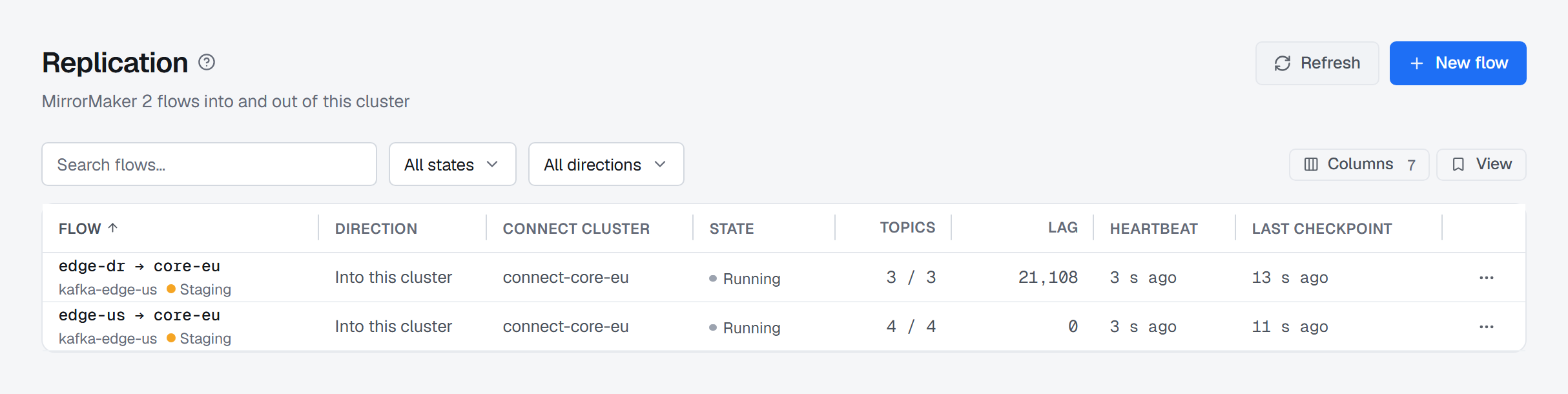
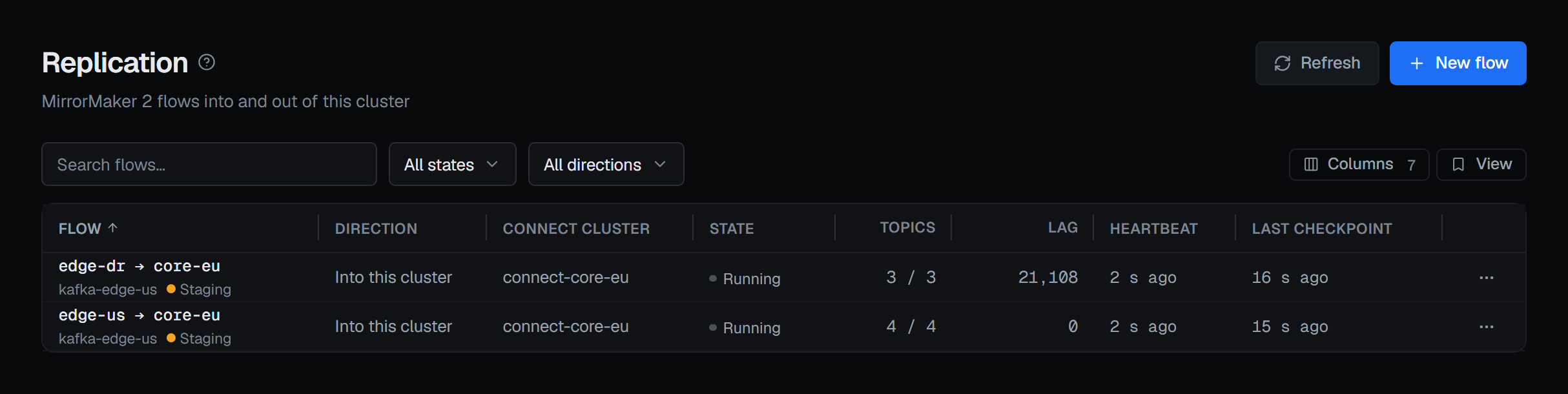
Columns adds Sync offsets — whether translated offsets are written to this cluster's groups — Exactly-once and Tasks, running out of all. The search box matches a flow's aliases, its Connect cluster and its source connection; beside it are filters for the Connect cluster, where more than one is registered, the state and the direction. A row opens the flow. Its ⋯ menu holds the writes described below and Open connectors, which opens the Connect cluster with the flow's connectors in its search.
A Connect cluster that did not answer is named above the table, with the reason it gave, and its flows are not listed — rather than listed as none.
State is read from the connectors:
- Running — every connector and every task is running.
- Degraded — a task has failed, or one of its connectors or tasks is not running: a checkpoint or heartbeat connector paused or stopped on its own while the source connector runs makes the flow Degraded.
- Failed — one of its connectors has failed.
- Paused or Stopped — its source connector is.
- Incomplete — one of its source, checkpoint and heartbeat connectors is missing.
- Disabled — one of its connectors is set with
enabled=false. - Observed — named by this cluster's heartbeats and run by no registered Connect cluster (below).
Where several apply, the flow shows the first of Disabled, Failed, Degraded for a failed task, Paused or Stopped, Incomplete, and Degraded for a connector or task that is not running. A state is coloured only when the flow is not doing all its work: Incomplete and Degraded amber, Failed red.
Lag is read from the source connector's committed position, which Kafka Connect writes about once a minute, so it may be up to a minute behind. A partition with no committed position yet is not counted, and hovering the figure says how many there are. The lag is a dash, with the reason, when the source is not linked or not visible to you, when nothing has been committed yet, and on Kafka Connect before 3.5, whose workers do not serve a connector's offsets — the Topics tab then shows each partition's backlog from MirrorMaker's offset syncs instead.
Heartbeat. A heartbeat proves that the worker writes to this cluster under the flow's aliases, not that data flows, so the column shows an age, never "healthy". The age is measured against the flow's own heartbeat interval: plain within three intervals, amber beyond, and red at ten — or whenever the heartbeat connector is not running. A dash means heartbeats are turned off, or none names the flow yet.
Flows leaving this cluster
Kafka Connect says nothing on a cluster about the flows that read from it, but MirrorMaker leaves a trace: while a flow
keeps its offset syncs on its source — MirrorMaker's default — it writes them to an offset-syncs topic there. BROKA lists
each one as a row Out of this cluster, with the target alias it names and, in Lag, a figure such as
≤ 1,204 · sync 12 s ago: the records this cluster holds past the newest offset sync — an upper bound, loose by up to
the flow's offset lag allowance and one commit interval. Every other column reads Managed on the target cluster.
Such a row opens the flow on its target, where BROKA found it on a Connect cluster registered here. A target you may not view is not named: the row says The target cluster is not visible to you. A target in another environment is not opened from this one: the row says to switch to that environment first. A flow that keeps its offset syncs on its target leaves nothing on this cluster and is not listed, which the list says when you filter on Out of this cluster and nothing is there.
A leaving flow that no registered Connect cluster manages is listed only while its newest offset sync is under 10 minutes old. MirrorMaker keeps its offset-syncs topic when a flow is removed, so a removed flow drops off the list about ten minutes after its last sync; one run by MirrorMaker's own driver stays while it syncs, and leaves the list if it goes idle for longer, because MirrorMaker writes a sync only as records flow. A flow a registered Connect cluster manages is always listed. When a figure cannot be read because a topic it needs is not on the cluster, the reason says the cluster answered and the topic does not exist, not that the cluster did not answer.
Observed flows
A flow this cluster's heartbeats topic names that no registered Connect cluster runs — MirrorMaker run by its own
driver, or on a Connect cluster not registered here — is listed with the state Observed. It is shown, not managed:
its heartbeat age, last checkpoint and groups are read from this cluster; it has no lag, no topics, no connectors and no
writes, and its page says why wherever one of them would be.
It is listed only while its newest heartbeat is under 10 minutes old. MirrorMaker keeps its internal topics when a flow's connectors are removed, so a removed flow drops off the list about ten minutes after its last heartbeat; a flow run by MirrorMaker's own driver keeps writing heartbeats and stays, and returns if it writes again after a pause. A flow with connectors is listed whatever the age of its heartbeats.
A flow's page
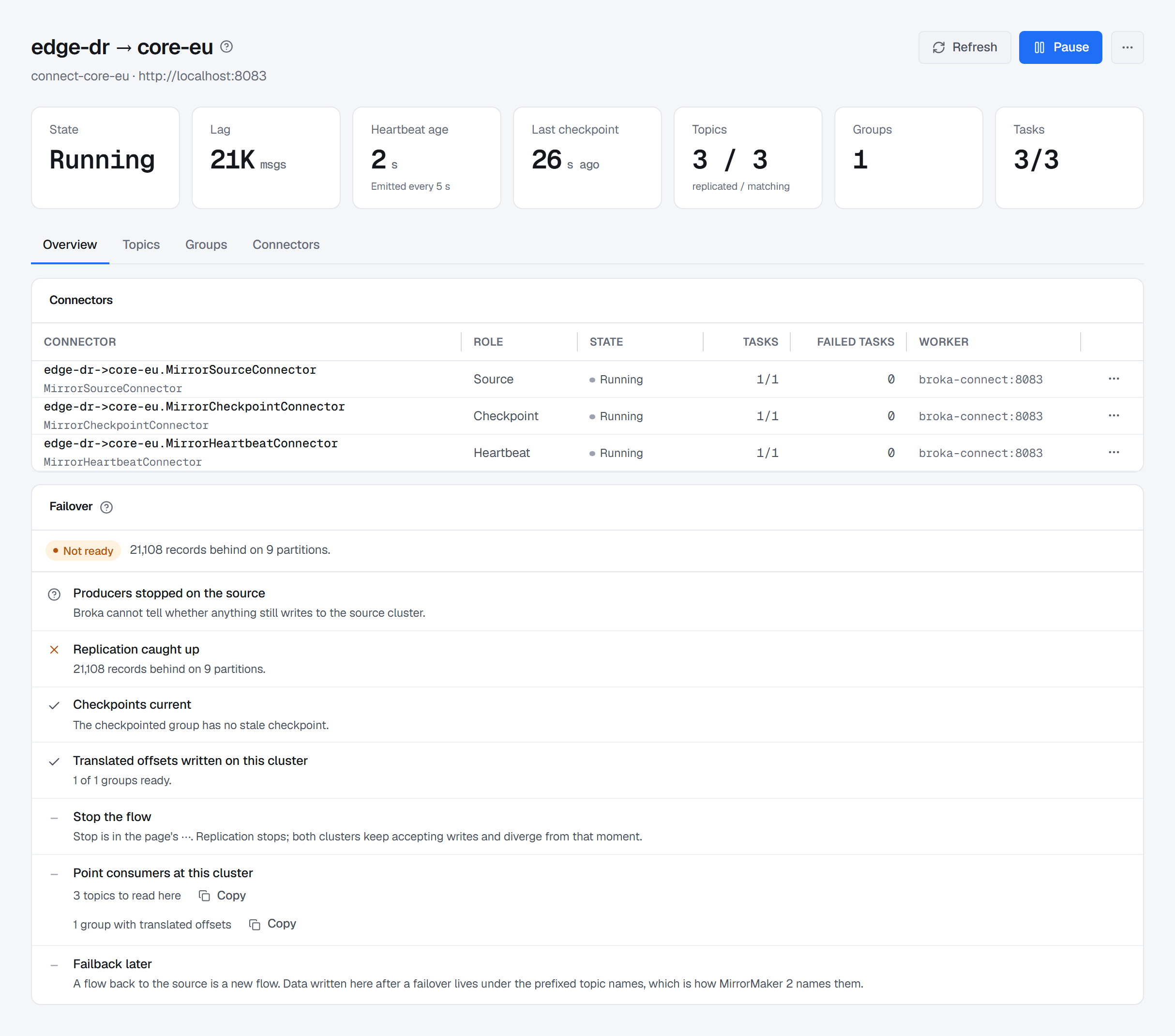
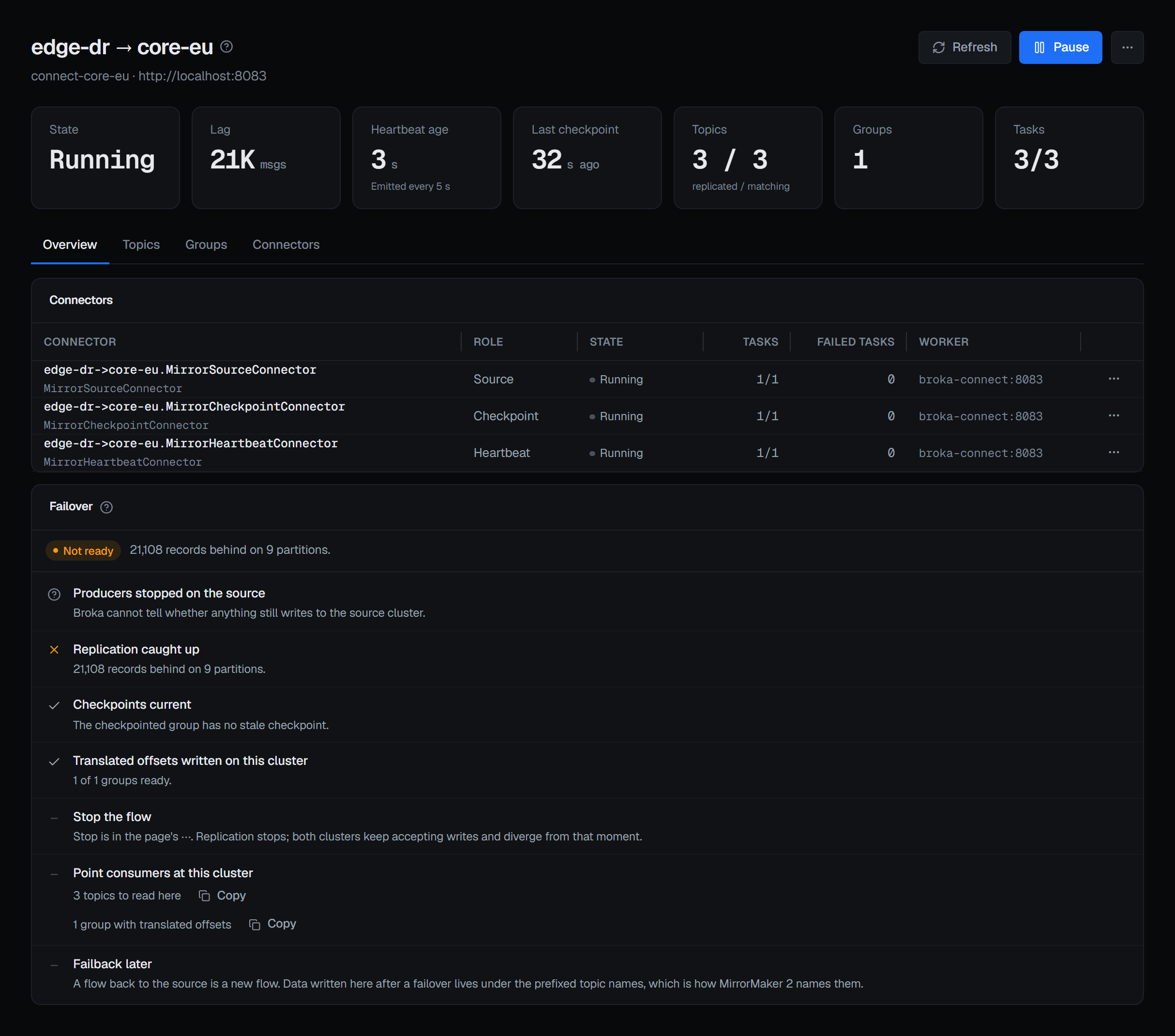
The header names the flow and its Connect cluster, with Refresh and Pause or Resume; Restart, Stop, Remove and, for a flow whose source is not linked, Link source cluster… are in its ⋯ menu. Below it is a band: State, Lag, Heartbeat age with the interval heartbeats are emitted at, Last checkpoint, Topics replicated out of matching, Groups, and Tasks running out of all, with how many have failed.
Then four tabs: Overview, Topics, Groups and Connectors.
The Overview tab
- Connectors — the flow's connectors, one row each: Connector (its name and class), Role, State, Tasks, Failed tasks and Worker. A row's ⋯ menu opens the connector's own page, and pauses, resumes, restarts or stops that connector alone, confirmed as on the Kafka Connect page.
- Failover — whether this cluster could take over from the source, described below.
- Warnings — what is wrong with the flow by construction, whatever the clusters answer: a missing source, checkpoint or heartbeat connector; more than one connector in a role; source and checkpoint connectors that name different offset-syncs locations, or different replication policies or separators; translated offsets not written to this cluster, so that a failover starts from scratch unless offsets are applied by hand; heartbeats turned off; a custom replication policy, whose topic names are read as the default policy's and may be inexact; a source cluster that matches no registered connection; workers that write to a different Kafka cluster than the connection they are registered on; and a replication factor above this cluster's broker count, which stops a new topic being created here.
- Settings — what the connectors say, read-only: the aliases, the replication policy and its separator, the topic and group filters, where the offset syncs are kept, whether translated offsets are written, the heartbeat and checkpoint intervals, the offset lag allowance, the replication factor, whether topic configurations and ACLs are synced, and exactly-once. A key the connectors leave out shows MirrorMaker's default. A setting is changed on the connector's own page, one connector at a time.
- Metrics — the flow's figures from the metric history: its lag and heartbeat age, and any other flow figure an alert rule watches.
Topics
The Topics tab lists each source topic the flow's topic filter names:
- Source topic and Target topic — its name on each side, with Not on the target yet where it has not been created here.
- Partitions — on the source and here, red where they differ.
- Lag — per topic, and per partition on a row opened with its chevron.
- Cleanup policy — a compacted topic is marked: its offsets count records compaction has removed, so its lag can stay above zero.
- Status — Replicating; Not on target; Partition mismatch, where this cluster has fewer partitions; Excluded by filter; or Cycle, a topic that came from this cluster in the first place, which MirrorMaker does not copy back.
A partition's row adds Replicated through, the source offset the flow has committed, and Source end. Where no
committed position is known, its lag is the backlog from MirrorMaker's newest offset sync, shown as
≈ 230 · sync 40 s ago: what the source holds past that sync, less what this cluster holds past it. Columns adds
Last sync — the newest offset sync's source and target offsets, and its age — and Time behind, how far this
cluster's newest record trails the source's.
A topic's ⋯ menu opens the topic's page on the source cluster or, with Open target topic, on this one. One read lists at most 1,000 topics, and says so when it stops there. A topic filter BROKA cannot evaluate in time is reported above the table, and no topic is listed.
Groups and failover readiness
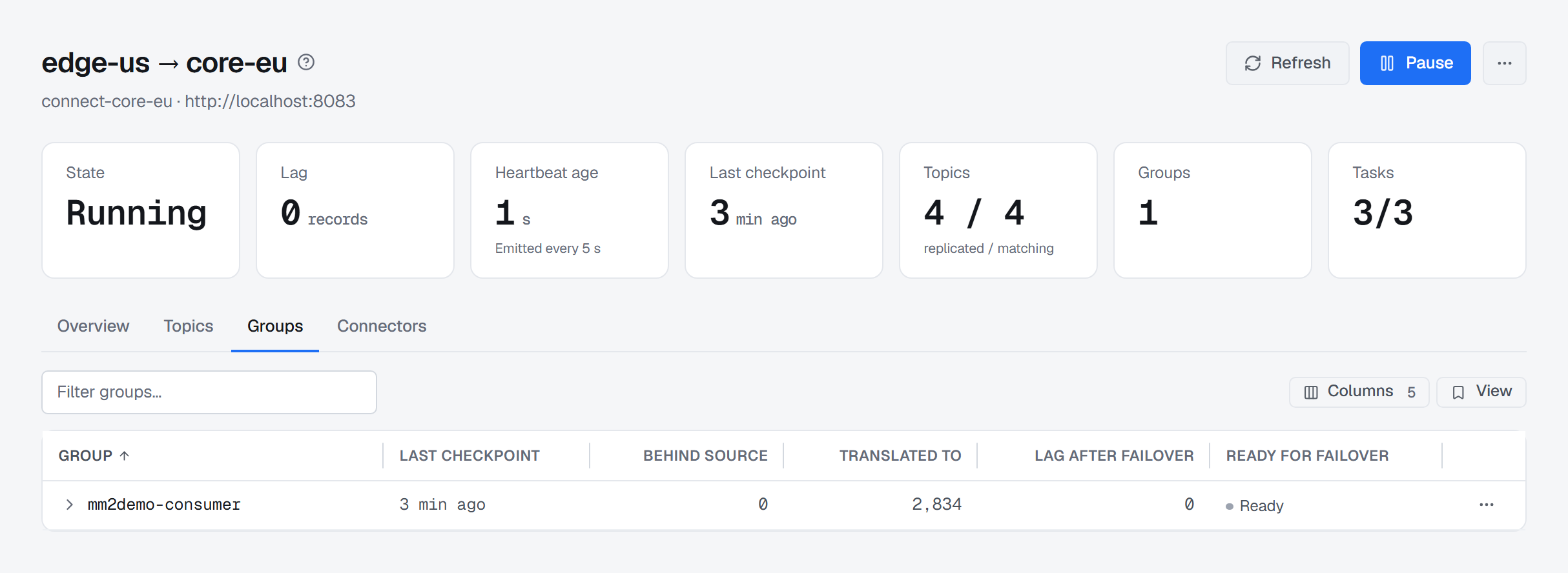
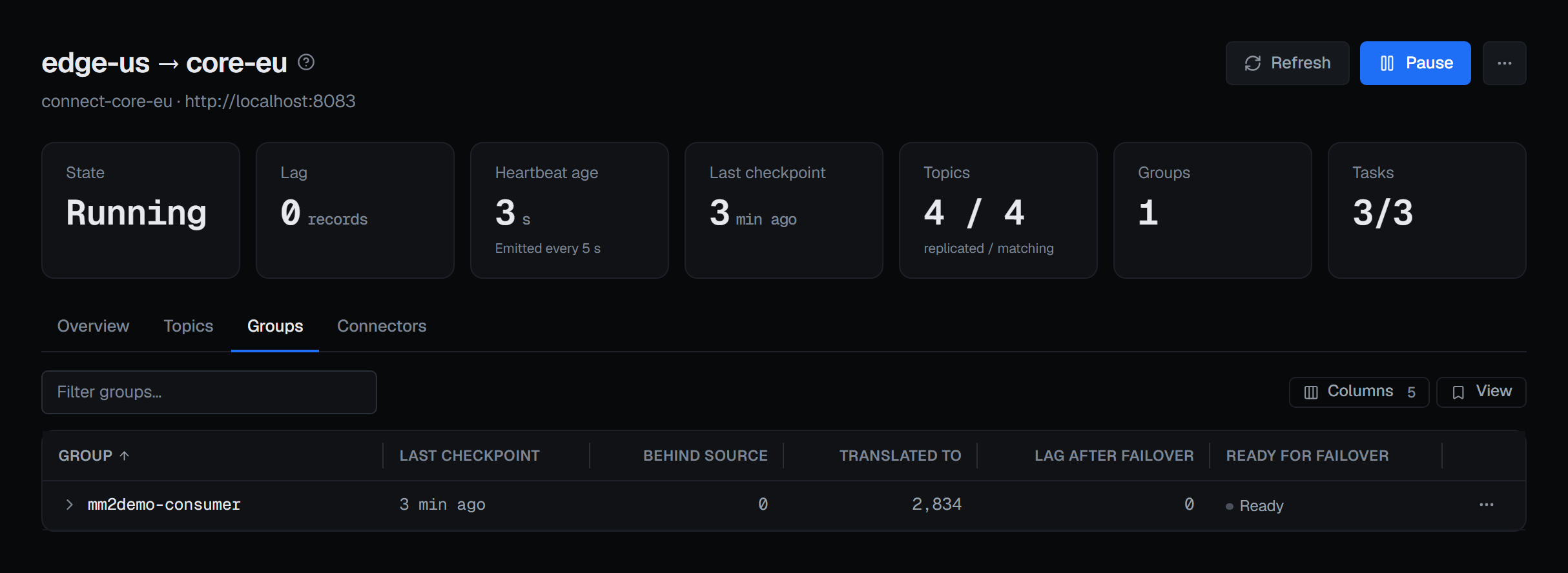
The Groups tab lists each consumer group MirrorMaker checkpoints for the flow:
- Partitions checkpointed — out of the partitions the group has committed on the source.
- Last checkpoint — its age.
- Checkpoint behind source — the records between the group's commit on the source and its newest checkpoint.
- Translated to — the offsets on this cluster that the group's source positions translate to.
- Written to target — Yes, No, Group active on target (the group has members here, so its offsets are not written) or Sync off.
- Lag after failover — the records a consumer started here would read before it caught up.
- Ready for failover — Ready or Not ready.
A group is Ready when every partition it has committed on the source has a checkpoint on this cluster, the checkpoints do not trail those commits, the translated offsets are written to this cluster's group, and nothing consumes the group here. A consumer started here with that group id continues from the translated offsets, and reads again at most the flow's offset lag allowance per partition. Not ready names the clause that fails, on hover: no checkpoint for some partitions, the checkpoint trailing the source's commit, the offsets not written because the sync is off or the group is active here, or not written yet. Where the source cannot be read, readiness is a dash, not a guess.
MirrorMaker 2's own default leaves translated offsets unwritten (sync.group.offsets.enabled off). The groups of a flow
set that way are not ready: a failover would start their consumers from scratch unless offsets are applied by hand.
A group's row opens to its partitions, the target topic and partition on each. Its ⋯ menu has Open group on source and Open group on target. One read lists at most 100 groups, and says so when it is cut short. A filter BROKA cannot evaluate in time is reported above the table, and only the groups already checkpointed are listed.
The failover card
The Overview's Failover card sets out whether this cluster could take over from the source, one line at a time. Each line is a measured fact with a verdict — a muted tick where it holds, an empty ring where it does not, and a dash where it is not known or not BROKA's to know:
- Producers stopped on the source — always a dash: BROKA cannot tell whether anything still writes to the source cluster.
- Replication caught up — no replicated partition is behind its source; otherwise how many records, on how many partitions. A dash, with the reason, where the source is not linked, not visible to you or could not be read, or the flow's topic filter cannot be evaluated: BROKA then cannot tell.
- Checkpoints current — the newest checkpoint is younger than twice the checkpoint interval.
- Translated offsets written on this cluster — how many groups are ready, and for up to three that are not, the clause that fails. A group whose readiness could not be read is counted apart and makes the line a dash, never a group that is not ready. Where no group is listed because the source is not linked, not visible to you or could not be read, or a filter cannot be evaluated, the line is a dash with that reason, as line 2 is.
- Stop the flow — holds once the flow is stopped.
- Point consumers at this cluster — the topics to read here and the groups with translated offsets, each list with Copy — or, where either cannot be listed for one of those reasons, that BROKA cannot tell, with the reason.
- Failback later — a flow back to the source is a new flow, created the other way round; under the Default policy, data written here after a failover lives under the prefixed topic names.
Lag can trail by up to a minute, so a zero is a reading, not a promise. The card is read-only and BROKA has no failover button: stopping the flow is the page's own Stop, and moving the consumers is yours.
Links to the source cluster
A topic's or a group's page on the source cluster opens from the flow — from the Topics tab's ⋯ menu, or Open group on source on the Groups tab — only when the source cluster is in the environment you are working in. Otherwise the menu item is disabled, with the reason — The source cluster is in the Staging environment — switch to it to open this topic. — because a page opened under one environment's banner would show another environment's cluster with this one's guardrails. The item is disabled as well while the source is not linked, or not visible to you.
When you may not see the source
A flow into this cluster is listed for every role that may view this cluster, whether or not it may view the source cluster. Where it may not, the source's name is not shown, the figures read from the source — the lag and the topic counts — are dashes with The source cluster is not visible to you., and the Topics and Groups tabs list no rows, since each row names topics, groups and positions read from the source. The addresses the workers use for the source are shown only to a role that may manage this cluster.
Pausing, stopping and removing a flow
A flow's writes act on all of its connectors at once, from the row's ⋯ menu or from the flow's page:
- Pause and Resume take one click.
- Restart asks first: it restarts the flow's connectors and all of their tasks, and in-flight records are delivered again from the last committed offset, so the target may see duplicates.
- Stop asks first, with a reason: replication stops, and both clusters keep accepting writes and diverge from that moment.
- Remove asks first, with a reason: it deletes the flow's connectors from the Connect cluster. The replicated topics and MirrorMaker's internal topics stay, and the removal cannot be undone.
Pause and Stop act on the source connector first, then the checkpoint connector, then the heartbeat connector; Resume goes the other way round. If Kafka Connect refuses a connector part-way, the error names the connectors that were acted on and those that were not. One connector can also be paused, resumed, restarted or stopped on its own, from the Overview's Connectors.
Every write needs the permission to manage this cluster, and is disabled with the reason in a read-only environment, on a connection marked read-only, or for a role that may not. Stop and Remove ask for a reason in every environment; Pause, Resume and Restart ask for one only where the cluster's environment is guarded.
Resuming a flow that keeps its offset syncs on its source — MirrorMaker's default — has the flow write on the source again, so the source's environment is asked as well: the resume is refused where that environment is read-only, and asks for a reason where it is guarded.
Creating a flow
New flow, beside Refresh above the flow list, creates a flow into the cluster you are in: MirrorMaker 2's three connectors on one of its registered Kafka Connect clusters, set up from two registered Kafka connections. It is disabled, with the reason on hover, where no Kafka Connect cluster is registered here or none here has MirrorMaker 2's connectors; where there is no other Kafka connection you may view to replicate from — Register the other Kafka cluster as a connection first.; and wherever a connector could not be created on this cluster — in a read-only environment, on a connection marked read-only, or for a role that may not manage it. Where more than one applies, the button gives the first in that order.
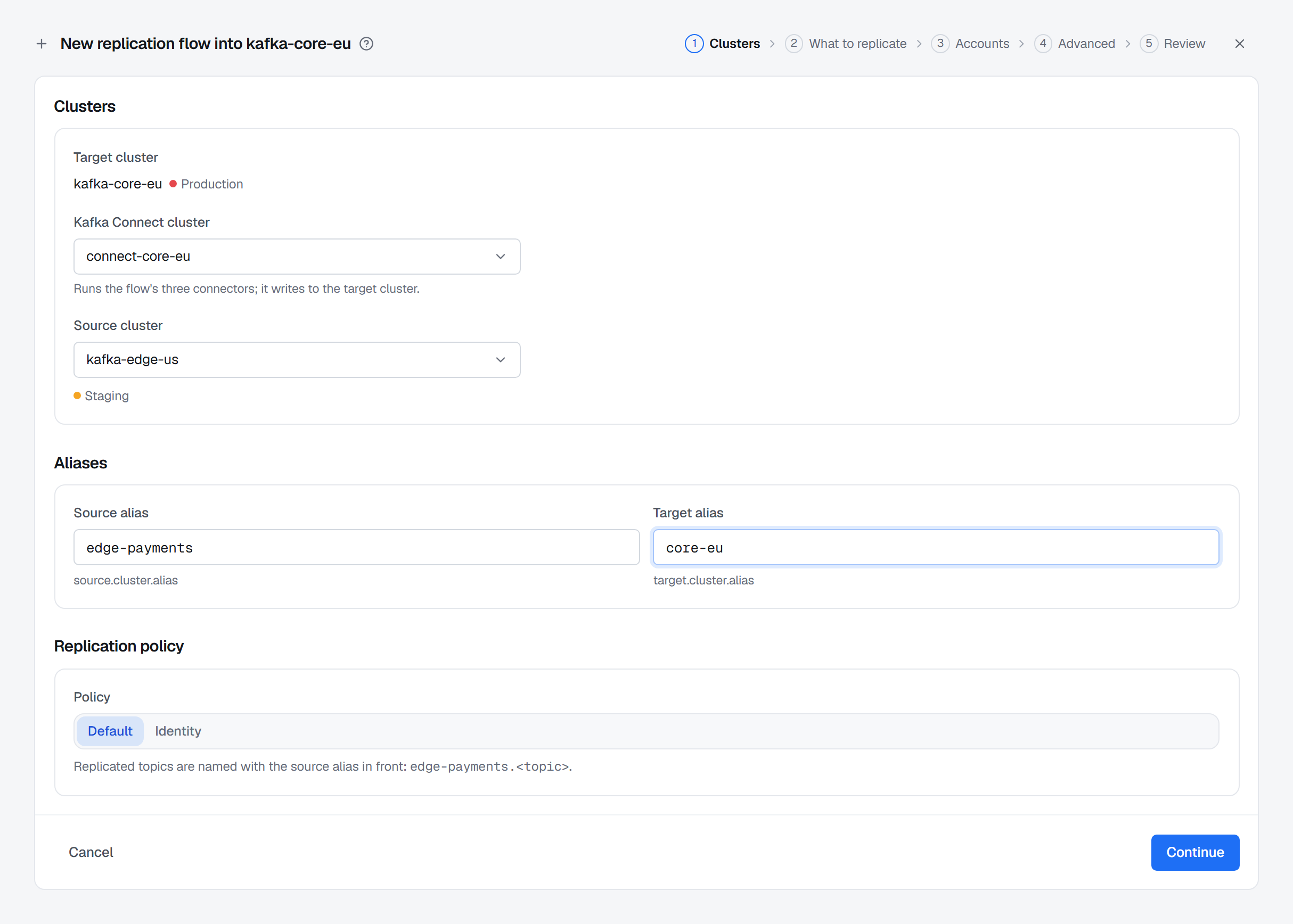
It opens a page of five steps: Clusters, What to replicate, Accounts, Advanced and Review.
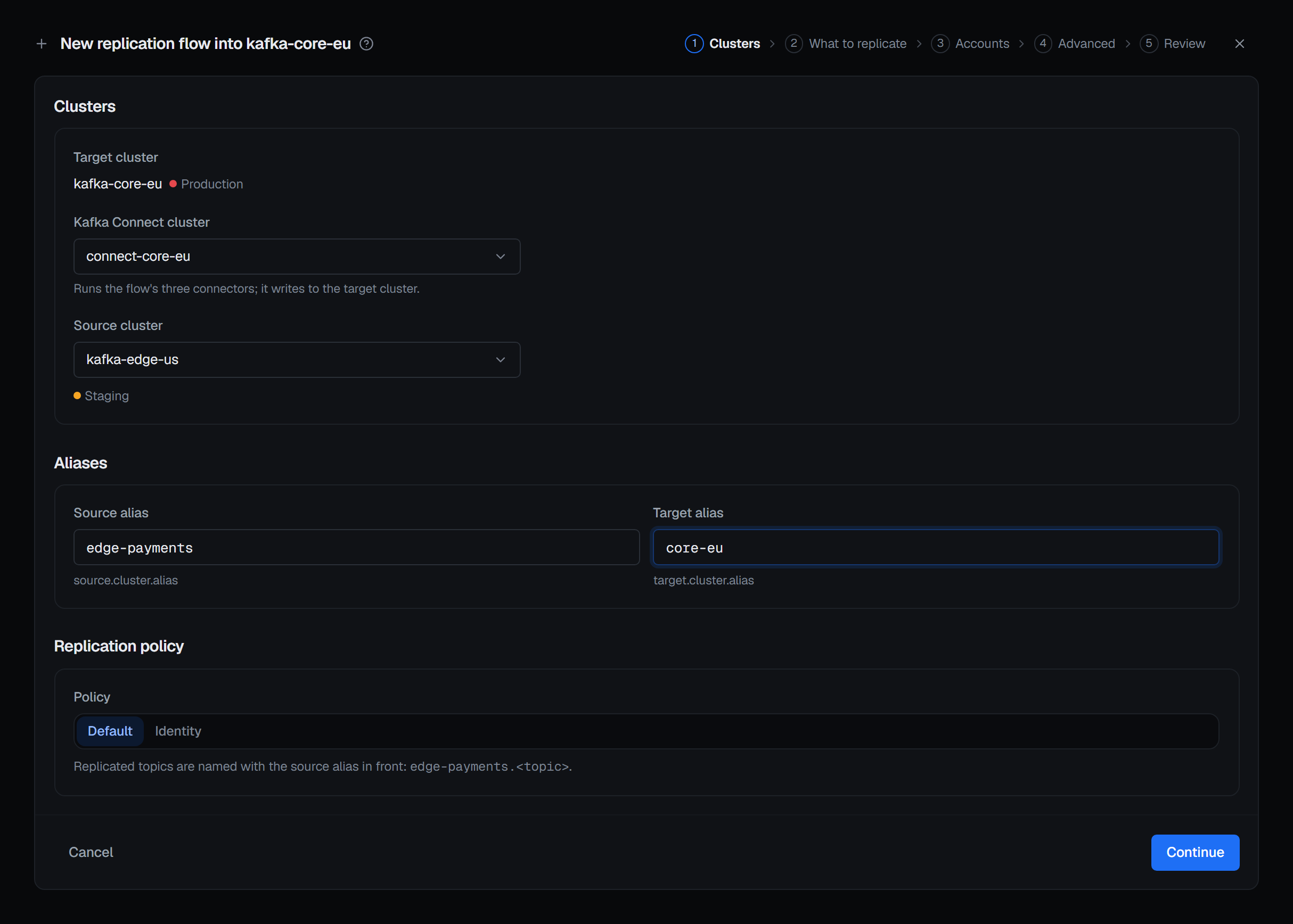
Clusters. The target is this cluster, shown with its environment. Kafka Connect cluster is the registered
Connect cluster that runs the flow's connectors; one that did not answer, or whose workers do not offer
MirrorSourceConnector, is disabled with the reason, and where only one can run a flow it is chosen for you. Source
cluster is any other Kafka connection you may view, in any environment, grouped by environment; one you may not
manage is disabled, with the reason. Source alias and Target alias are filled in from the two connections'
names — in lower case, in letters, digits, hyphens and underscores — until you type your own. An alias may hold what a
topic name holds — letters, digits, ., _ and - — but not the replication policy's separator, a dot by default,
because MirrorMaker reads a replicated topic's source alias up to the first one; and the two aliases differ. Policy
is Default, which names a replicated topic after its source alias (edge-us.orders), or Identity, which keeps
the name: BROKA then cannot tell a replicated topic from a local one, and the replication between your clusters must
have no cycle.
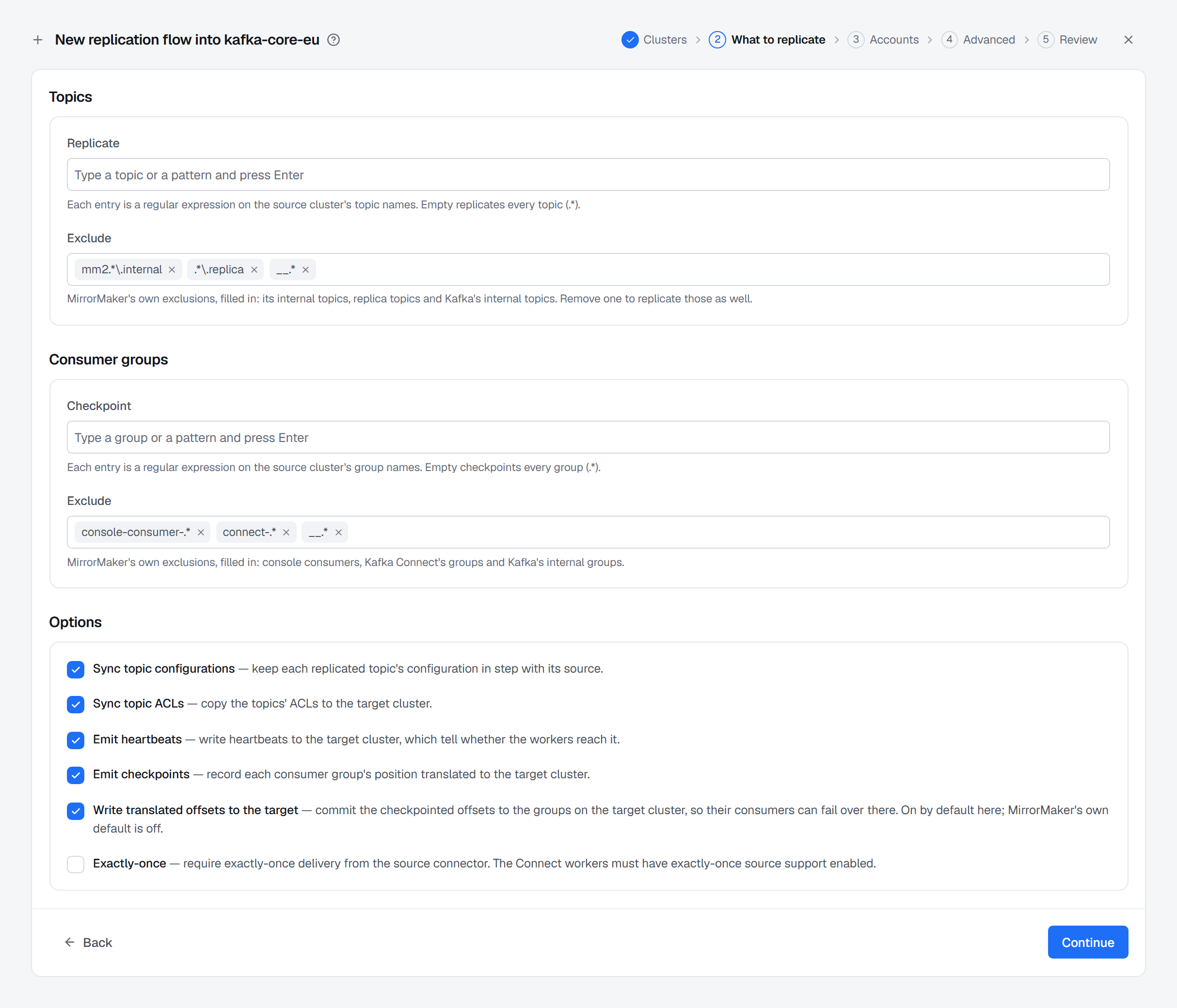
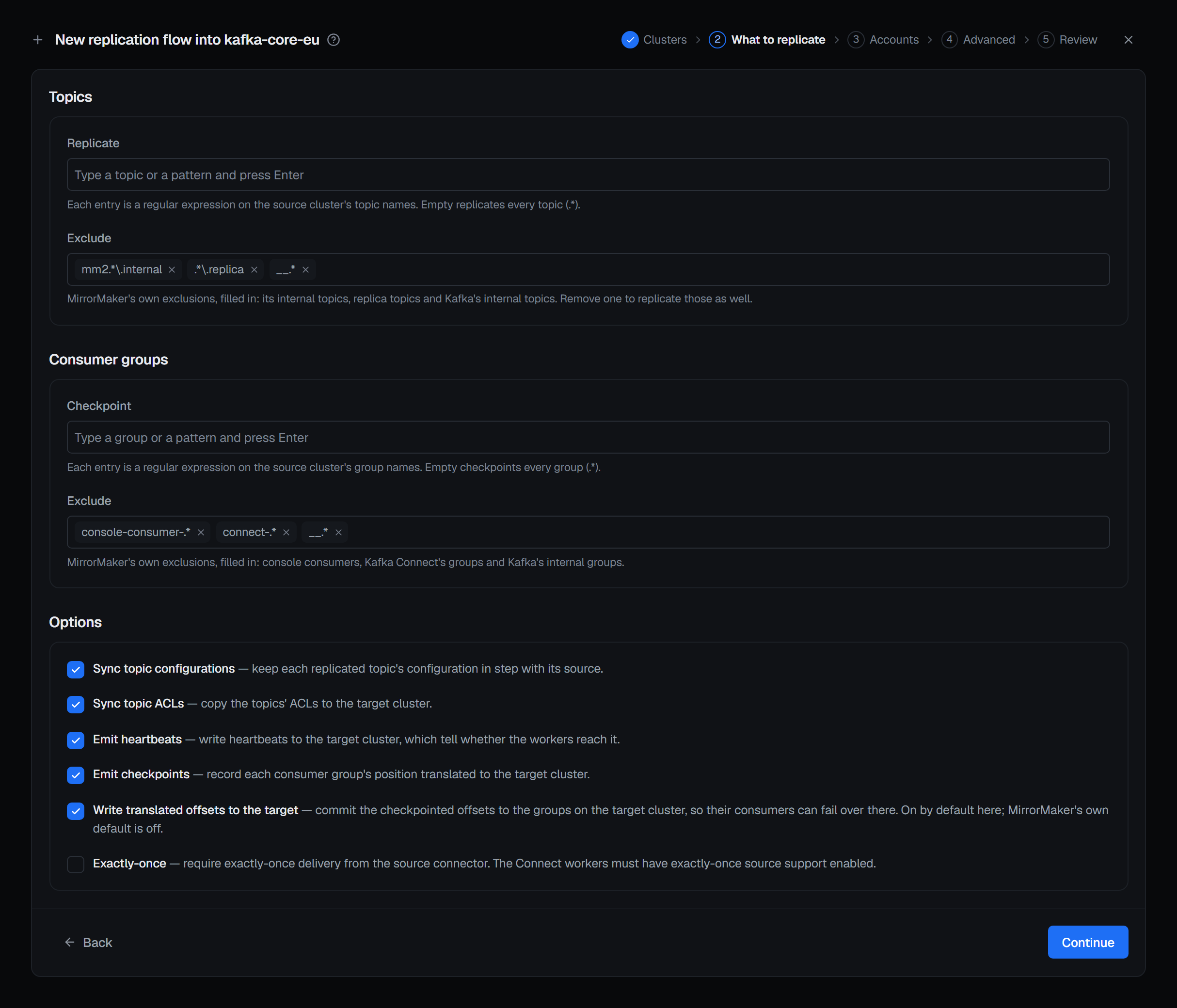
What to replicate. Under Topics, Replicate and Exclude, and under Consumer groups, Checkpoint and Exclude, are lists of regular expressions on the source cluster's names, each typed or picked from the source's own topics and groups. An empty Replicate takes every topic, and an empty Checkpoint every group. Both Exclude lists start filled with MirrorMaker's own exclusions — its internal topics, replica topics and Kafka's internal topics; console consumers, Kafka Connect's groups and Kafka's internal groups — which you may remove. A pattern cannot hold a comma, since MirrorMaker reads each list comma-separated. Options holds the flow's switches:
- Sync topic configurations, Sync topic ACLs, Emit heartbeats and Emit checkpoints — on, as MirrorMaker has them.
- Write translated offsets to the target — on. MirrorMaker's own default is off, and a flow set that way leaves its groups not ready for failover.
- Exactly-once — off. Turned on, it requires exactly-once delivery from the source connector, which the Connect workers must have enabled; what Kafka Connect says about that is shown beneath it.
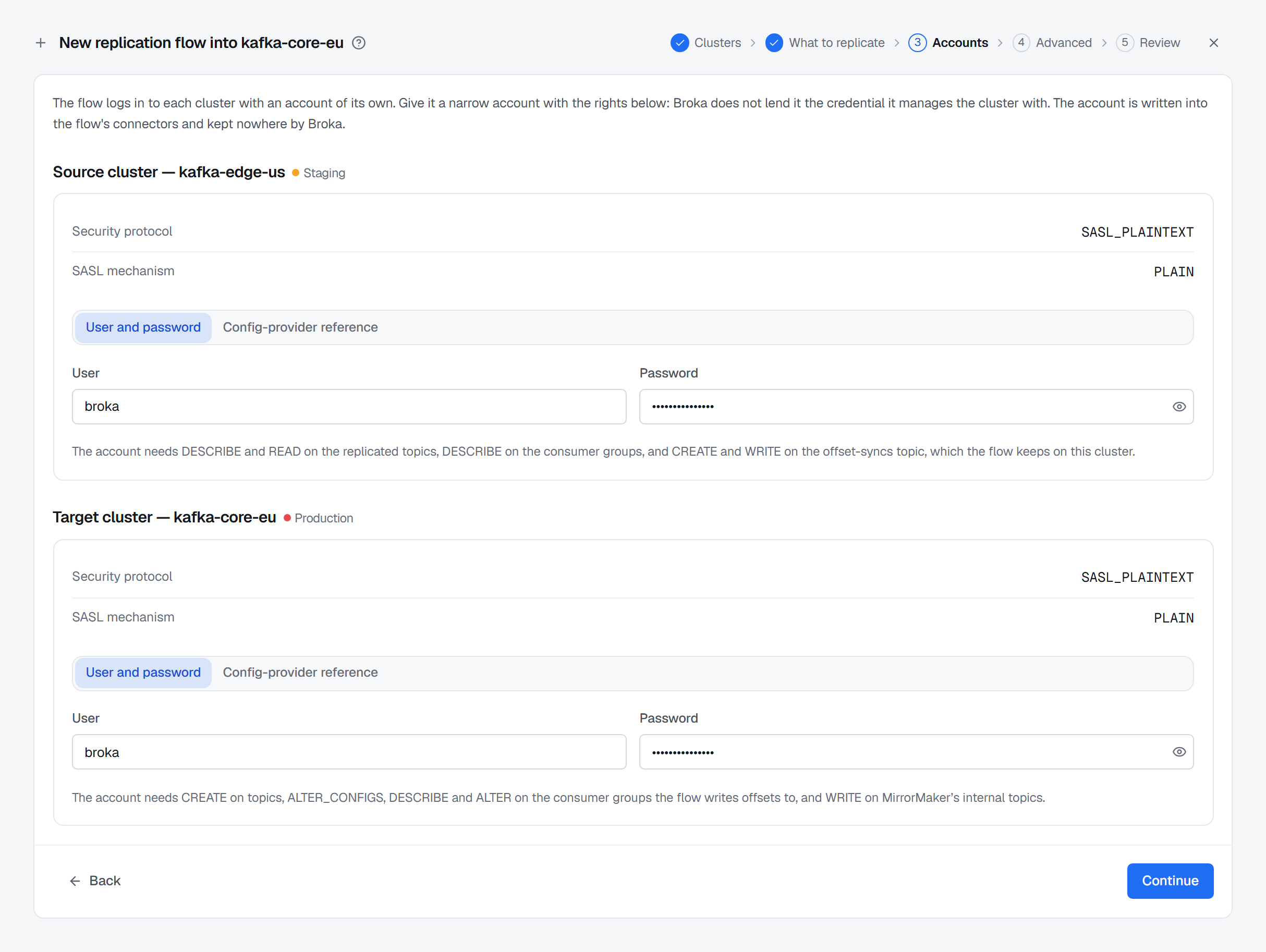
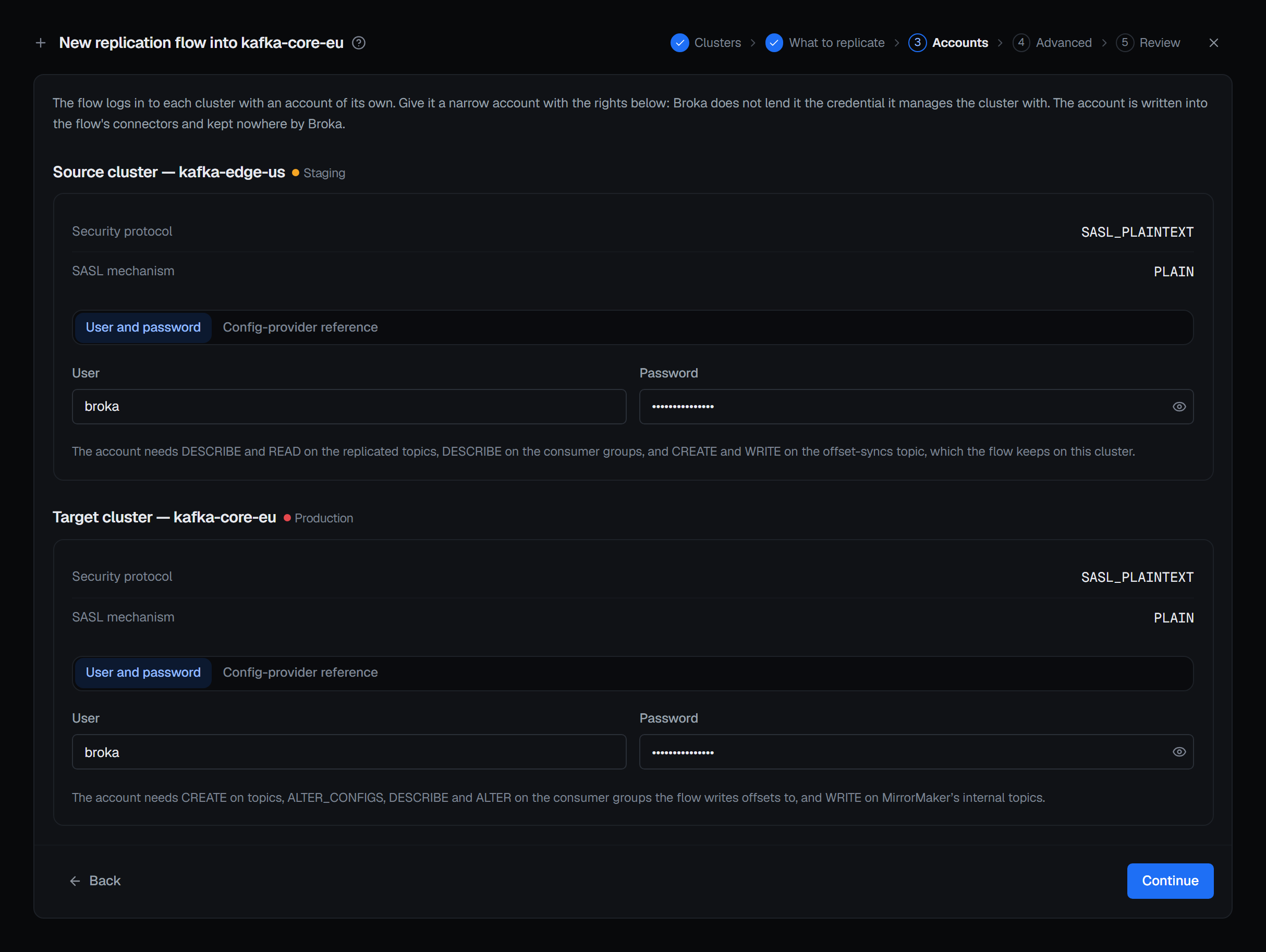
Accounts. The flow logs in to each cluster with an account of its own, never with the credential BROKA manages the
cluster with. For each side the step shows the security protocol and SASL mechanism of the cluster's connection, and
asks for what that cluster takes: a User and Password — a Client id and Client secret under
OAUTHBEARER — or a Config-provider reference such as ${file:/opt/kafka/secrets/mm2.properties:jaas}, which the
Connect workers resolve into the whole login line, so the connectors hold only the reference. BROKA writes the login
line for PLAIN, SCRAM-SHA-256, SCRAM-SHA-512 and OAUTHBEARER; for any other mechanism the step takes a reference, or
the line itself under Advanced as source.cluster.sasl.jaas.config or target.cluster.sasl.jaas.config. On a
cluster with neither a SASL login nor a client certificate, the step asks for nothing: the flow connects to it as its
connection does. Under each side are the rights its account needs — on the source, DESCRIBE and READ on the
replicated topics, DESCRIBE on the consumer groups and, while the flow keeps its offset syncs there, CREATE and
WRITE on the offset-syncs topic; on the target, CREATE on topics, ALTER_CONFIGS, WRITE on MirrorMaker's
internal topics and, where the flow writes translated offsets, DESCRIBE and ALTER on the consumer groups it writes
them to. Choosing another source empties the source's account, so a password typed for one cluster is never sent to
another.
BROKA keeps no replication account. What you type lives in the wizard's page alone — never in its address or anywhere else the console keeps state — and is sent only to check the flow and to create it. BROKA writes it into the flow's connectors on Kafka Connect and keeps no copy: it is not stored, not logged and not in the audit trail, and every configuration BROKA shows, the Review's and a connector's own page alike, masks it. Leaving the page discards it.
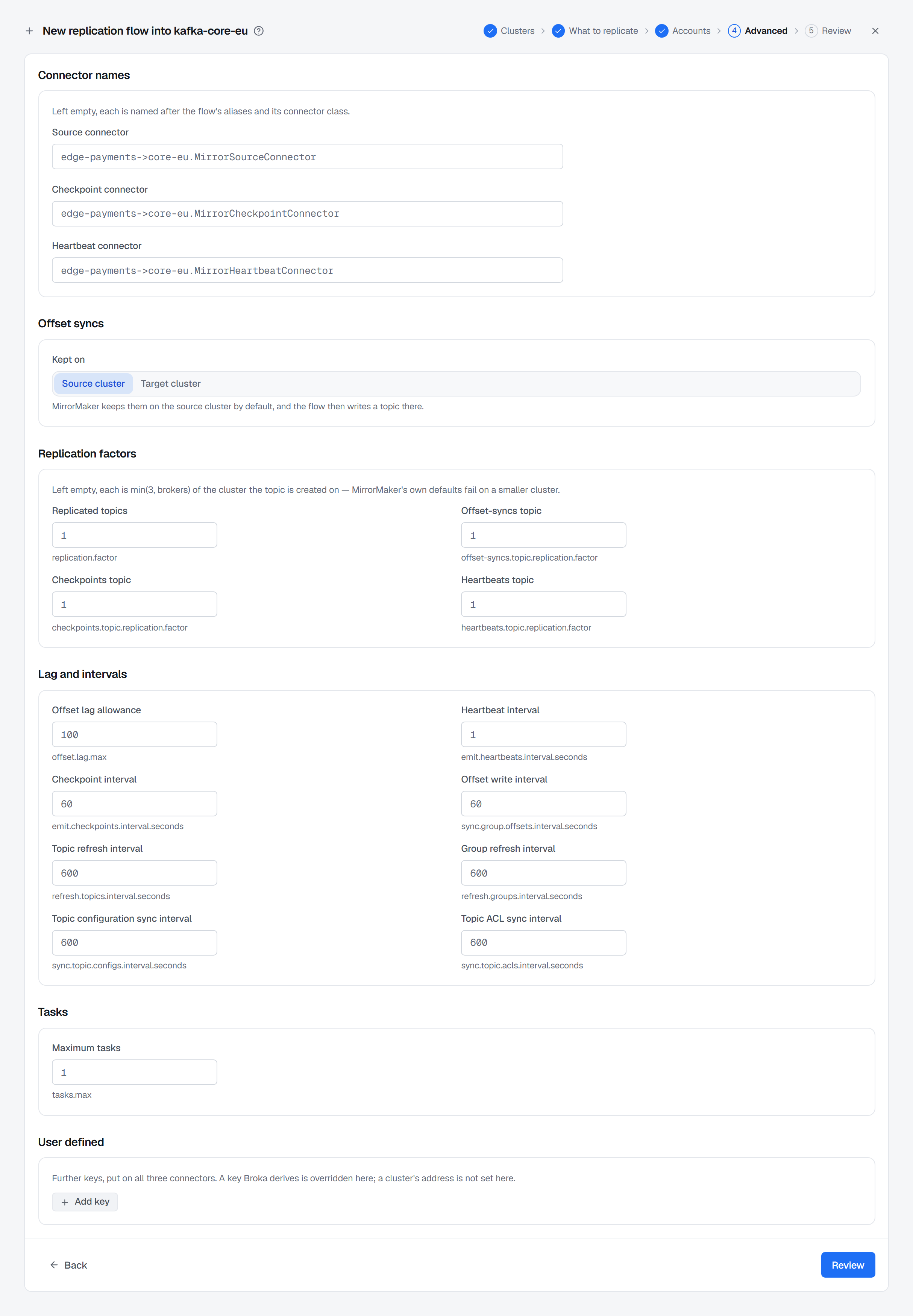
Advanced. Under Offset syncs, Kept on is Source cluster — MirrorMaker's default, and the flow then writes a topic there — or Target cluster. The Replication factors — of the replicated topics and of the offset-syncs, checkpoints and heartbeats topics — are left empty to take the smaller of 3 and the broker count of the cluster each topic is created on, the figure shown in the field, because MirrorMaker's own defaults fail on a smaller cluster; where a cluster does not say how many brokers it has, the check asks you to set the factor. Lag and intervals — the offset lag allowance and seven intervals, from the heartbeat interval to the topic ACL sync interval — and Maximum tasks are left empty to keep MirrorMaker's defaults, shown in each field. User defined takes further keys, put on all three connectors: a key BROKA derives is overridden there, and a key one of the wizard's fields sets, or a cluster's address, is refused.
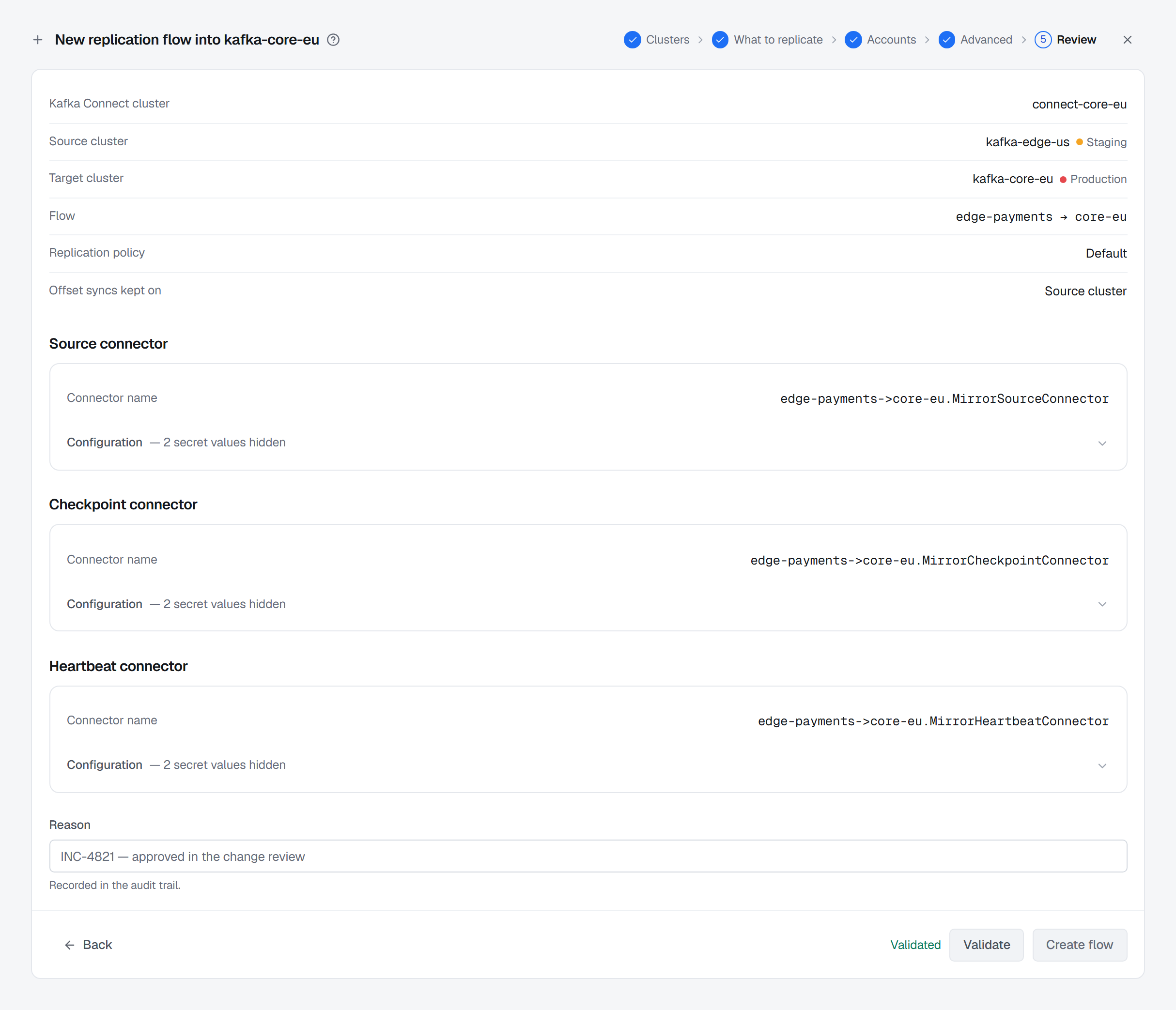
Review. A summary — the Kafka Connect cluster, the source and target clusters with their environments, the flow
source → target, the policy and where the offset syncs are kept — then, for each of the three connectors, its
Connector name, Kafka Connect's own errors, and its configuration as it would be created, with secret values
hidden. The names are BROKA's — edge-us->core-eu.MirrorSourceConnector, and the same pair before
MirrorCheckpointConnector and MirrorHeartbeatConnector — unless you change them. To fix lists every problem
still open on another step, each with a link to it.
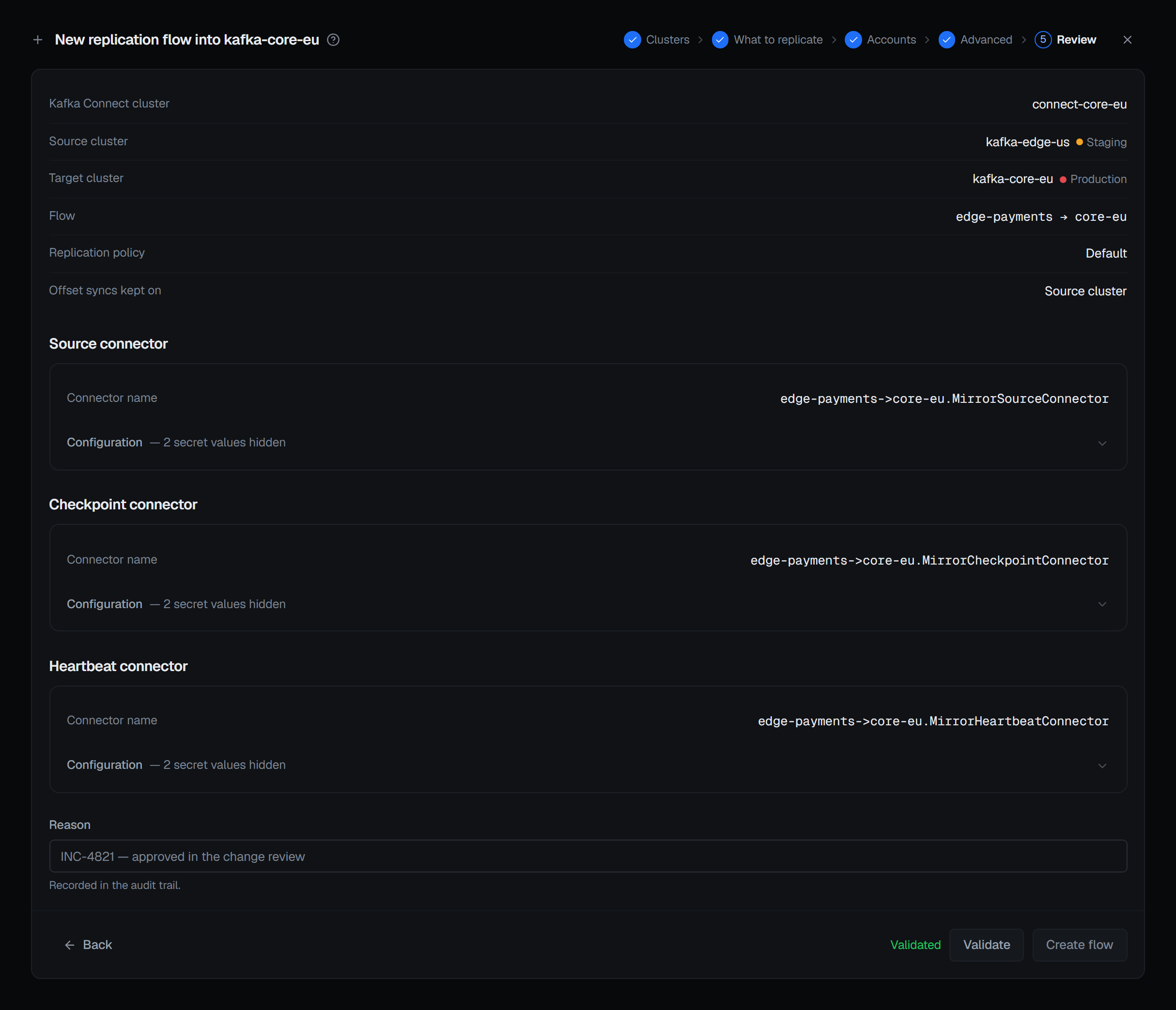
Checking. Each Continue sends the flow as it stands to be checked — by BROKA's own rules and by Kafka Connect's validation of each connector's configuration; nothing is written — and stays on the step while the check finds something wrong there, each problem under the field it names. The first check carries no account: it is how the Accounts step learns what each cluster asks. Validate, on the Review, checks again. Create flow is enabled only when the latest check was of exactly what would be created and found nothing wrong.
Masked topics are not replicated. While a data masking rule masks topic contents for you on either cluster, a flow is refused unless you may read them unmasked: a pattern cannot be told apart from what the rule covers, and the flow would copy it to where the rule may not apply. The check says so under the topics.
What BROKA takes from the two connections:
- Where the workers reach each cluster — the source at its connection's Address as seen from Connect workers, or its bootstrap servers where that is empty; the target at the Connect cluster's Kafka bootstrap (worker's view), else the target connection's Address as seen from Connect workers, else its bootstrap servers. Fill these in where the workers reach a cluster at another address, such as a name inside a container network: without them the connectors are created, and their tasks cannot reach the cluster. An address cannot be set in the wizard itself.
- How to log in — each cluster's security protocol and SASL mechanism, and under OAUTHBEARER its token endpoint, with the account you give. The connection's own login is never copied into a flow.
- The rest — byte-array converters on all three connectors, so that records reach the target as they left the source, and the replication factors and connector names above.
Creating. Create flow creates the source connector, then the checkpoint connector, then the heartbeat connector, and opens the flow's page. Nothing is written where a connector by one of the three names already exists on the Connect cluster, where a flow with the same two aliases already runs there, or where the source alias is linked to another Kafka connection on that Connect cluster. If Kafka Connect refuses a connector part-way, or does not confirm it, BROKA removes what it created, in reverse order, and the message says what was removed, what could not be — still on the Connect cluster, to remove from the Kafka Connect page — and which of MirrorMaker's internal topics, and replicated topics, may already have been created: removing a connector never deletes a topic.
Unless the source alias is linked already, the create links it to the source connection on the Connect cluster's registration, as Link source cluster… does, so the flow finds its source even where the workers' addresses match no connection. Where that link cannot be written, the flow is created all the same, and Link source cluster… is there if its addresses do not find the source.
Environments and reasons. A flow is created on this cluster and — while it keeps its offset syncs on the source, MirrorMaker's default — writes on the source as well, so both environments are asked. Create flow is disabled, with the reason, where this cluster's environment or connection is read-only, and where the flow writes on the source and the source's environment or connection is; the Review asks for a reason where this cluster's environment is guarded, or the source's is and the flow writes there. Creating a flow is not destructive: an open environment asks no reason.
Permissions. Creating a flow needs the permission to manage both clusters. On this one the create is checked as deploying each of the three connectors by name, so a resource grant that denies deploying a Kafka connector by one of those names refuses it. On the source it is asked because the flow's account for that cluster is written into connectors that act on it, and the check shows both clusters' settings as the workers will use them.
Alerting on flows
A flow run by a registered Connect cluster can be watched by an alert rule, with replication flow as the resource and the flow picked by its aliases from a list grouped by Connect cluster. Seven figures are measured: whether the flow is running, its failed tasks, its lag, the replicated partitions missing on this cluster, its heartbeat age, its checkpoint age, and how many of its groups are not ready for failover. A figure that needs what cannot be read — the lag of an unlinked flow, the heartbeat of one whose heartbeats are off — is not measured, rather than read as healthy. Observed flows are not watched. Every metric, with its key and unit, is listed in Alert metrics.
Where a flow runs, the starter rules offer a flow not running, failed tasks, a heartbeat older than 30 seconds, lag over 10,000 records, and lag rising for 30 minutes while the heartbeat stays under 10 seconds — two conditions held together, which tell a throughput problem from an outage. An incident on a flow opens its page. A flow's lag and heartbeat age are kept in the metric history without a rule; they are what the Overview's Metrics draws.
Elsewhere in the console
- On a Connect cluster's page, the connector list has a Flow column wherever the cluster runs a MirrorMaker connector, linking to its flow, and the list's search matches the flow too. A MirrorMaker connector's own page says Part of flow, with a link.
- In both editions, MirrorMaker's own topics — its heartbeats, checkpoints and offset syncs — are recognised by name: the topic list keeps them behind Show internal, and the message browser decodes their records as JSON with the MirrorMaker format, which Automatic picks on those topics.
Permissions and the audit trail
Seeing a cluster's flows and a flow's page needs the permission to view this cluster, and the figures read from the source need the permission to view the source as well (above). Creating a flow needs the permission to manage both clusters (Creating a flow). Opening a connector's own page needs the permission to manage the cluster, because a connector's configuration carries its stored credentials; a role without it finds those links locked, with the reason.
Each creation, pause, resume, restart, stop and removal of a flow is one entry in the audit trail, naming the flow by its aliases, its Connect cluster, each of its connectors and its source cluster, with the reason where one was given. A creation records what the flow was created with — its aliases, policy, topic and group filters, where its offset syncs are kept, its switches and its connectors' names — and never an account, a config-provider reference or a key set under Advanced. Linking a source, by hand or by a create, is recorded as a change to the Connect cluster's registration. A connector acted on alone from the Overview is recorded as that connector's own action.
What BROKA does not do here
- It has no failover button, and does not write a group's translated offsets itself: MirrorMaker does, where the flow is set to.
- It does not edit a flow's settings as one: each connector's configuration is changed on its own page.
- It lists the flows into and out of the cluster you are in, not the flows of every cluster at once.